Appearance
IMP-04 · Service catalogue and payer prices
Every line on a bill comes from the service catalogue, so the invoice in FAC-OPD-01 could assemble itself. The catalogue price is the cash price. A payer price (tariff) is what a named HMO, NHIA or corporate scheme pays for the same service from a given date, and it's applied automatically to that payer's patients.
Steps
1. Add a service
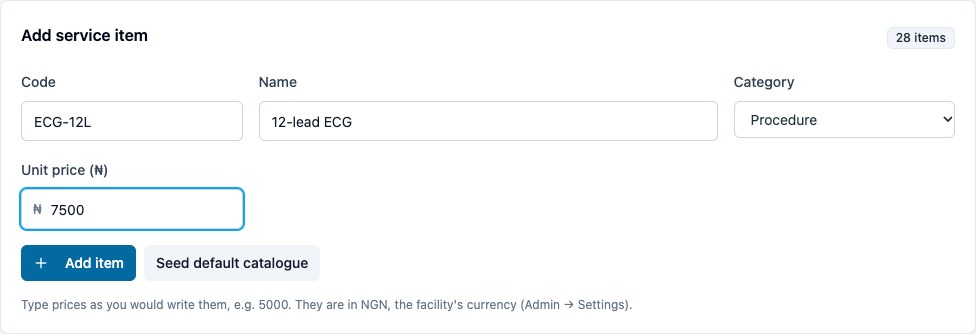
Revenue → Service catalogue → Add service item: a Code (e.g. ECG-12L), Name, Category and Unit price (₦) in naira (7500 for ₦7,500). Then Add item. The category is the service area Reports groups revenue by: Consultation, Nursing, Lab, Imaging (X-ray, ultrasound, CT, MRI), Pharmacy, Procedure, Bed or Other. The demo catalogue has 27 items; Seed default catalogue loads a starter set for a new hospital.
2. Add a payer price
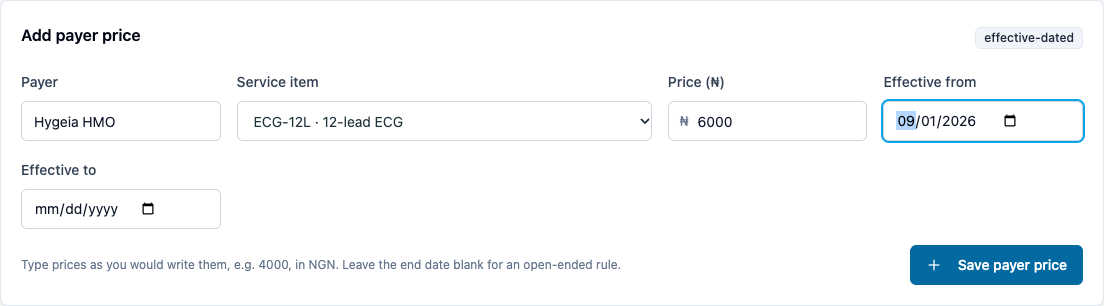
Revenue → Tariffs & payers → Add payer price: choose the Payer (or type a new one), the Service item, the Price (₦) and Effective from (leave Effective to blank for open-ended). Then Save payer price.
You should see: the rule under Active price rules.

The same page also manages the payer and scheme registry, plans and covered benefits, corporate accounts and capitation (monthly rate in ₦).
Bulk import
Bulk import tariff rules takes a CSV (payerName,serviceItem,unitPrice,…). Write unitPrice the way you write prices (4000 or 4000.50), like every other price box. An optional currency column sets the row's currency; otherwise it's the facility's (IMP-07).
You're done when…
- [ ] Every chargeable service has a catalogue entry with today's cash price.
- [ ] Every contracted HMO/NHIA scheme has its prices with the contract start date.
Practice task
Add Physiotherapy session at ₦6,000 and an NHIA price of ₦4,500 from the first of next month. Check: the catalogue shows ₦6,000 and the NHIA rule shows ₦4,500 with the right date.
Related journeys
FAC-OPD-01 step 10 · FAC-BILL-03 claims (catalogue)