Appearance
CP-11 · Set up clinical intelligence and knowledge access for a hospital
Three cards on a tenant's page in platform-admin decide what clinical intelligence a hospital gets:
- Medical knowledge access gives the hospital a key for medication lookups and safety checks.
- Clinical knowledge library holds the reference documents it may cite.
- Clinical intelligence sets the model, the region, the collections it searches and how much patient context may leave the hospital.
Hospital staff never choose models or providers. Operators set them here.
Why this matters
Clinical suggestions are only as safe as what they draw on. An unreviewed document, a guideline from the wrong country, or patient details sent to a cloud model the hospital didn't agree to are all clinical and legal risks. Every choice here is audited, and a document is cited only after a person has read and approved it.
Before you start
- Platform Admin on platform-admin (
admin@verabase.locallocally; see CP-01). - A live hospital (see CP-02). The walk uses a new hospital, Abeokuta General.
- The hospital's signed agreement on data sharing (private models only, or minimised context to approved cloud models).
- The hospital's own protocols, as text, HTML or text-based PDF files.
Steps
1. Give the hospital a knowledge key
In Medical knowledge access, choose an Expiry date within the next year and Grant access and provision key. The key appears once, for a self-hosted hospital server; hosted hospitals receive it automatically. After that, the card shows only Key ending … and the expiry date.
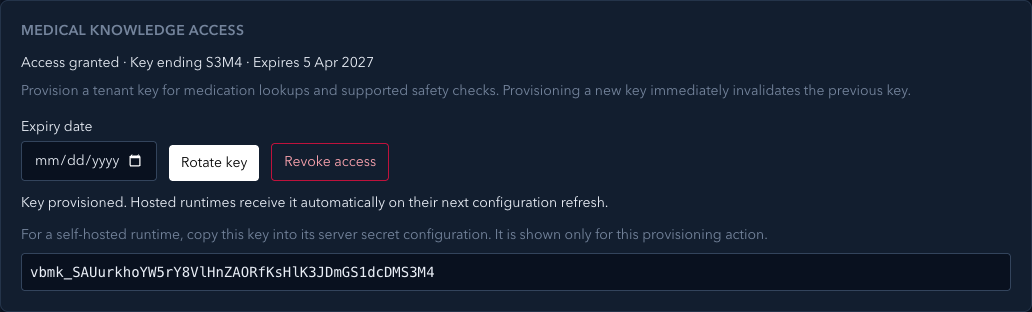
Rotate key replaces it at once, so the old key stops working. Revoke access turns lookups off. A hospital that isn't live yet shows Available once the hospital is live.
2. Add the hospital's protocols to the library
- In Clinical knowledge library, open Import a reference document.
- Fill in the Title, the Publisher, the Knowledge collection (for example
abeokuta-protocols), the Region (NG, or blank for global), the Knowledge type (for example Hospital protocols) and the Review expires date. Then choose the Document. - Choose Import for review. The document appears in the list as Waiting to process, then Ready for review; the list updates by itself.
- Open Review extracted document → Load document text and read what was extracted. A scanned PDF has no text, so it needs OCR first.
- Choose Approve reviewed version. The card says Approved. Clinical intelligence can now cite it.
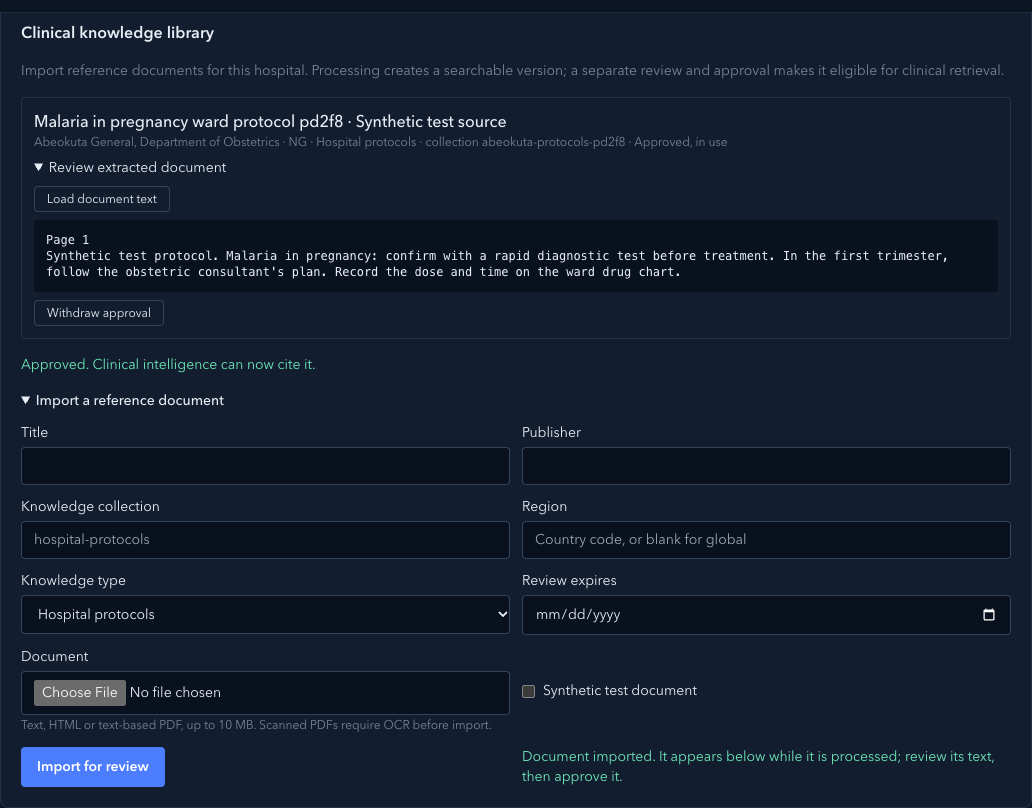
Withdraw approval stops a document being cited straight away.
3. Turn clinical intelligence on
In Clinical intelligence:
- Tick Enable clinical intelligence.
- Set the Clinical guidance region (
NG), and any Permitted regional fallbacks. - Choose the Default model.
- Set Clinical data sharing to match the hospital's agreement. Private inference only allows only private models. Allow minimized structured context to approved cloud models lets a cloud model see a reduced, de-identified summary, never names, exact dates or notes.
- Name the Knowledge collections it may search (the collection from step 2).
- Untick any Supported knowledge types the hospital doesn't want, and order Source priority with the arrows. Higher types are ranked first in what it cites.
- Choose Save hospital policy.
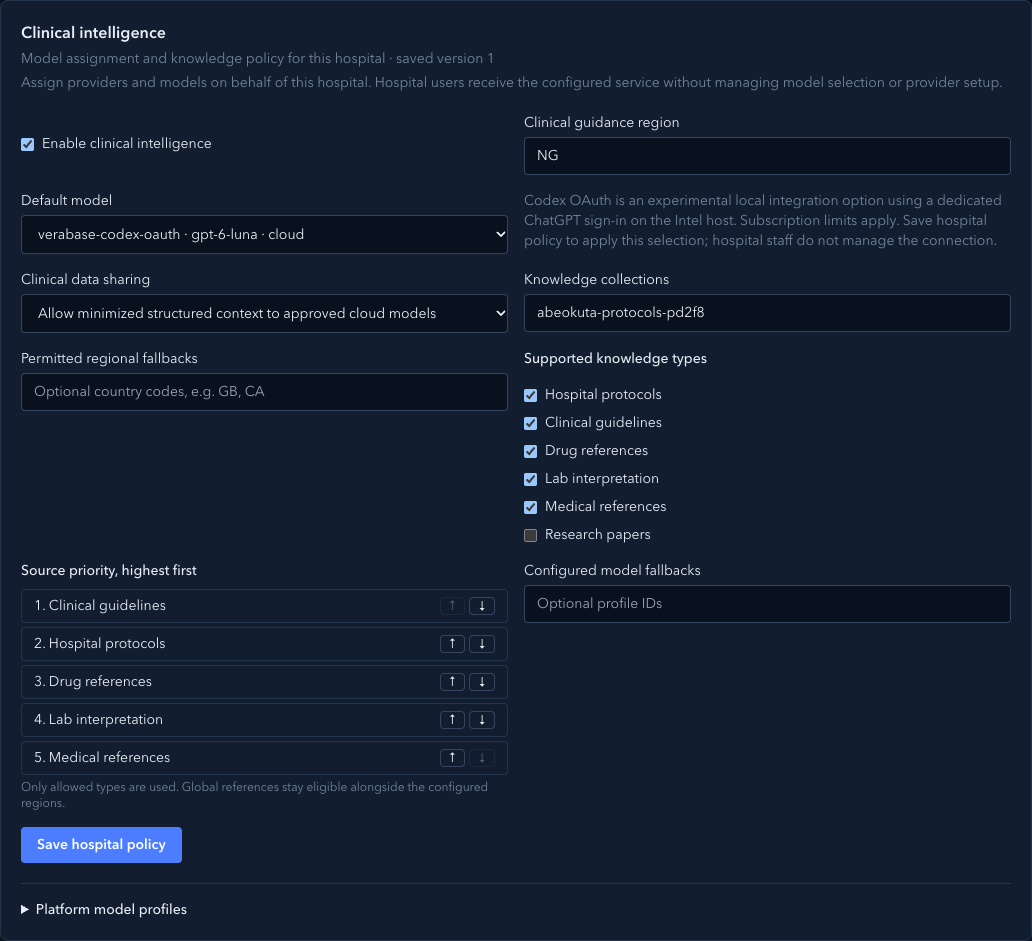
The card heading shows the saved version. Each save is audited and applies to the next assessment.
What Verabase will refuse and why
| You try to… | Verabase says | Why |
|---|---|---|
| Turn it on without a collection | Name at least one knowledge collection before turning clinical intelligence on. | It would have nothing approved to cite |
| Turn it on without a model or region | Choose a default model… / Set the clinical guidance region… | Guidance depends on both |
| Use a cloud model while data sharing is private | … is a cloud model, but clinical data sharing is set to private inference only. | Patient context would leave the hospital against its agreement |
| Give a region that isn't a country code | Regions must be two-letter country codes, such as NG. | Region filters the evidence |
| Grant knowledge access before go-live | Available once the hospital is live. | A draft hospital has no staff to use it |
| Approve a document still processing | Approve reviewed version stays disabled | There is nothing to review yet |
You're done when…
- [ ] The knowledge key is active with an expiry date the hospital agreed.
- [ ] Every document in the hospital's collections was read and approved by a named person.
- [ ] Data sharing matches the signed agreement, and the default model is allowed under it.
Practice task
On a local practice tenant, import a synthetic protocol, approve it, and turn intelligence on with Private inference only and a cloud model. Check: the save was refused with the reason; it saved after switching to minimised context; and the protocol showed Approved, in use.
Not walked
- The hospital's side. A clinician seeing suggestions with citations to the approved protocol needs the hospital server, a model and the medication service together. That is covered by the synthetic walkthrough in
docs/architecture/intelligence-local-integration.md, not by this walk. - Medication lookups with the key. The medication service wasn't running; this walk only granted, showed and revoked the key.
- Platform model profiles. The profile list is edited as JSON and wasn't changed in this walk (gaps).