Appearance
FAC-BG-01 · Break the glass: emergency access to a patient outside your coverage
Staff assigned to a ward or unit see only the patients they cover. That protects patients' privacy. But emergencies don't respect assignments: a patient collapses in the corridor, or arrives on your ward before their transfer. Breaking the glass opens that one patient's chart for an hour, to read it and record what your role allows. You give a reason, and the reason, everything you open and everything you record are reviewed afterwards. This follows Epic's break-the-glass.
Why this matters
Without a way in, a nurse at the bedside of a collapsed patient can't see their allergies or medicines. Without a record, any staff member could read any chart. Break-the-glass gives both: immediate access for real emergencies, and accountability for every use.
Before you start
- Nurse:
nurse.okon@demo-clinic.test/Verabase-2026(Nurse Grace Okon). She is on inpatient treatment teams only, so outpatients are outside her coverage. - Break-the-glass is available to nurses, doctors, pharmacists, lab and radiology staff, and theatre coordinators. Staff who cover the whole facility never need it.
Steps
1. When search doesn't find the patient
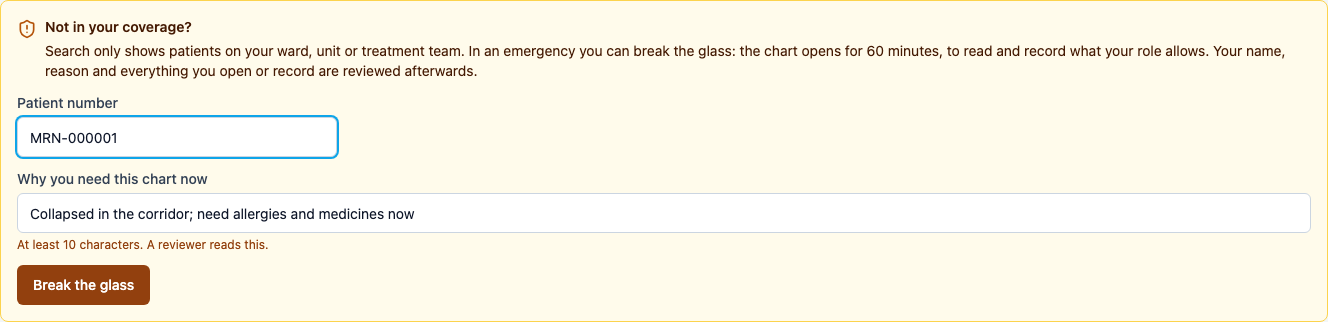
Patients → Patient directory. Search only shows patients you cover. For anyone else it finds nothing and says why, with a way in for emergencies. Enter the Patient number from the wristband or card, write why you need this chart now (at least 10 characters; a reviewer reads it), and choose Break the glass.
2. The chart under emergency access
The chart opens with a banner saying it is emergency access, when it ends, and your reason. Allergies, medicines, results, history and chart insights are all there.
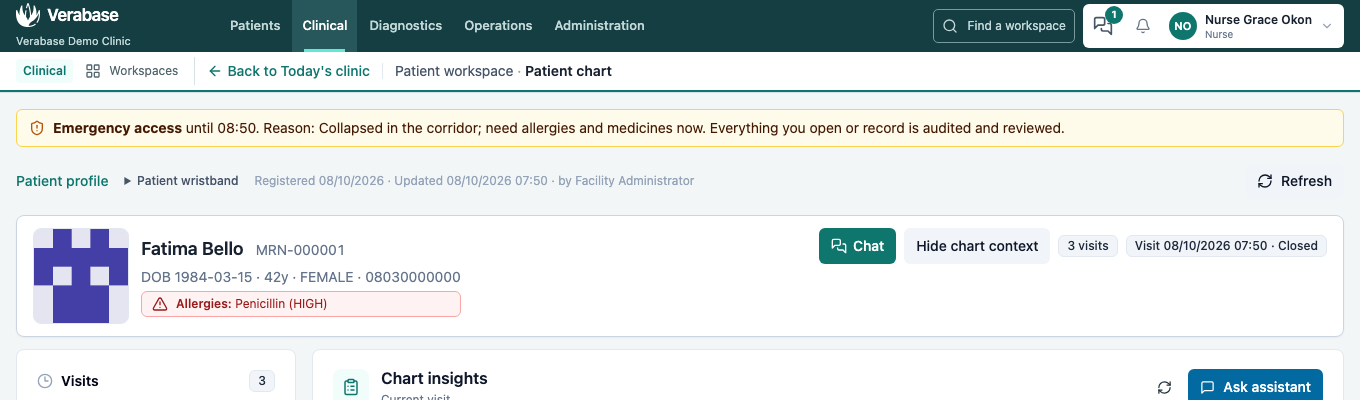
The access lasts for the hour in this browser tab, whichever page you go to and even after a refresh. It ends when the hour is up or when you sign out.
3. Record what your role allows
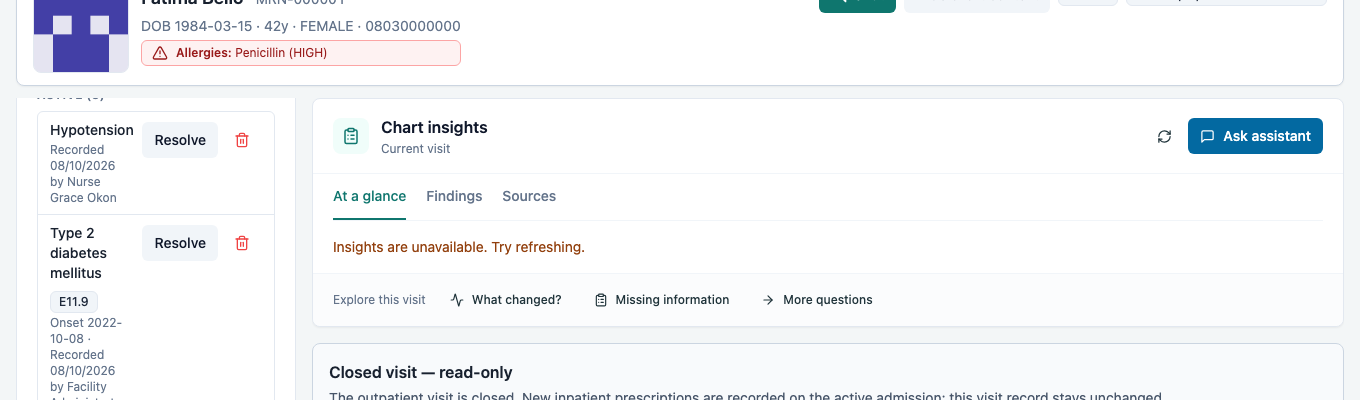
You can record what your own role allows for this patient: observations, problems, notes. Here the nurse adds Hypotension to the problem list. Emergency access adds nothing your role can't do (a nurse still can't prescribe), and it opens only this patient. Each record is marked as made under emergency access, and the facility admin sees it in the review (FAC-BG-02).
Ask a colleague who covers the patient (or the nurse in charge) to record it, or to add you to the patient's treatment team.
4. When a link takes you to a patient you don't cover
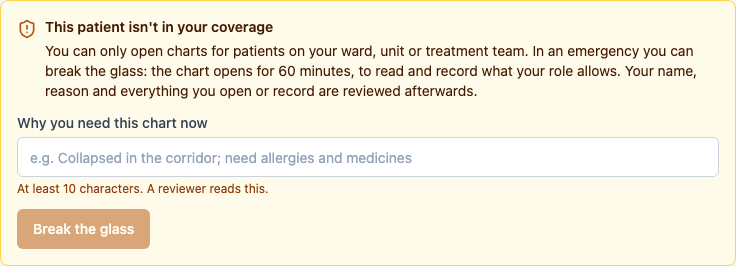
A link from a chat, a board or the results inbox to a patient outside your coverage shows the same way in, instead of an empty chart:
What Verabase will refuse and why
| You try to… | Verabase says | Why |
|---|---|---|
| Break the glass without a real reason | Break the glass stays disabled under 10 characters | The reviewer needs to know why |
| Break the glass with a wrong patient number | No patient has that number at this facility. Check the wristband or card. | You open exactly the patient in front of you |
| Do what your role can't, under emergency access (a nurse prescribing) | You do not have permission to perform this action. | Emergency access opens the patient, not extra rights |
You're done when…
- [ ] You can explain when breaking the glass is justified, and when it isn't (curiosity, a friend, a celebrity).
- [ ] You know that every use is recorded and reviewed by the facility administrator (FAC-BG-02).
Practice task
As Nurse Okon, find a patient who isn't on her team, break the glass by their patient number with a realistic reason, and read their allergies. Check: the trainer finds your request on the review list with your reason.