Appearance
CP-08 · Back up a hospital and test a restore
The Backups card on a tenant's page in platform-admin shows the hospital's last recovery point, its recent backups and restore tests, and why any of them failed. Each hospital's records live in their own database, which keeps a recovery point at every change. A backup marks an exact point to restore to, and a restore test proves that point opens.
Walked locally, so only the failure path
A backup can only succeed against the hosted database service (Turso), and the local walk has none. It showed a hospital with no database, then a backup that failed with its reason. A successful backup and restore test have not been walked in a browser: that needs a Turso test organisation, which is the owner's to set up (gaps). The 90-day live drill is in cloud-platform/deploy/vps/restore-drills.md.
Why this matters
A hospital that loses its records can't treat its patients safely. A backup nobody has restored is a hope, not a backup, so a restore test is part of the job. If a backup fails, someone has to see it the same day and know who fixes it.
Before you start
- Platform Admin on platform-admin (
admin@verabase.locallocally; see CP-01). - A live hospital with a database (see CP-02).
Steps
1. Check the last recovery point
Open the tenant from Tenants. The Backups card says when the last recovery point was made (Last recovery point 8 Oct 2026, 09:12) or No recovery point yet. Backups run by themselves every day for every live or suspended hospital, so a new hospital is covered without anyone pressing a button.
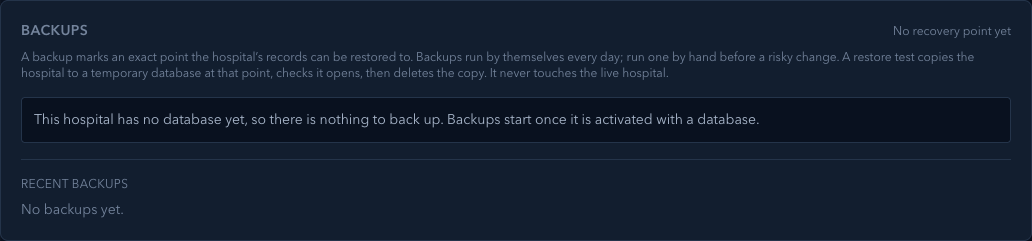
A hospital that has no database yet has nothing to back up, and the card says so:
2. Run a backup by hand
Before a risky change (a big import, a plan change, a restore), choose Run backup now. The card says Backup started. Its result appears below in a moment. It follows the job until it ends, without a reload, and Recent backups shows the result: Recovery point saved, or Failed: and the reason.
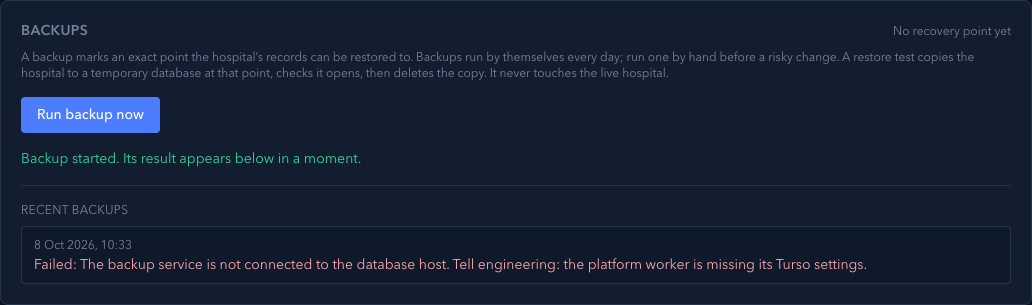
A failure says who must act. The backup service is not connected to the database host… means the platform worker is missing its settings, so it is a job for engineering, not for the hospital.
3. Test a restore
Once there is a recovery point, choose Test a restore to …. It is always offered against the newest backup that worked, even if a later one failed. The test copies the hospital to a temporary database at that point, checks it opens and has the hospital's tables, then deletes the copy. It never touches the live hospital. Restore tests shows Restore test passed or Failed: and the reason.
Run one at least every 90 days, and after any change to how backups work.
4. A real restore
Restoring the live hospital is an incident step, not a button on this card. The hospital must be suspended first (CP-06), so no new records land in the old database. Follow cloud-platform/DRILL.md §3.
What Verabase will refuse and why
| You try to… | Verabase says | Why |
|---|---|---|
| Back up a hospital with no database | No Run backup now; through the API: This hospital has no database yet, so there is nothing to back up. | There is nothing to back up |
| Test a restore before any backup worked | No Test a restore button | There is no recovery point to test |
| Restore the live hospital while it is live | Suspend the tenant before restoring… | New records would be lost in the switch |
You're done when…
- [ ] The card shows a recovery point from the last day.
- [ ] A restore test has passed in the last 90 days.
- [ ] Any failed backup has a named owner and a fix.
Practice task
On a local practice tenant, run a backup without Turso settings. Check: the card followed the job to its end without a reload, the failure said engineering must act, and Test a restore was not offered.
Not walked
- A successful backup and restore test. They need the hosted database service and a Turso test organisation. The steps above come from the code and its tests (
platform-backups,restore-job.spec.ts,turso-pitr.spec.ts). - The automatic daily backup. It is covered by tests (
scheduled-backups.spec.ts), not by a walk.
Related journeys
CP-02 Onboard a hospital · CP-04 Support a hospital · CP-06 Suspend a hospital