Appearance
FAC-OPD-01 · Outpatient visit: front door to paid
One patient, Adaeze Nwankwo, walks in with a sore throat and a fever. In about thirty minutes she is registered, seen by a nurse and a doctor, has a blood test and a prescription, and pays. You play seven people to get her there. Nobody types her name after reception, nobody carries paper, and the bill builds itself from the care she received.
If you only ever do one journey in this guide, do this one. Every other flow in the hospital is a variation on it.
Before you start
- A demo hospital loaded with the demo data (implementers:
verabase-client/scripts/demo-reset.shthennode scripts/seed-demo-environment.mjs). It has 64 patients, a clinic already in progress, wards, lab and pharmacy. - These accounts. Every password is
Verabase-2026except the admin's.
| Role in this journey | Sign in as | Lands on |
|---|---|---|
| Facility Admin | admin@demo-clinic.test / DemoAdmin-2026 | Dashboard |
| Front Desk | frontdesk@demo-clinic.test | Patients → Schedule |
| Nurse | nurse.eze@demo-clinic.test | Clinical → Nursing tasks |
| Provider (doctor) | dr.okafor@demo-clinic.test | Clinical |
| Lab Technician | lab@demo-clinic.test | Lab |
| Lab Supervisor | labsup@demo-clinic.test | Lab |
| Pharmacist | pharmacist@demo-clinic.test | Pharmacy |
| Billing Officer | cashier@demo-clinic.test | My patient board |
Sign out and back in between roles. What you see (navigation, landing page, buttons) comes from the role you are signed in as. That is the point of the exercise.
First time signing in
Each workspace opens with Waiting for you: what your role owes right now. First time in, it offers a one-minute role guide (Show me / No thanks).
Steps
0. Route chart prescriptions to the pharmacy — as Facility Admin
This is a one-time go-live step for a real hospital. Until it's on, prescriptions written on the chart never reach the pharmacy counter. The demo data arrives with it already on, so here you only check it.
- Sign in as the Facility Admin and open Pharmacy.
- Scroll to Prescribing integration and tick Provider orders: "Outpatient prescriptions become dispense requests at the counter." Tick Drug chart (MAR) as well if the hospital has wards.
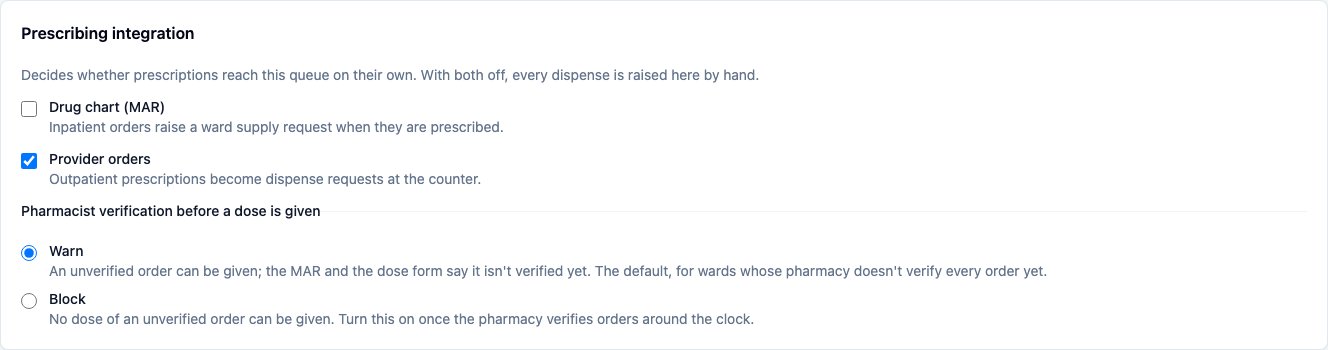
Turn it on before anyone prescribes
A prescription only reaches the counter if the integration was on when it was written. Don't assume earlier prescriptions will appear. Check the counter, and raise any missing ones with Manual dispense.
1. Register the walk-in — as Front Desk
- Choose Front desk in the Patients bar.
- Search first. Type the name as the patient says it (Adaeze Nwankwo, in either order), or the MRN or phone, into Search cached patients before you register anybody.
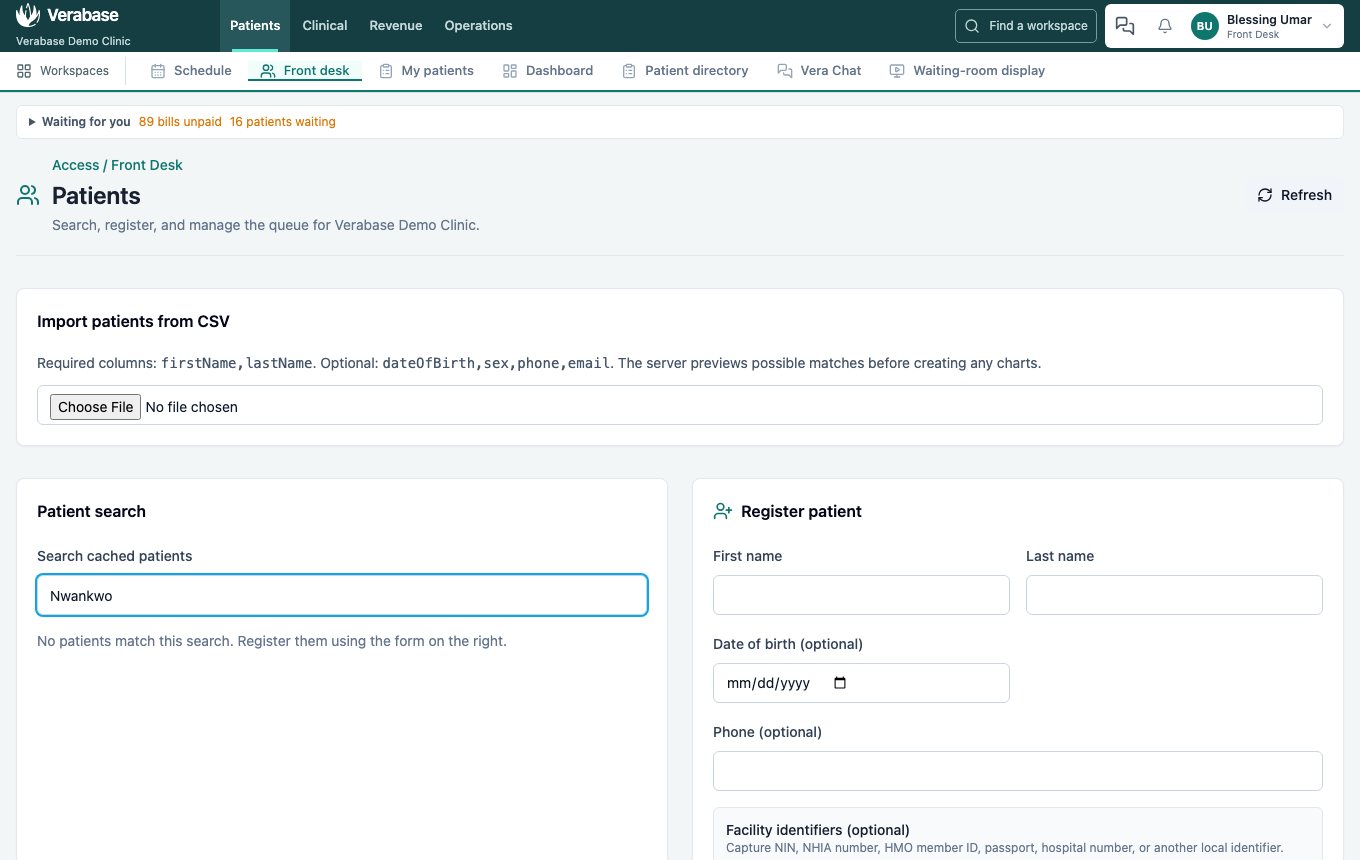
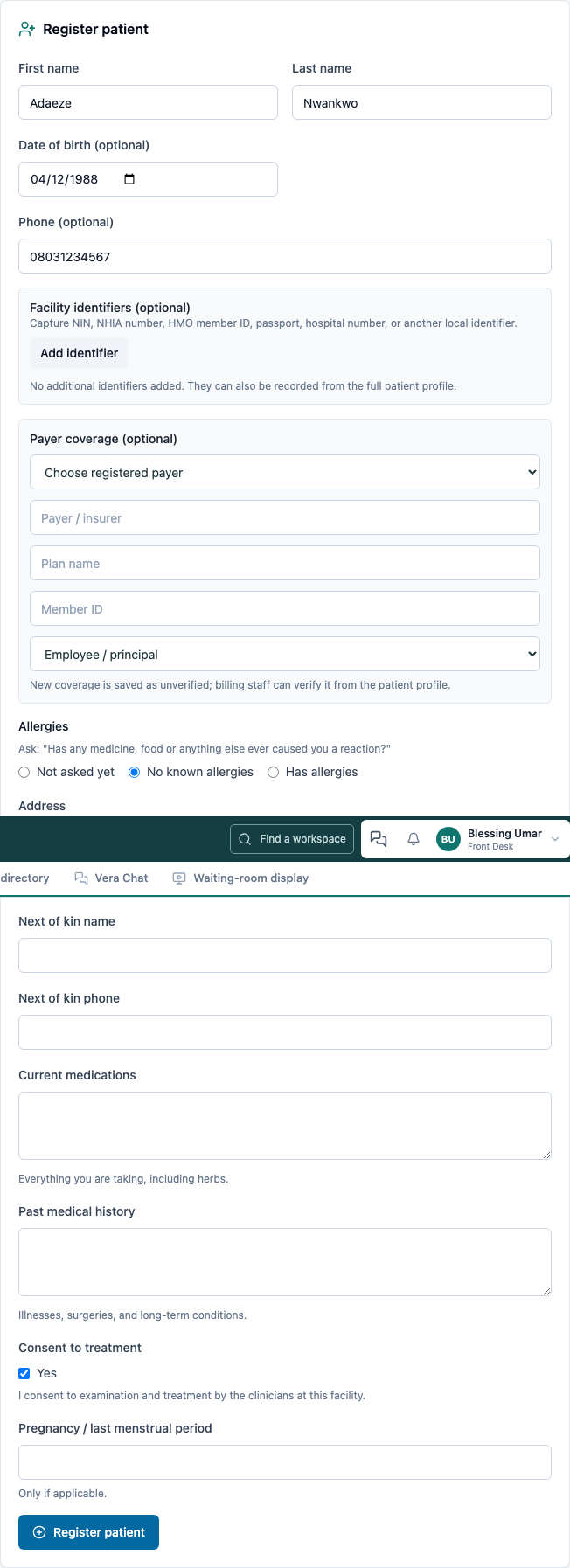
- In Register patient, enter First name, Last name, Date of birth and Phone.
- Under Allergies, ask "Has any medicine, food or anything else ever caused you a reaction?" Adaeze says no, so choose No known allergies. If the patient names an allergy, choose Has allergies and give each one a substance, reaction and severity (Mild, Moderate or Severe). Leave Not asked yet only if nobody asked.
- Tick Consent to treatment, and fill in anything else the patient tells you (next of kin, payer, current medications).
- Register patient. She gets the next local number, e.g. MRN-000065.
- Now try to register the same person again.
You should see: "An existing patient matches these identity details. Use that record instead of creating another one." The panel shows which record matched and why (name and date of birth match · phone matches), labelled Strong match. A weaker match (e.g. the phone alone) asks you to confirm it's a different person. A strong match refuses outright.
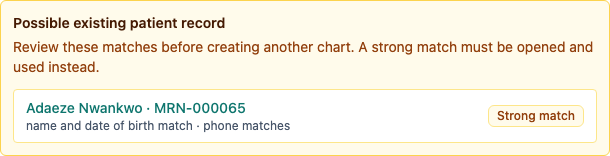
Why it matters: duplicate charts are how an allergy list ends up on a record nobody opens.
2. Check the allergy status — still Front Desk
"No allergies recorded" and "no known allergies" are different statements. The first means nobody asked. The answer you gave at registration is the allergy status: it's what the prescribing check reads.
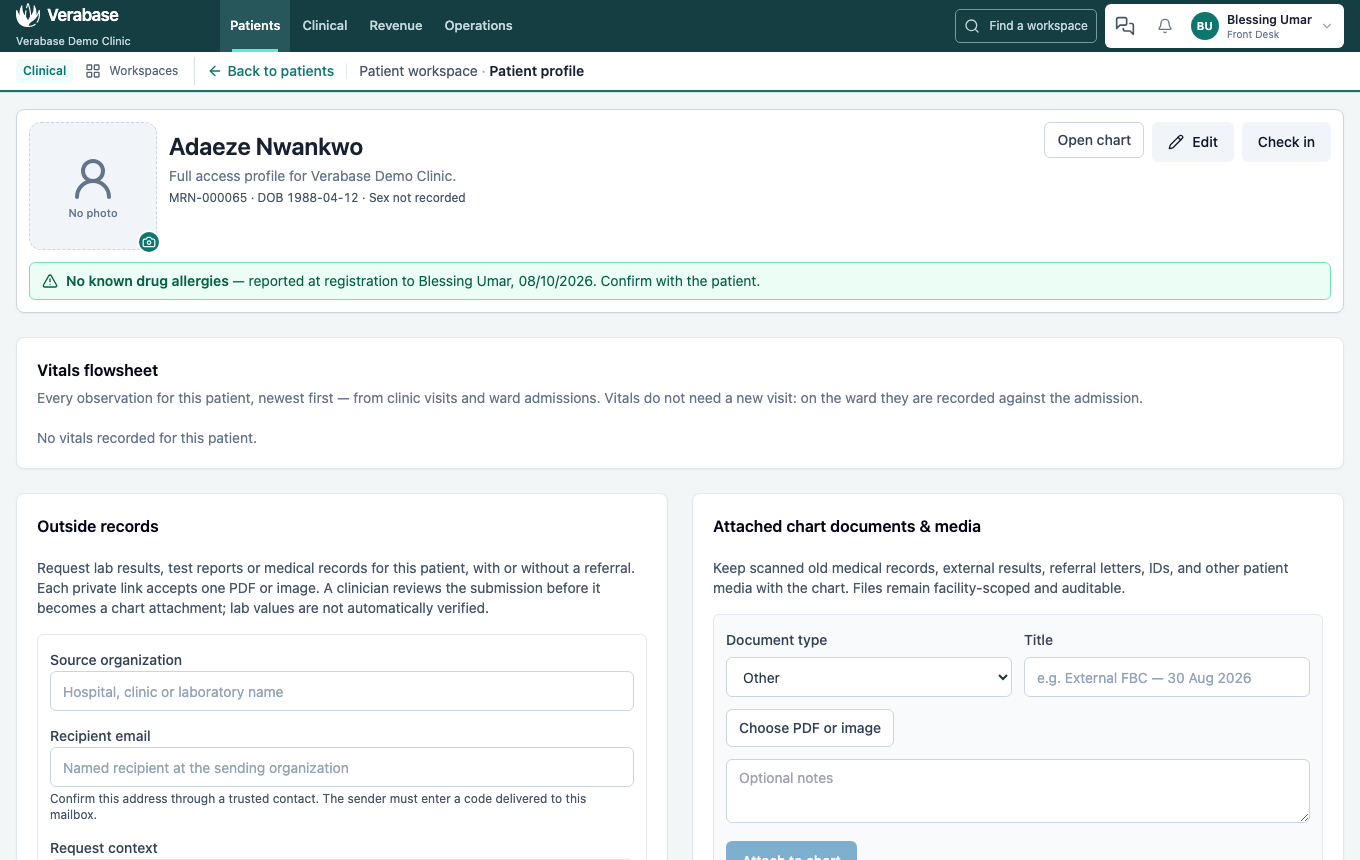
- Open full profile from the patient summary.
You should see: No known drug allergies — reported at registration to Blessing Umar, <date>. Confirm with the patient. Clinicians see the same on the chart banner, so the doctor or nurse knows the desk asked and can confirm it.
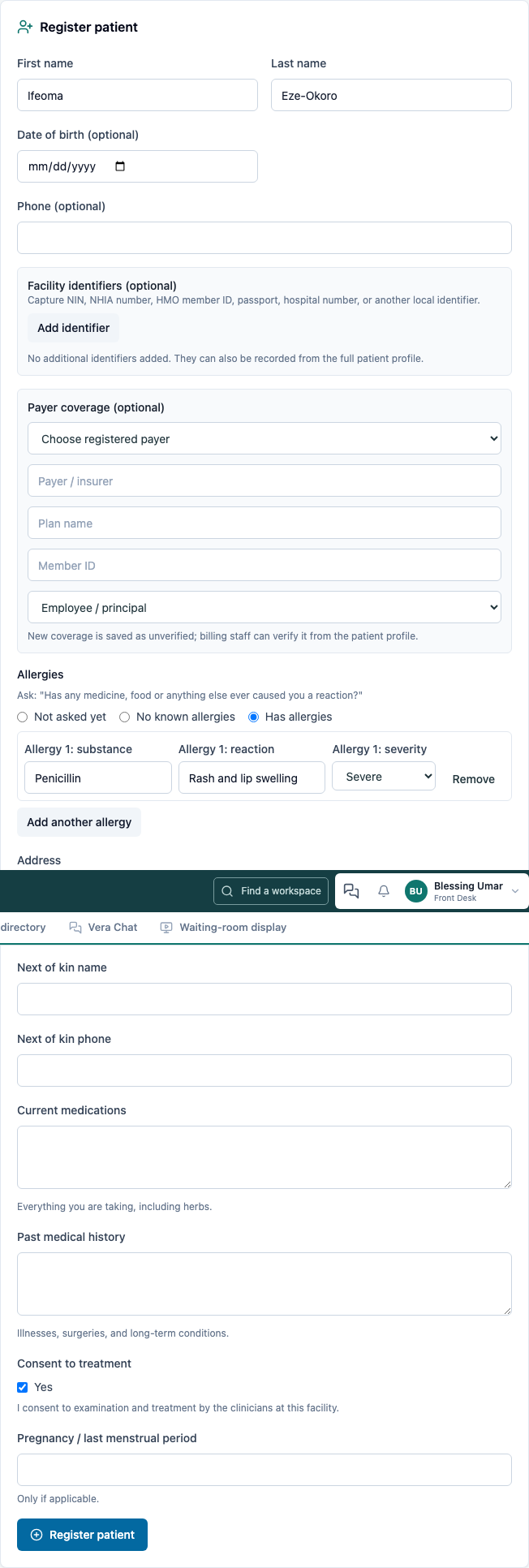
An allergy given at the desk reaches the doctor the same way. A walk-in registered with Has allergies → Penicillin · Rash and lip swelling · Severe:
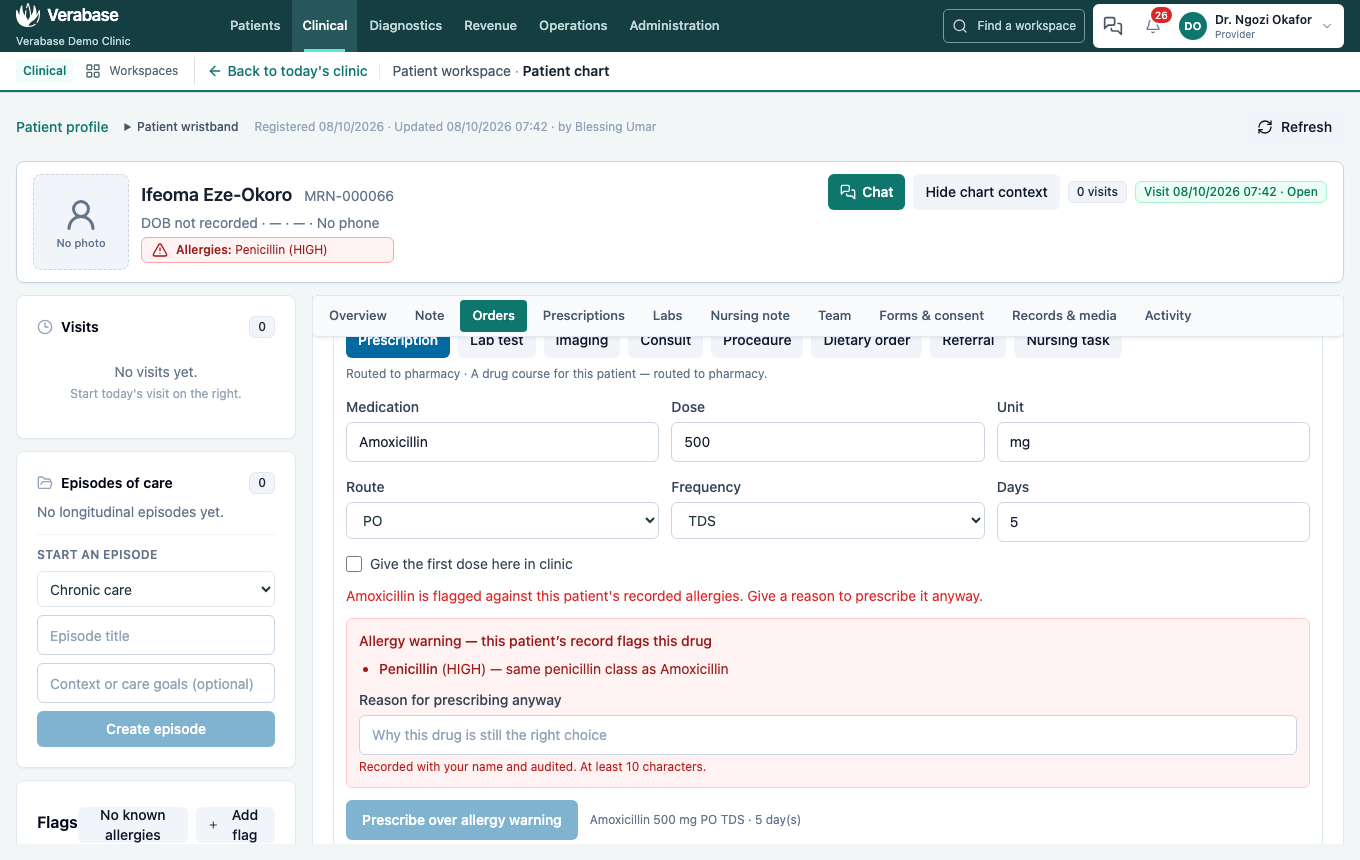
…shows Allergies: Penicillin (HIGH) on the doctor's chart, and amoxicillin is stopped by the allergy gate (step 6):
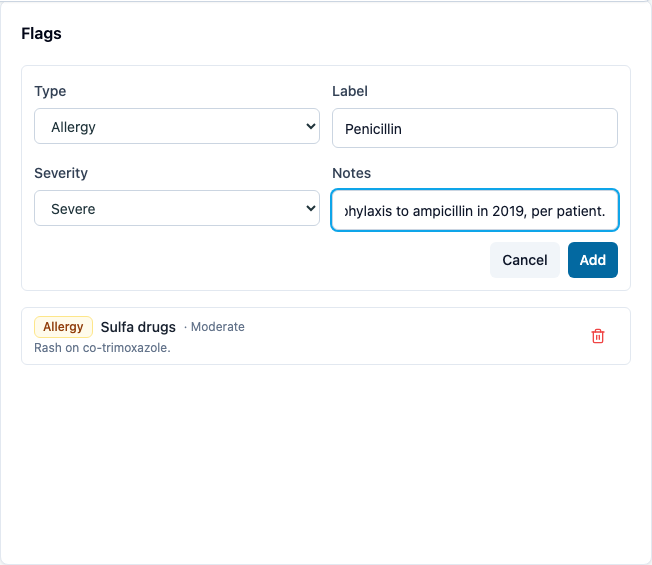
To add or change an allergy after registration: choose Add flag in the profile's Flags. Set Type Allergy, Label (e.g. Penicillin), Severity (Mild, Moderate or Severe) and Notes, then Add. The profile header shows it at once; clinicians see it in red on the chart banner, and it feeds the allergy gate (step 6).
Doctors, nurses and pharmacists can record allergy status and flags from the chart as well. They're the ones who usually ask (FAC-IPD-01 step 2).
3. Check her in — still Front Desk
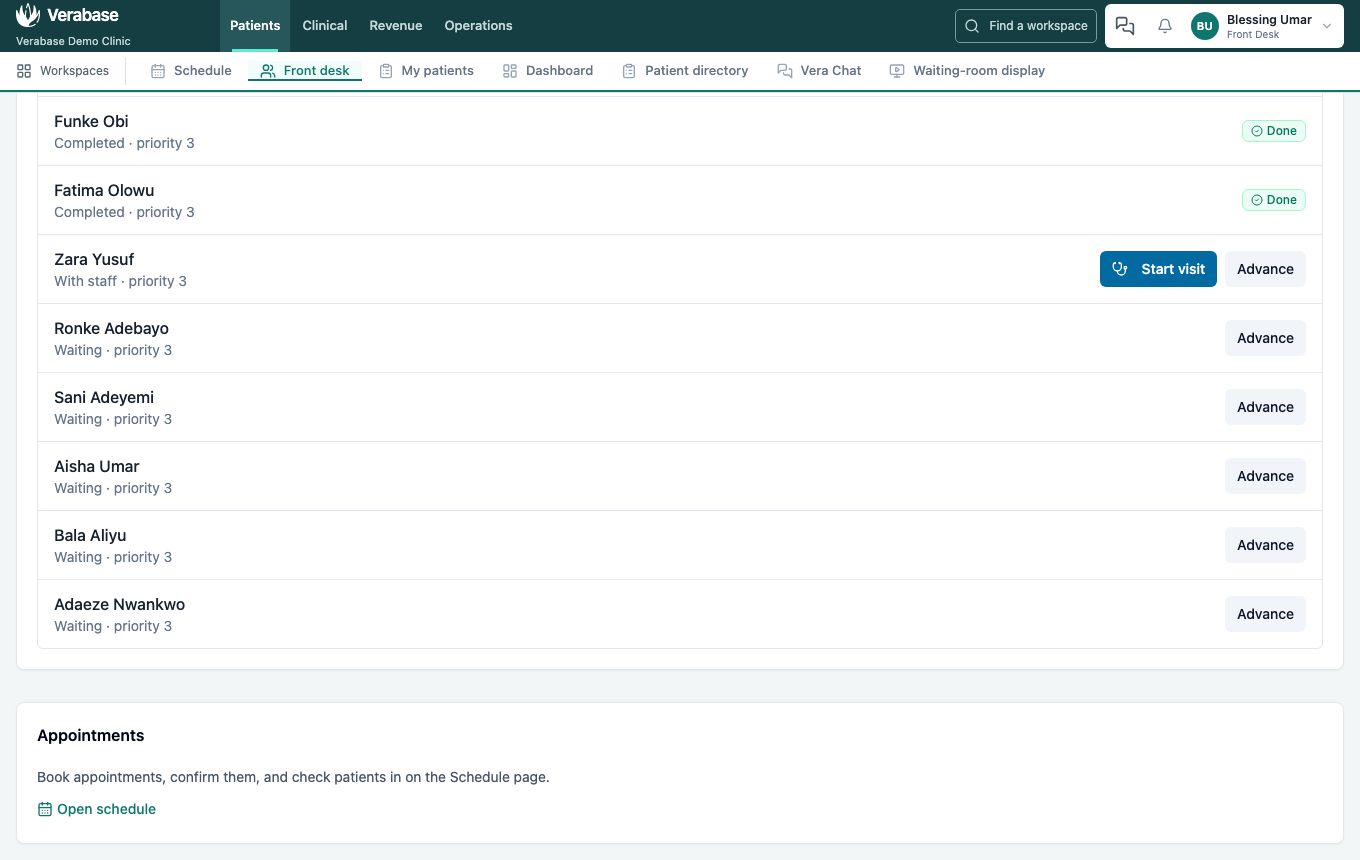
- Back on Front desk, search Adaeze Nwankwo and choose Check in.
You should see: her name at the bottom of the Queue board as Waiting · priority 3. From now on nobody searches for her. She is in the queue.
4. Take her observations — as Nurse
- Sign in as the nurse and choose Clinical in the Clinical bar. Today's queue has four columns: Waiting, With nurse, With doctor, Done.
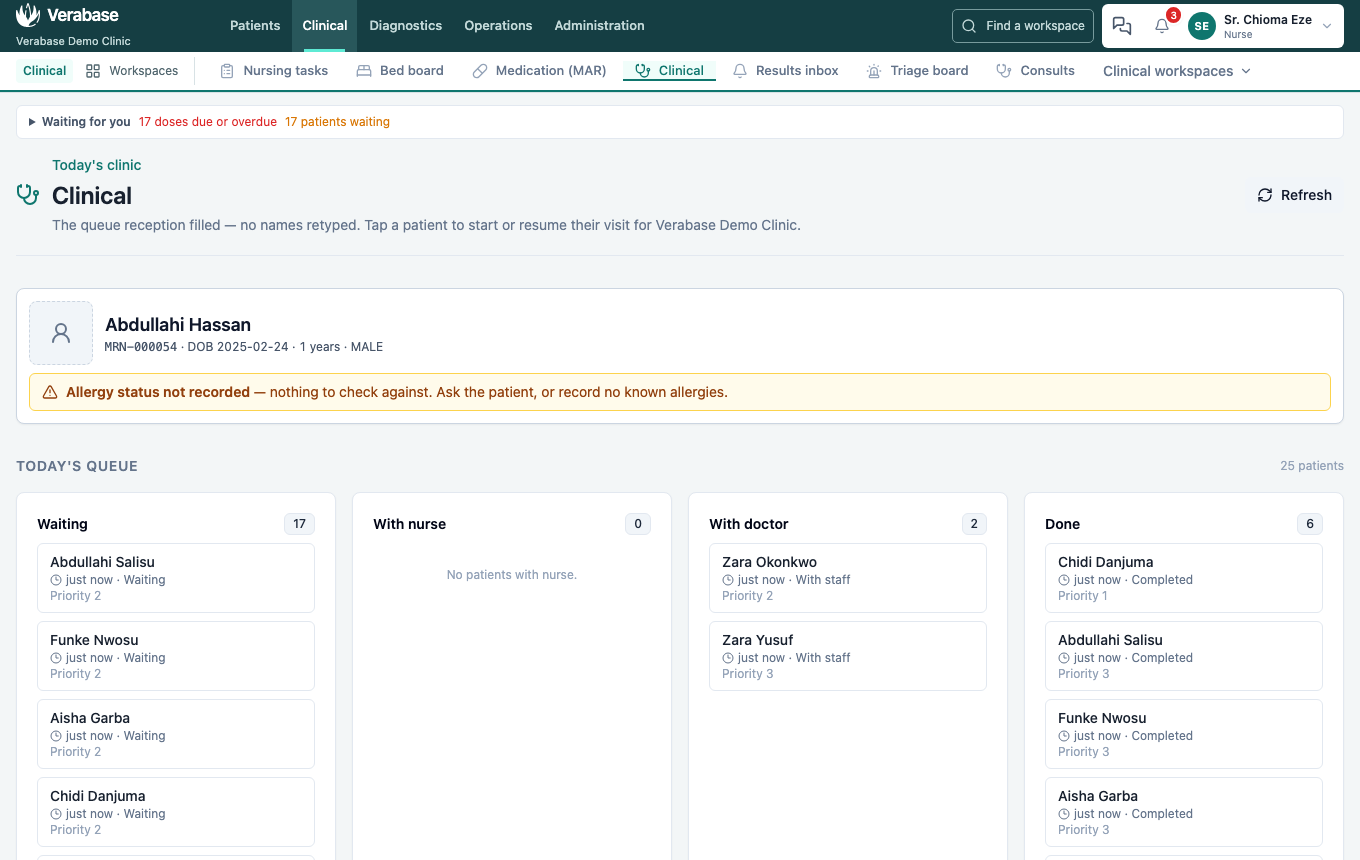
- Choose her card in Waiting. Her chart opens with a visit already started in your name.
- In Vitals, enter systolic/diastolic, heart rate, temperature, weight, respiratory rate, SpO₂, consciousness (AVPU) and pain.
As you type, Verabase tells you what NEWS2 still needs ("Missing: respiratory rate, SpO2…").
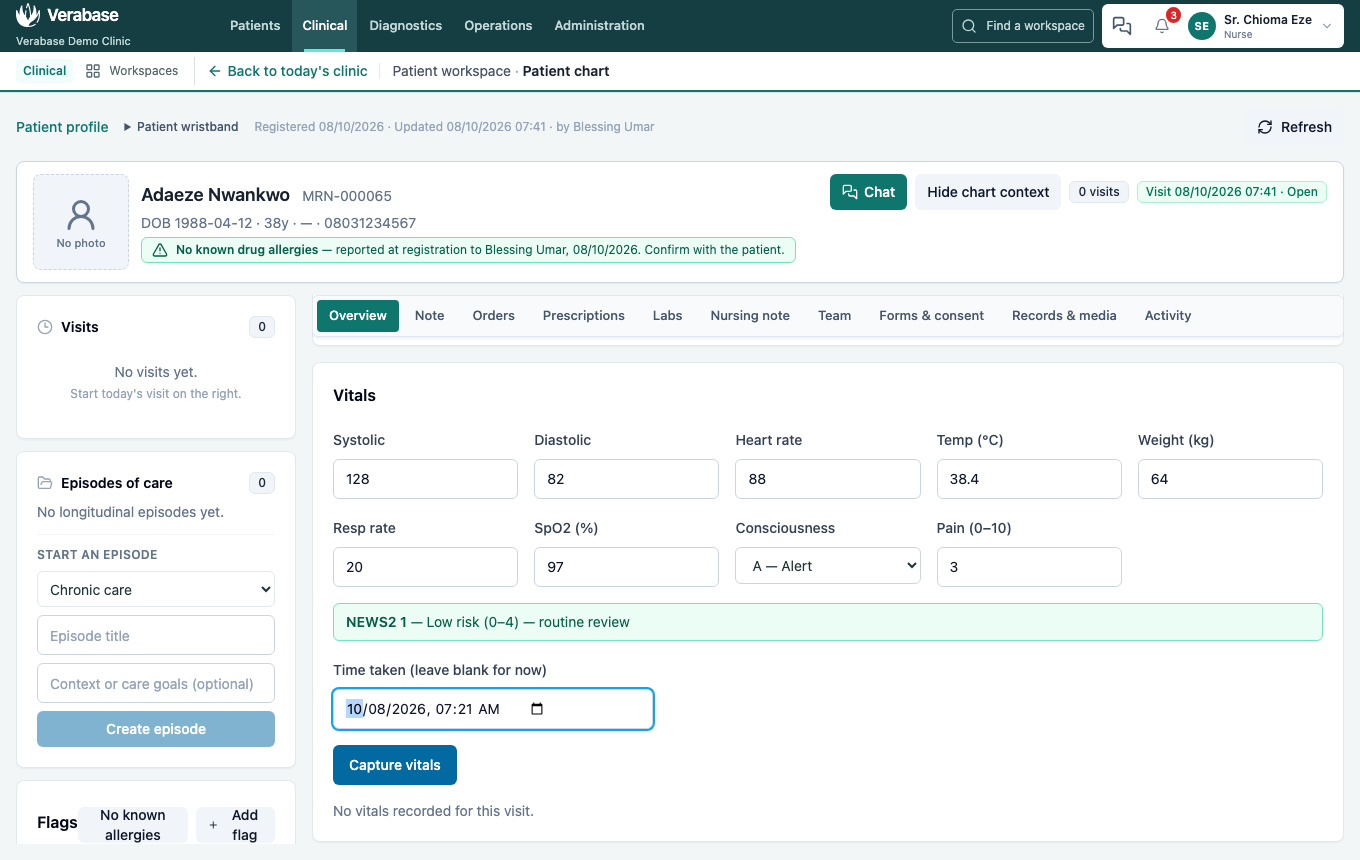
- If the observations were taken earlier (at triage, say), enter Time taken; leave it blank if you took them just now. The chart keeps the time taken and, separately, when you entered them.
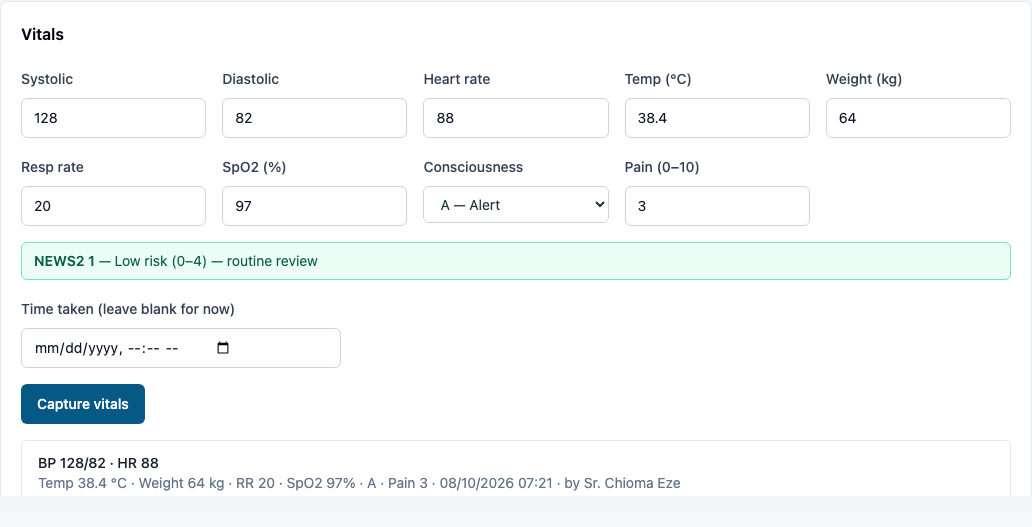
- Capture vitals.
You should see: NEWS2 1 — Low risk (0–4) — routine review, and a row with every value, the time and by Sr. Chioma Eze. The author comes from your login. There is no author field to type in.
5. Consult, order and prescribe — as Provider
- Sign in as Dr Okafor, choose Clinical, and pick Adaeze from the queue.
- Read the banner before anything else: name, MRN, age, allergy status, alerts.
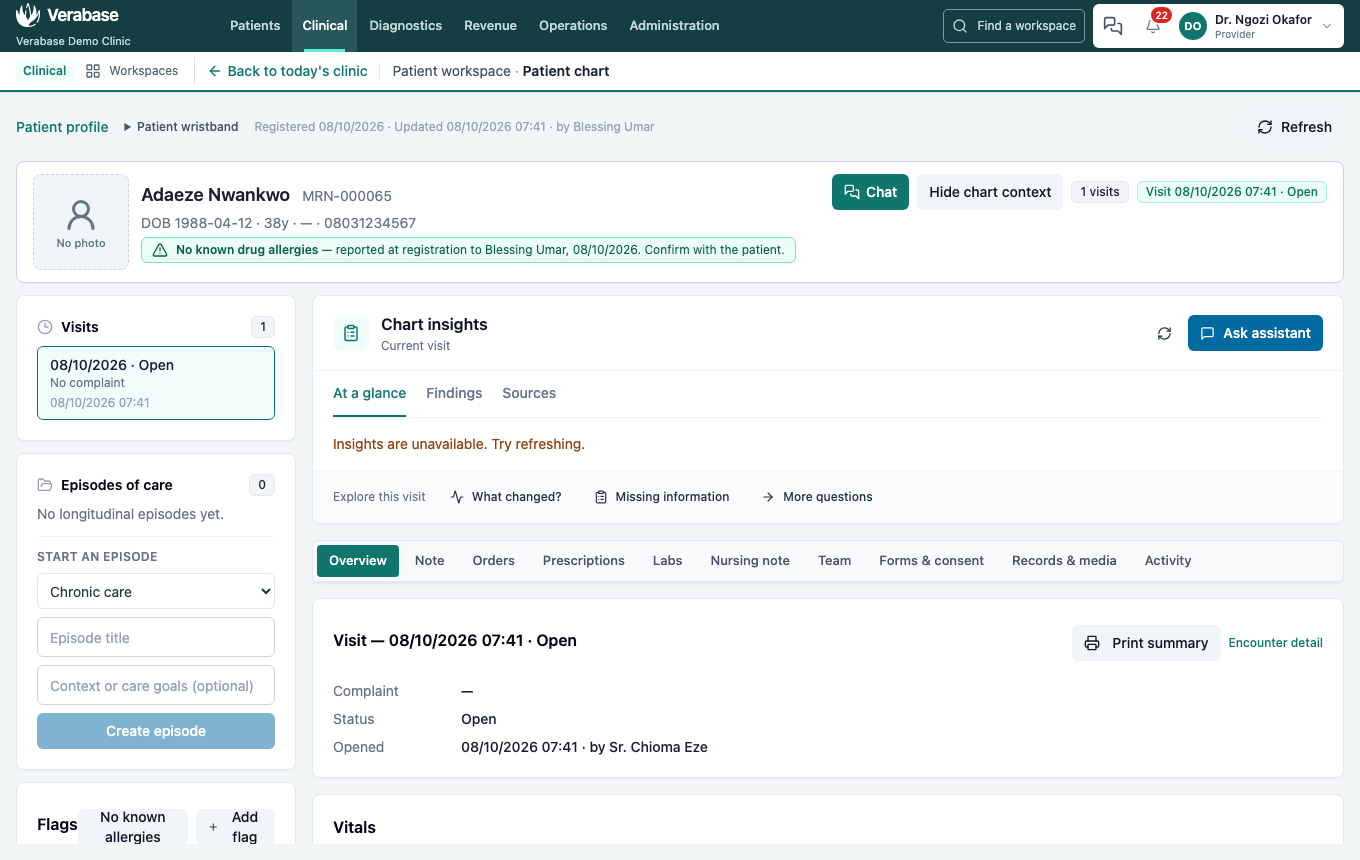
- Note tab → Provider note, written as SOAP. Fill in Subjective, Objective, Assessment and Plan. Type
.in any box for saved phrases, or Insert chart data to pull in the vitals.- Time of service is when the care happened, not when you typed it. The chart keeps both.
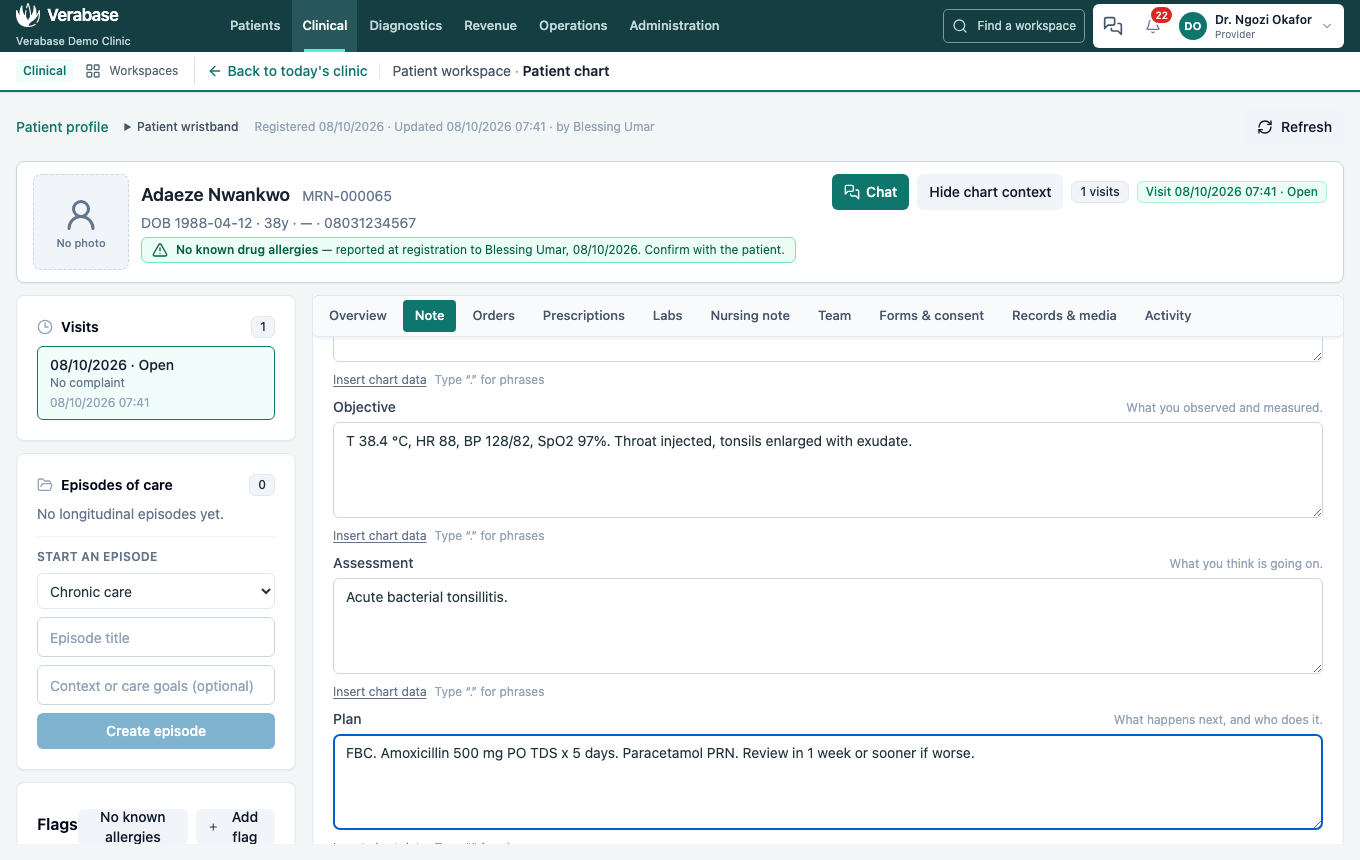
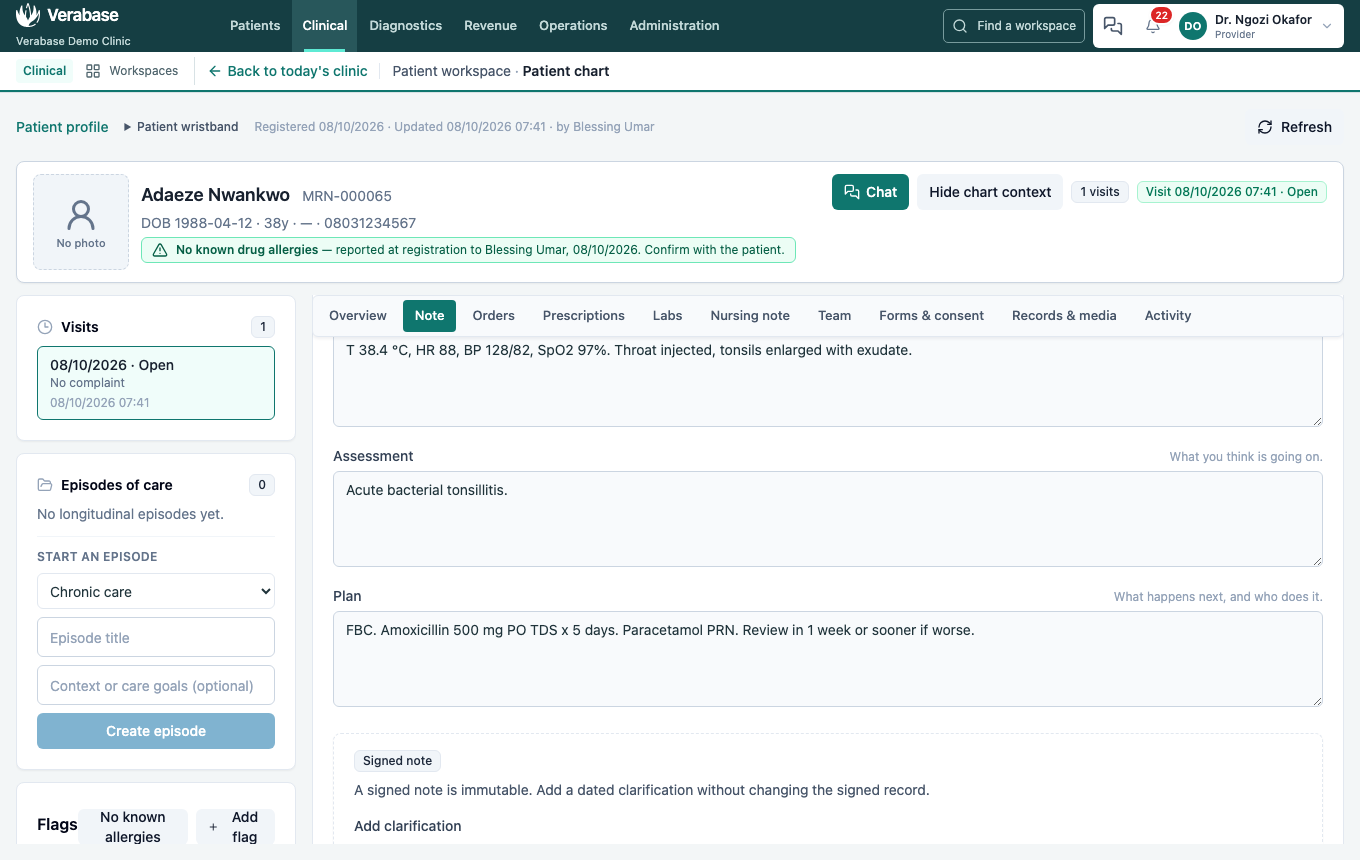
- Save draft (Saved to the record.), then Sign note.
You should see: "Signed by Dr. Ngozi Okafor. Signed notes cannot be edited — add an addendum instead." A signed note is immutable. Corrections are new, dated versions. You can also attach ICD-10 codes under Structured diagnoses.
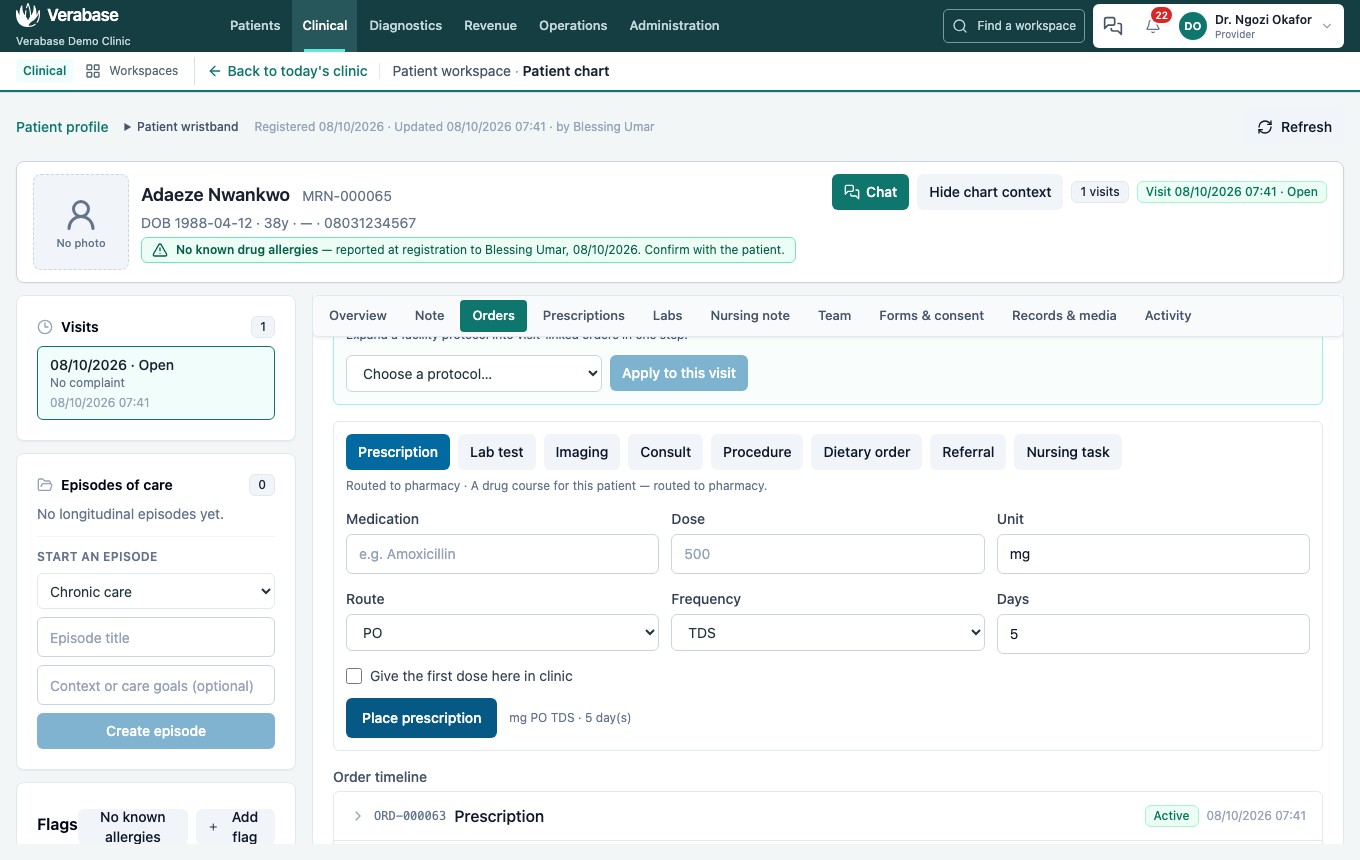
- Orders tab → Lab test. Enter Full blood count, indication Fever workup, and choose Place lab test. The panel says it is routed to the laboratory.
- Prescription. Enter Amoxicillin, dose 500 mg, PO, TDS, 5 days. This is a clinic visit, so the course goes home with her: Give the first dose here in clinic is unticked. Tick it only if a nurse should give the first dose before she leaves. Choose Place prescription. It is routed to pharmacy.
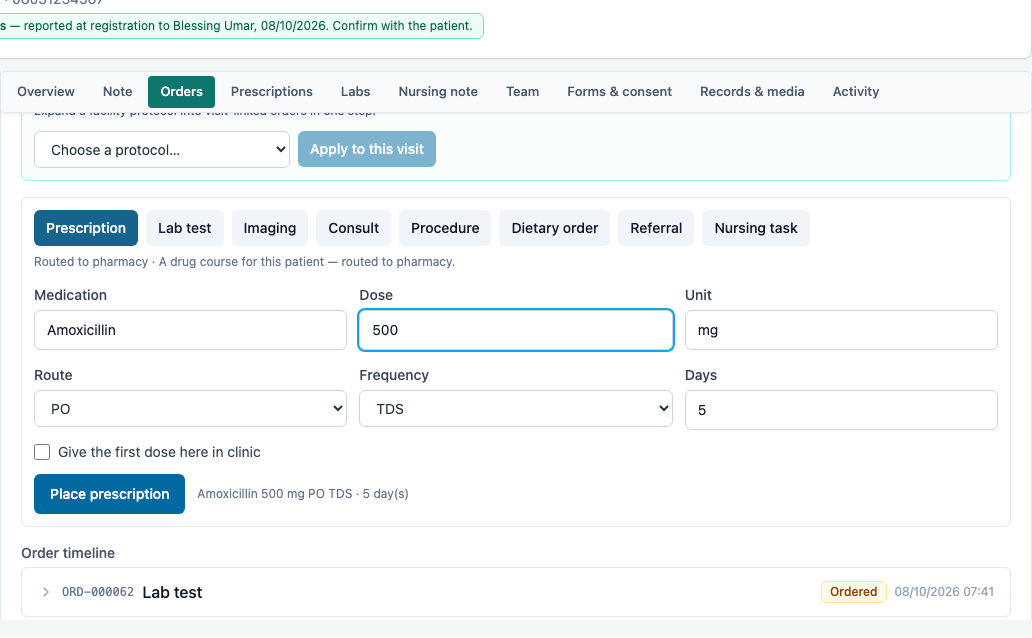
You should see: both in the Order timeline: ORD-… Lab test Ordered and ORD-… Prescription Active.
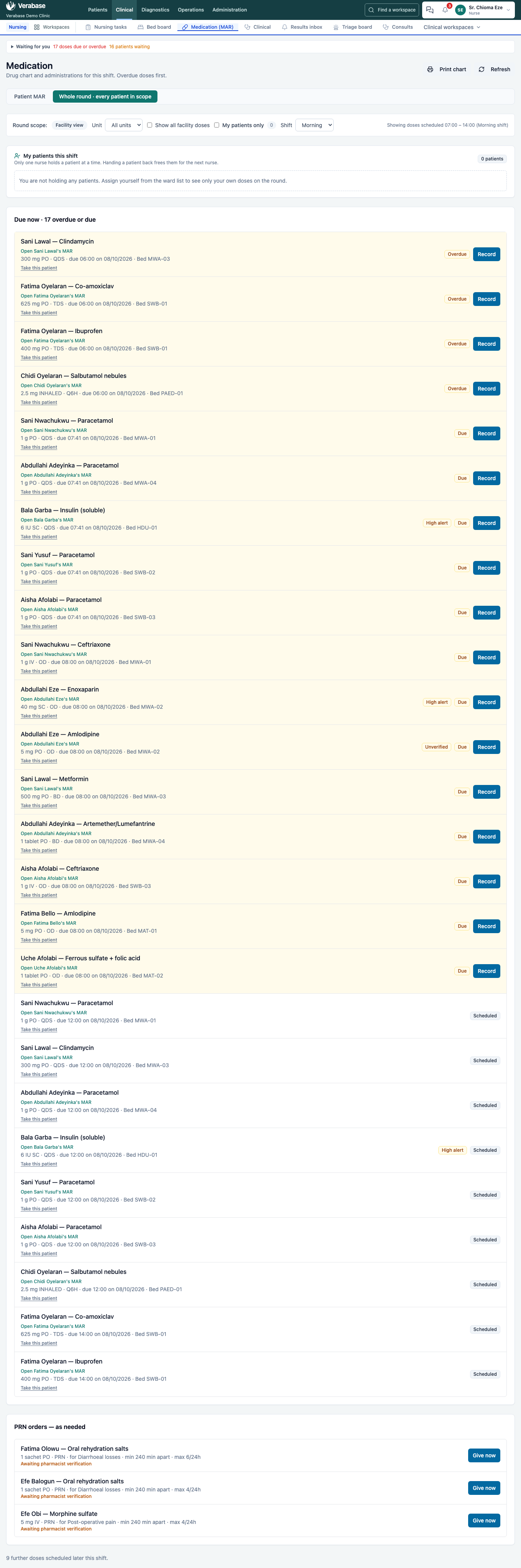
A take-home course is not on the ward drug round: a nurse working the round (Medication (MAR)) sees the ward's doses, and none for Adaeze. On an inpatient, emergency or day-case visit, prescriptions go on the round as before.
6. See the allergy gate — still Provider
Open Chidi Oyelaran from the Inpatient → Ward round worklist. He is a child with an active admission, and his chart banner reads Allergies: Penicillin (HIGH).

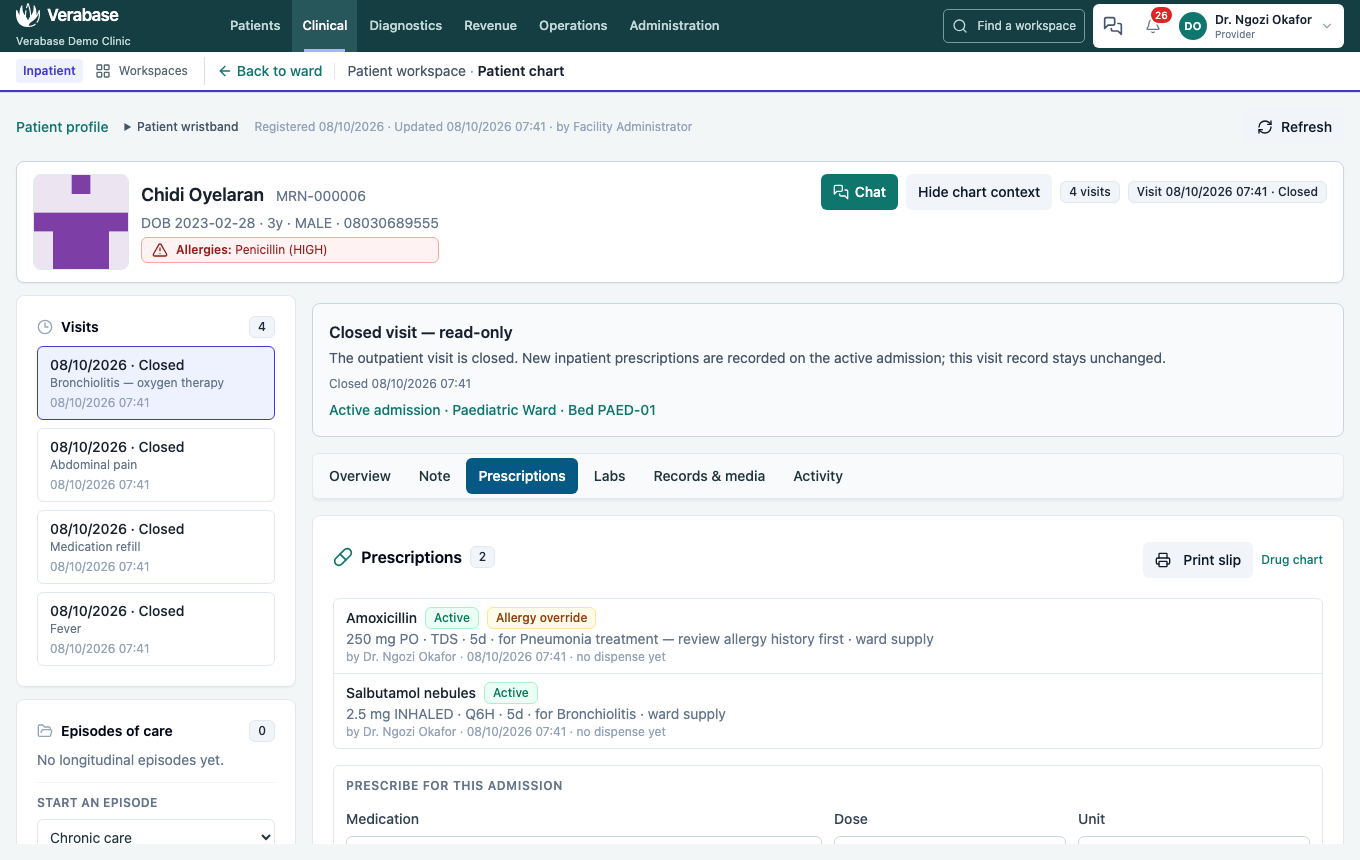
On Prescriptions, the closed source visit shows that the active admission can receive new orders. Try Amoxicillin 250 mg PO TDS for 5 days in Prescribe for this admission.
You should see: "Amoxicillin is flagged against this patient's recorded allergies. Give a reason to prescribe it anyway." The allergy is recorded as penicillin, and the drug is amoxicillin. Verabase matched them by drug class, not by name.
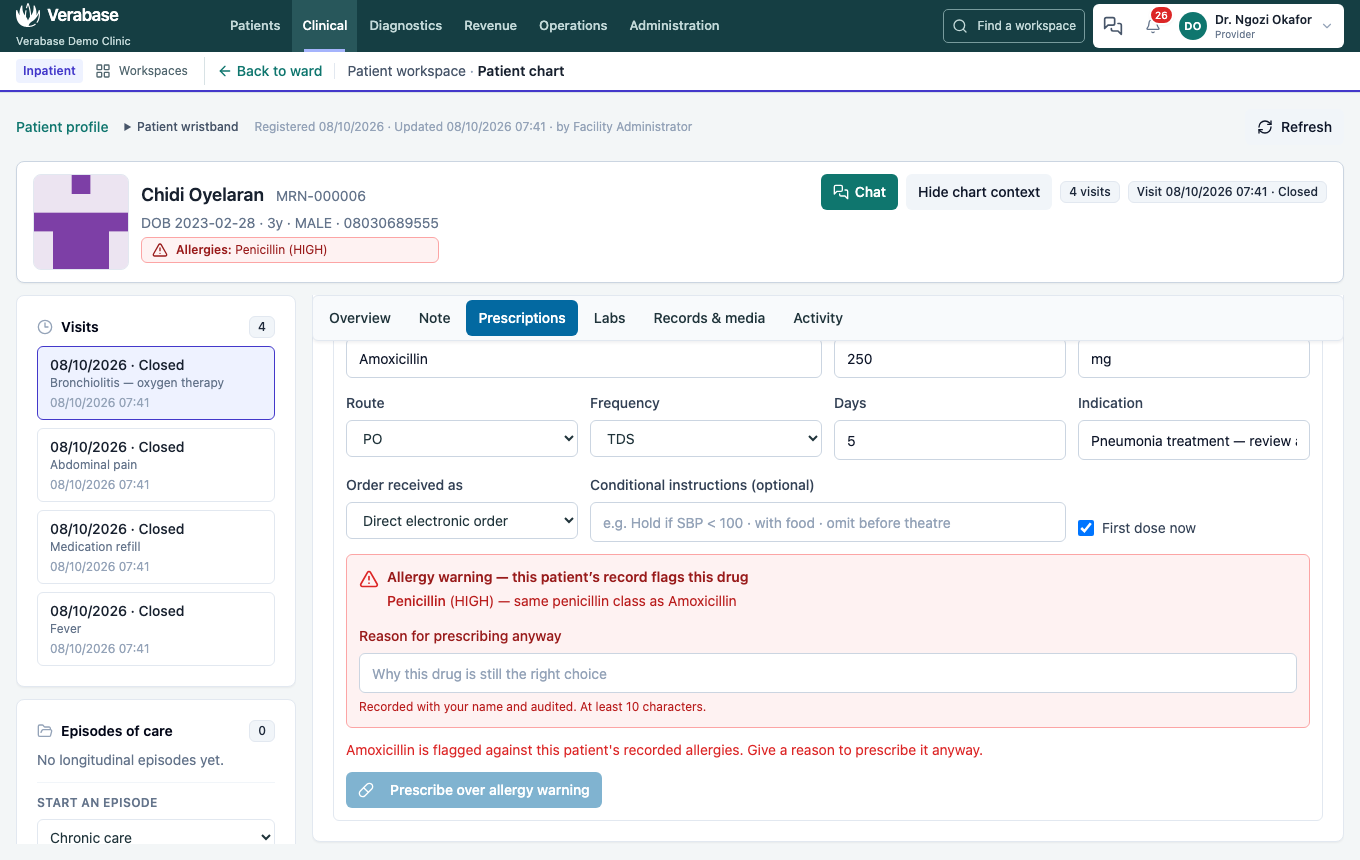
Under the message, Verabase shows exactly what matched, Penicillin (HIGH) — same penicillin class as Amoxicillin, and a Reason for prescribing anyway field. The button now reads Prescribe over allergy warning and stays disabled until the reason is at least 10 characters. The reason is recorded with your name and audited.
For this exercise, give a reason and prescribe. On the Prescriptions tab the order is listed as Active · Allergy override, so every later reader sees that it was a decision, not an accident.
The full composer on Prescriptions runs more checks the same way: duplicate therapy ("Amoxicillin … is already active. Confirm intentional."), dose sanity, high-alert drugs, and verbal-order read-back.
7. Work the sample — as Lab Technician, then Lab Supervisor
- Sign in as the lab technician. Adaeze's Full blood count · Fever workup is at the top of the Order queue, marked Ordered, with the doctor's name. Nobody carried a slip.
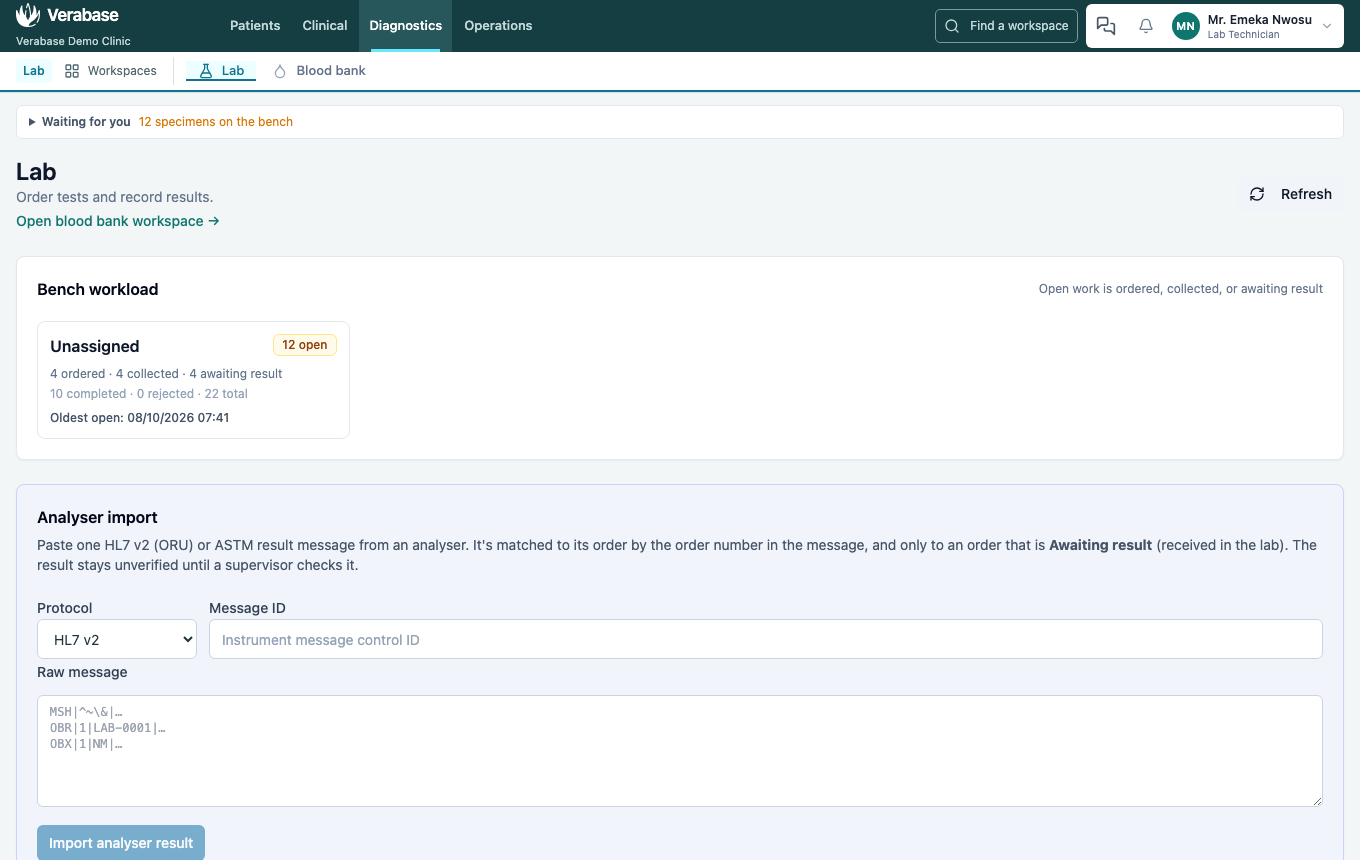
- Select it. The Enter result panel names the five steps and tells you which one you are on: 1 Collect → 2 Receive in lab → 3 Record result → 4 Verify → 5 Acknowledge.
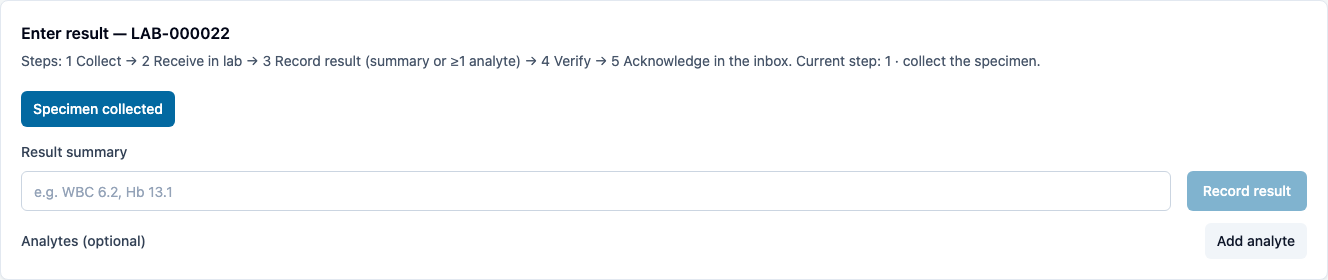
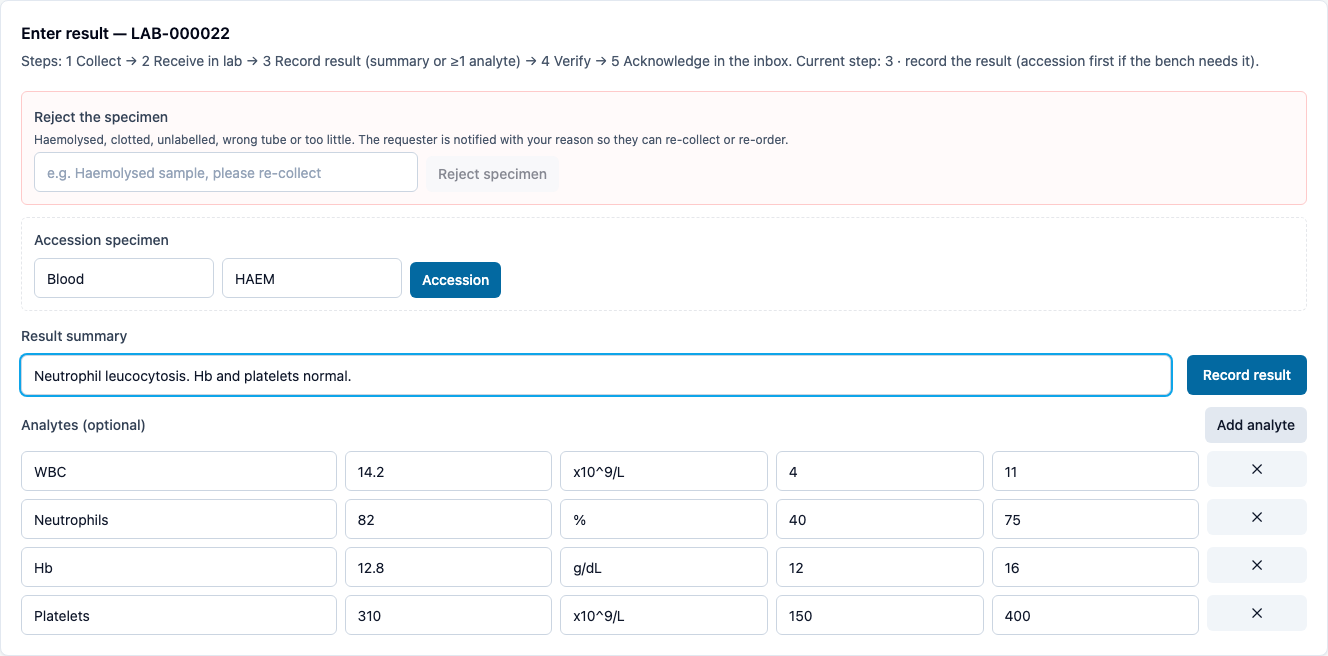
- Specimen collected → enter the bench (e.g. HAEM) → Received in lab → Accession.
- Enter a Result summary and use Add analyte for each value: name, value, unit, reference low and high. Then Record result.
- Sign in as the lab supervisor, open the Lab, and select the same order. Values outside their range are flagged automatically (High). The result is Awaiting verification.
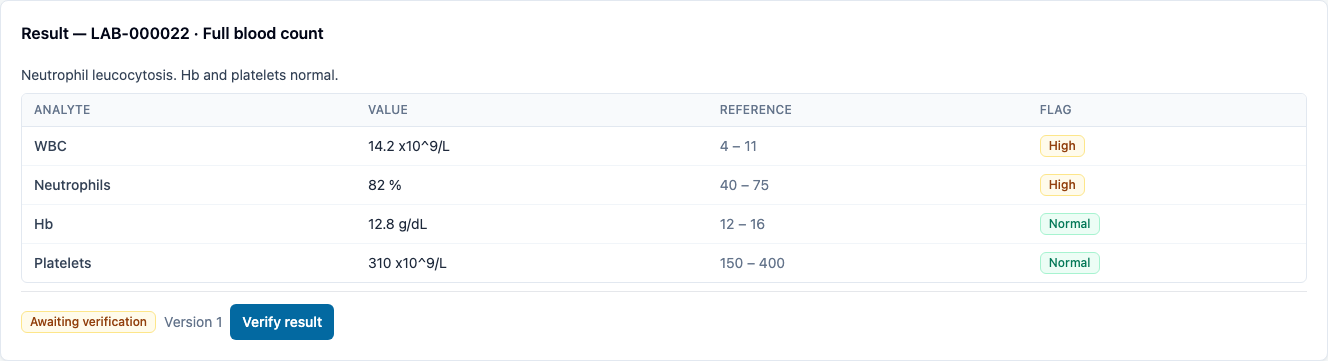
- Verify result. It now reads Verified. A technician enters; a supervisor releases. The separation is deliberate.
8. Review and acknowledge the result — as Provider
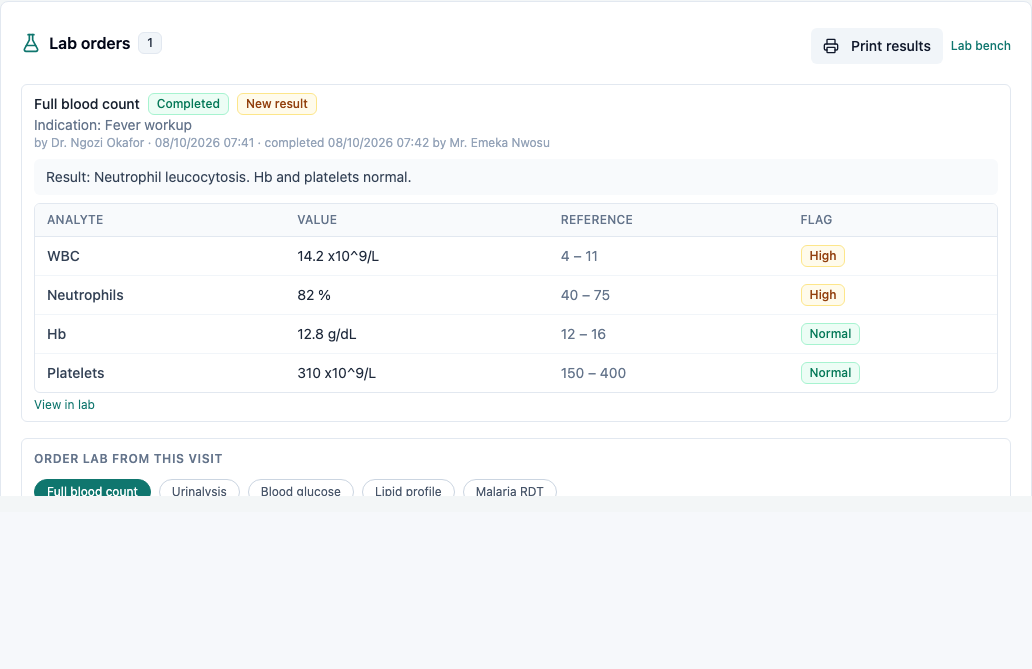
Back as Dr Okafor, open Adaeze's chart → Labs. The full blood count is there, marked New result, with the analyte table, the flags, who completed it and when.
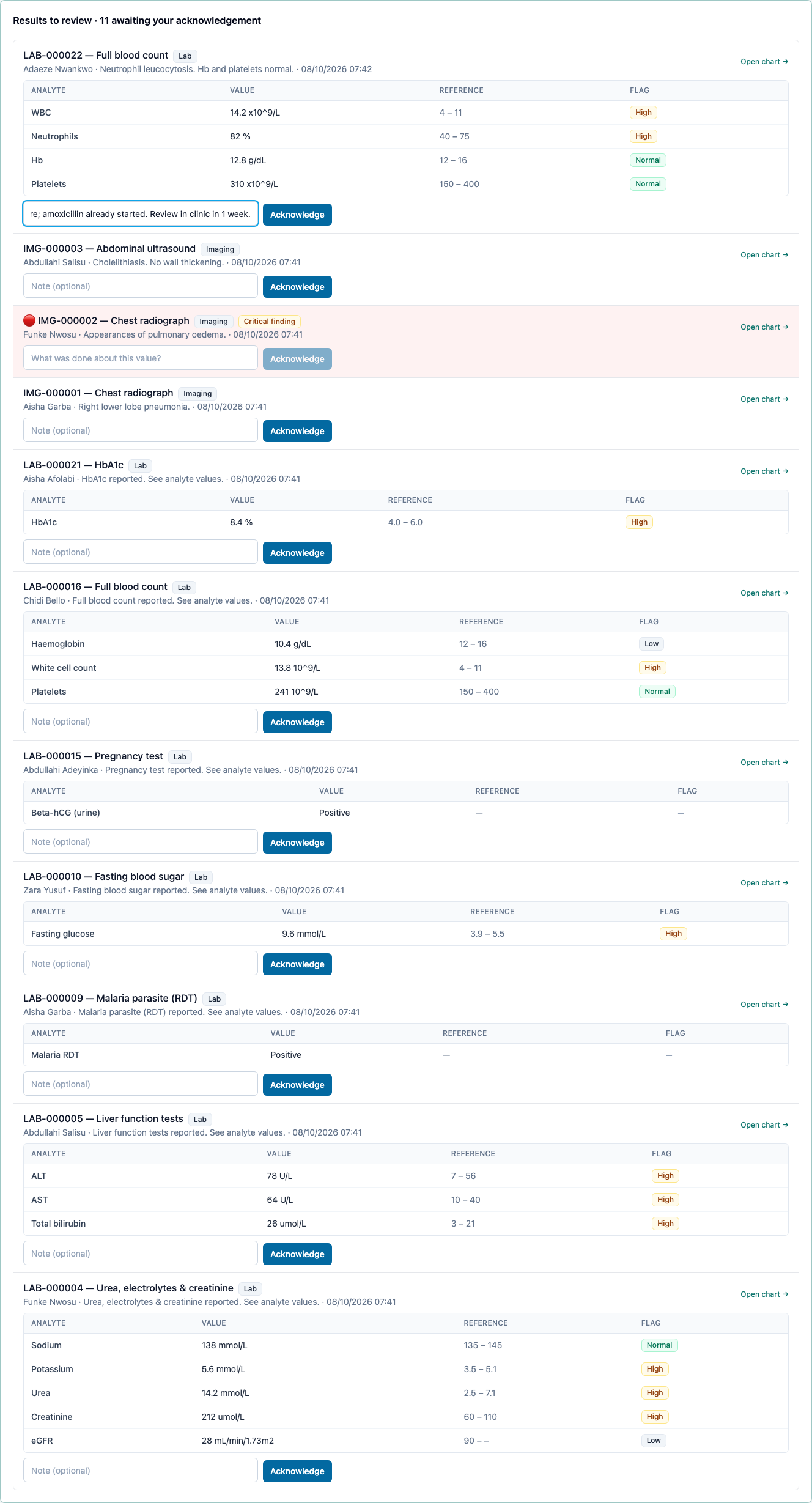
Waiting for you now counts results to review. It links to Clinical → Results inbox, where Results to review lists every completed lab and imaging result you ordered that you haven't acknowledged yet, abnormal flags included. Add a note on what you did about it, then choose Acknowledge. The result leaves your queue, and the acknowledgement (who, when, note) stays on the record. Critical values can't be acknowledged without a note.
9. Verify and dispense — as Pharmacist
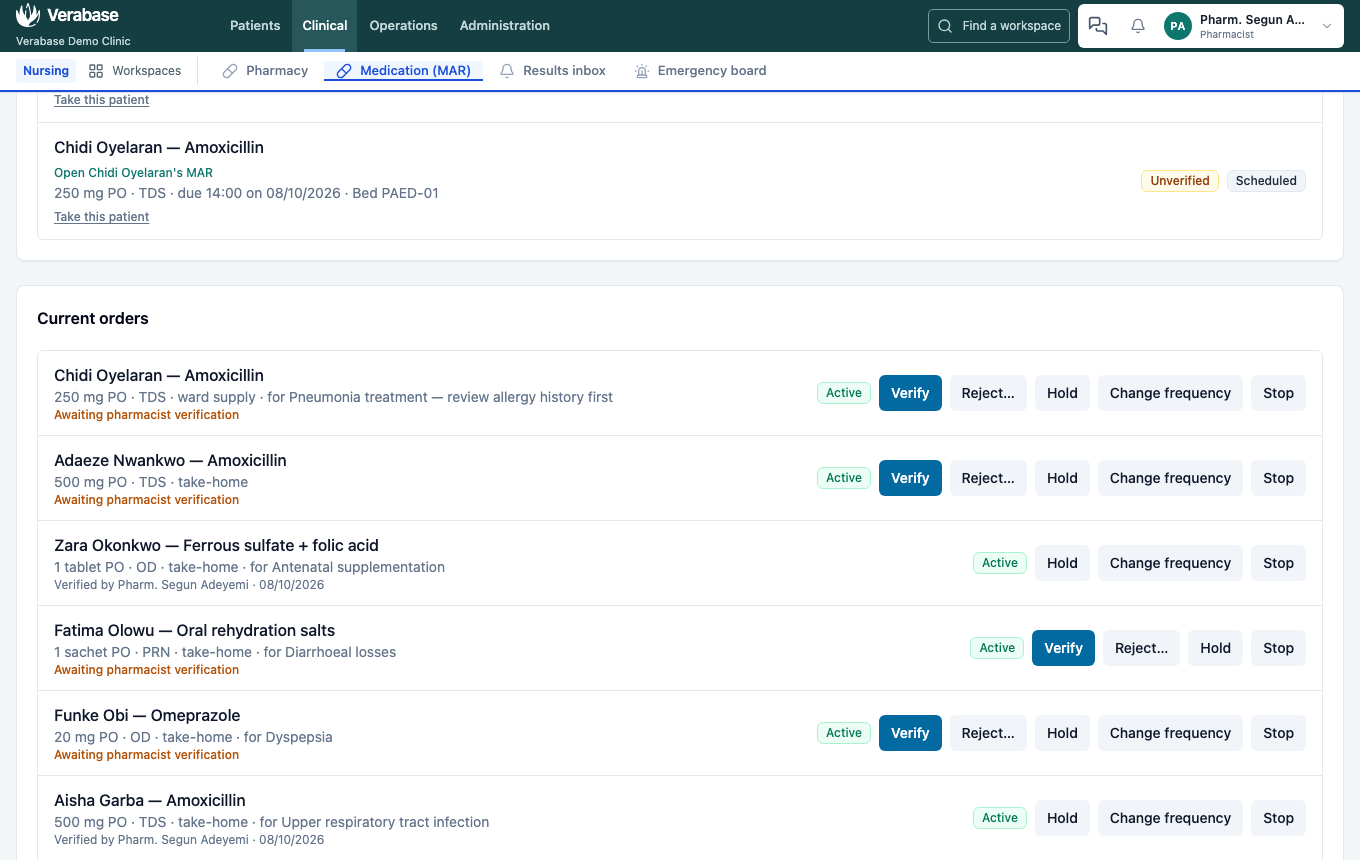
- Sign in as the pharmacist. Waiting for you counts prescriptions to verify. Open Medication (MAR) → Current orders.
- Find Adaeze Nwankwo — Amoxicillin · 500 mg PO · TDS · take-home · Awaiting pharmacist verification. Choose Verify, after checking dose, route and frequency against the formulary.
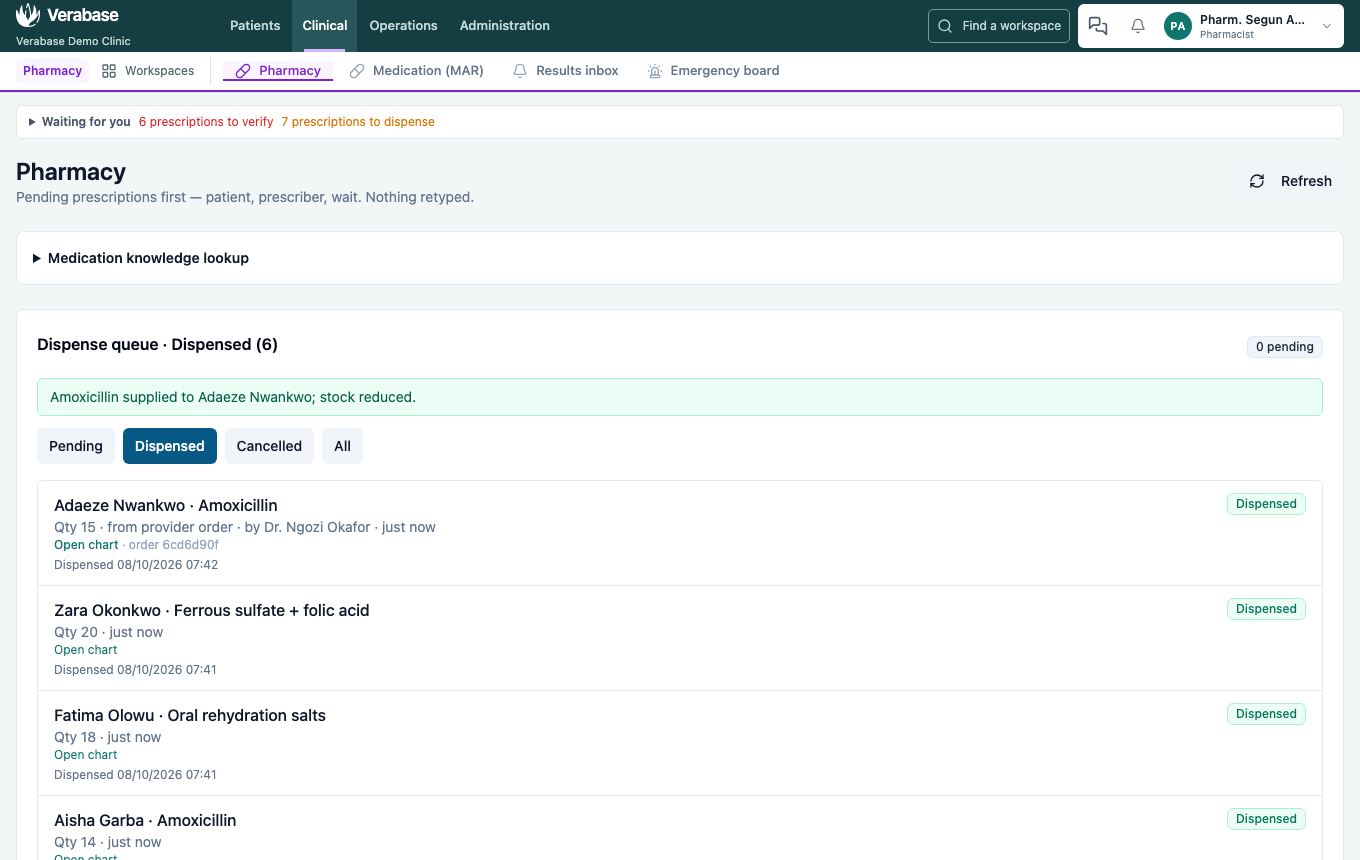
- Open Pharmacy. The prescription is already in the Dispense queue: from provider order · by Dr. Ngozi Okafor. Nothing is retyped.
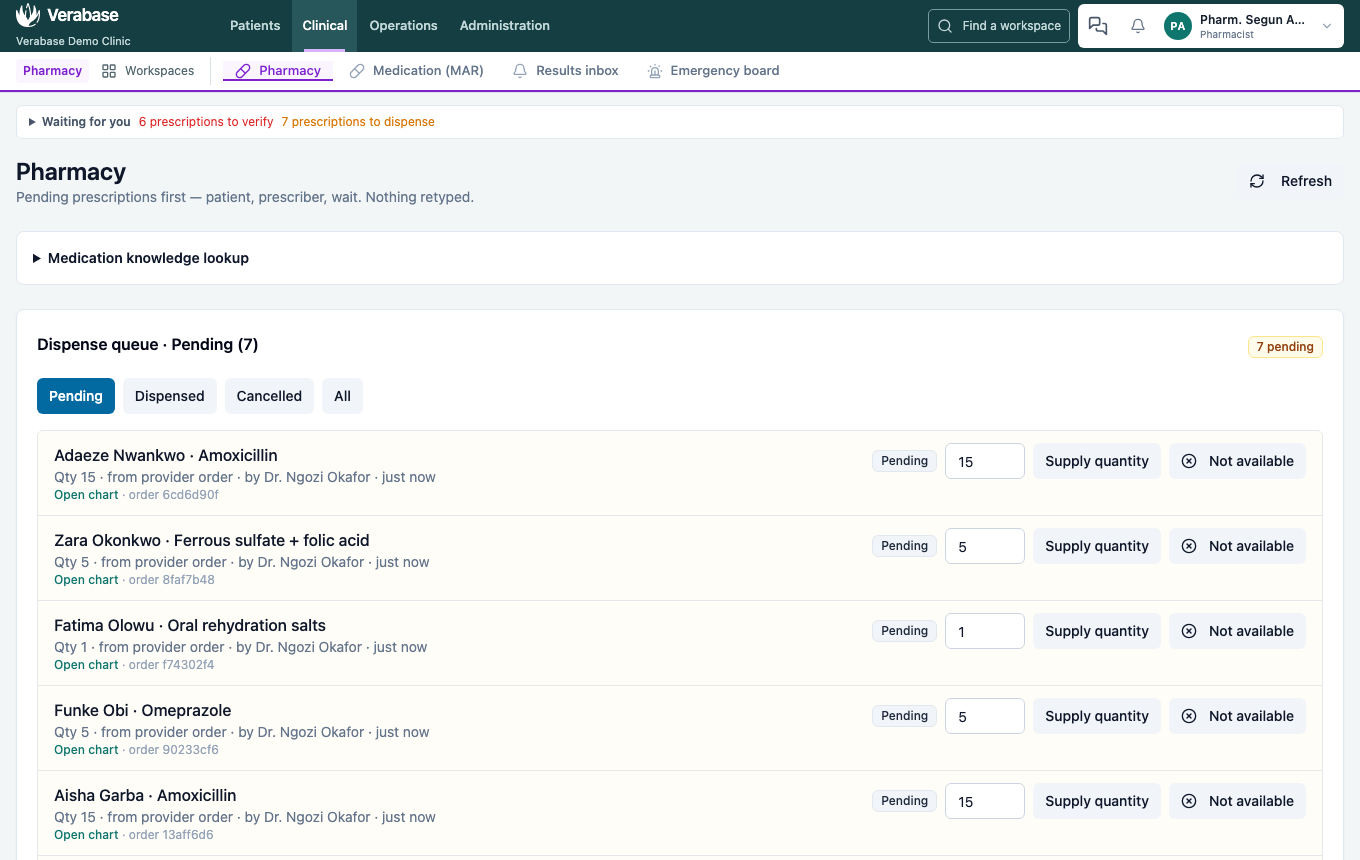
- Check Quantity to supply: Qty 15, the whole course (TDS for 5 days). Choose Supply quantity. The dispense moves to Dispensed. Dispensing draws down pharmacy stock; check Inventory if you want to watch the balance fall (not part of the captured walk).
10. Take the payment — as Billing Officer
- Sign in as the cashier and open Revenue → Invoices & payments. Each invoice row shows the patient's name.
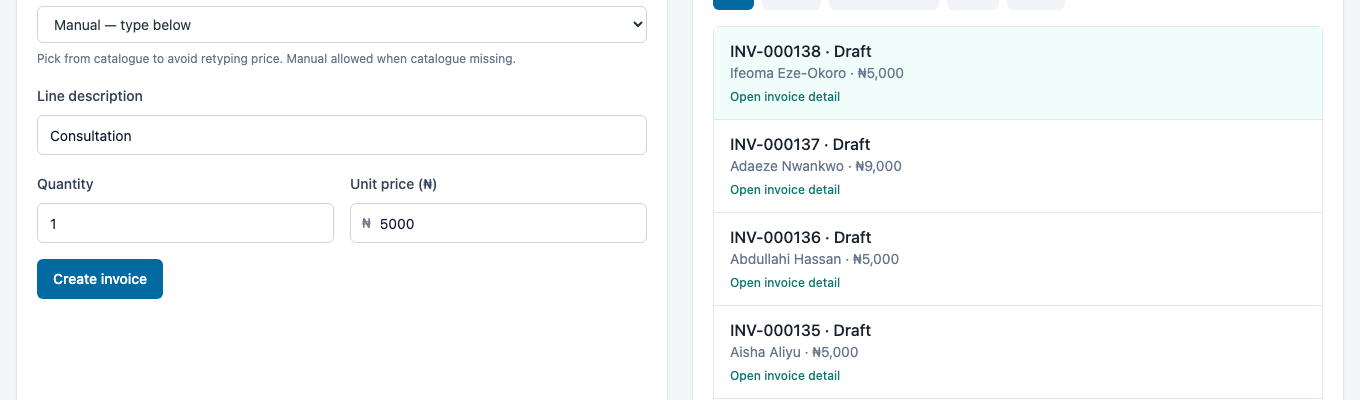
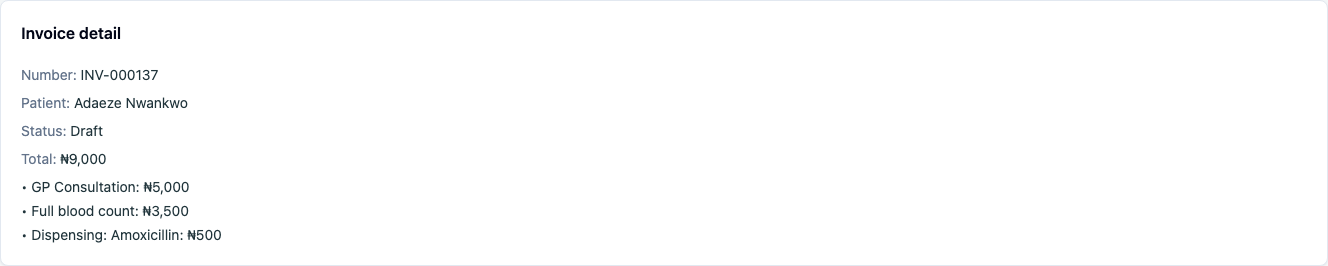
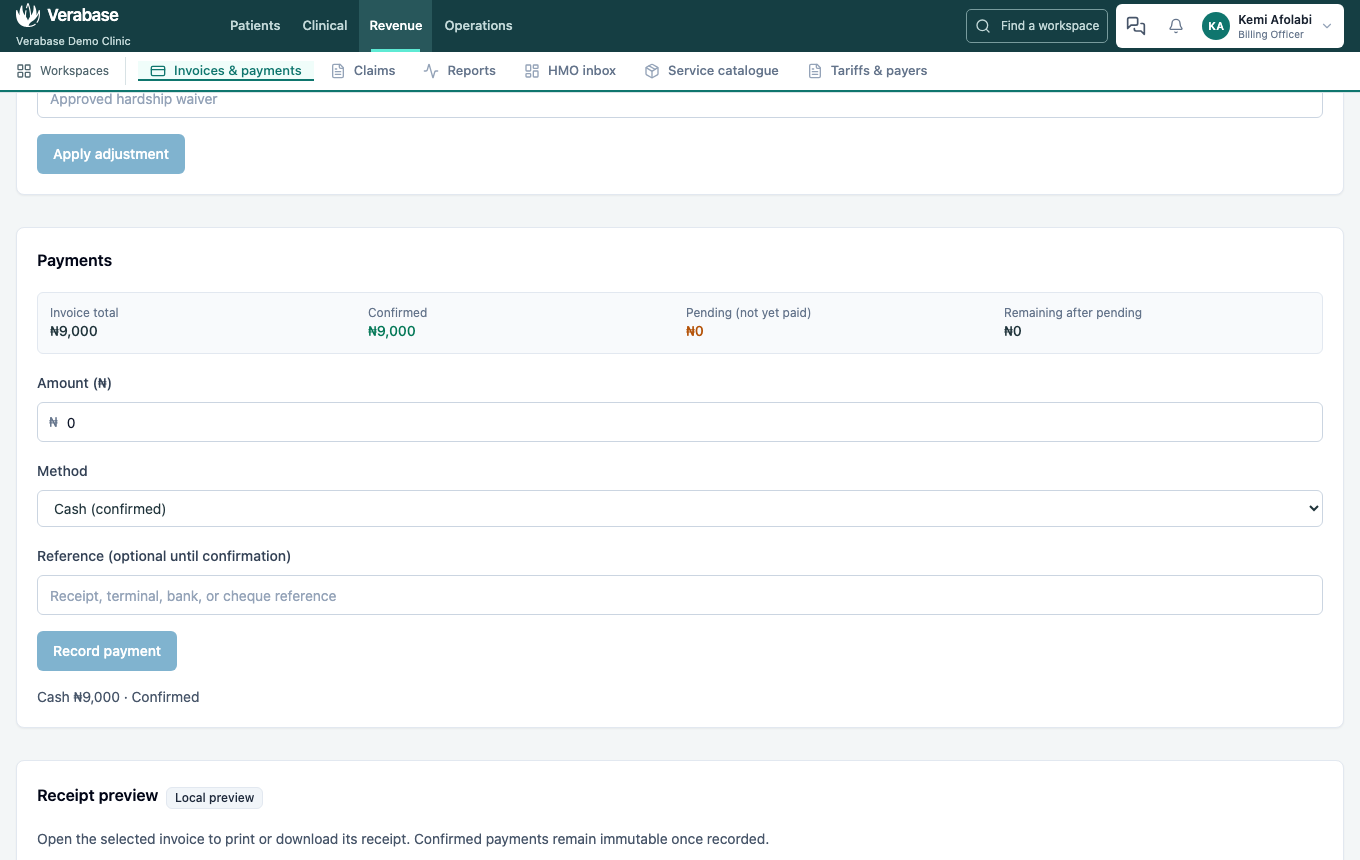
- Select Adaeze Nwankwo's invoice. The consultation, the lab test and the dispensing are already on it, charged when they were ordered or supplied: GP Consultation ₦5,000 · Full blood count ₦3,500 · Dispensing: Amoxicillin ₦500 = ₦9,000.
- In Payments, the Amount (₦) is already filled with what's outstanding, in naira (9000). Choose the method and Record payment. Cash and POS are confirmed immediately. Bank transfer, Mobile money and Cheque stay pending until someone confirms them against a reference.
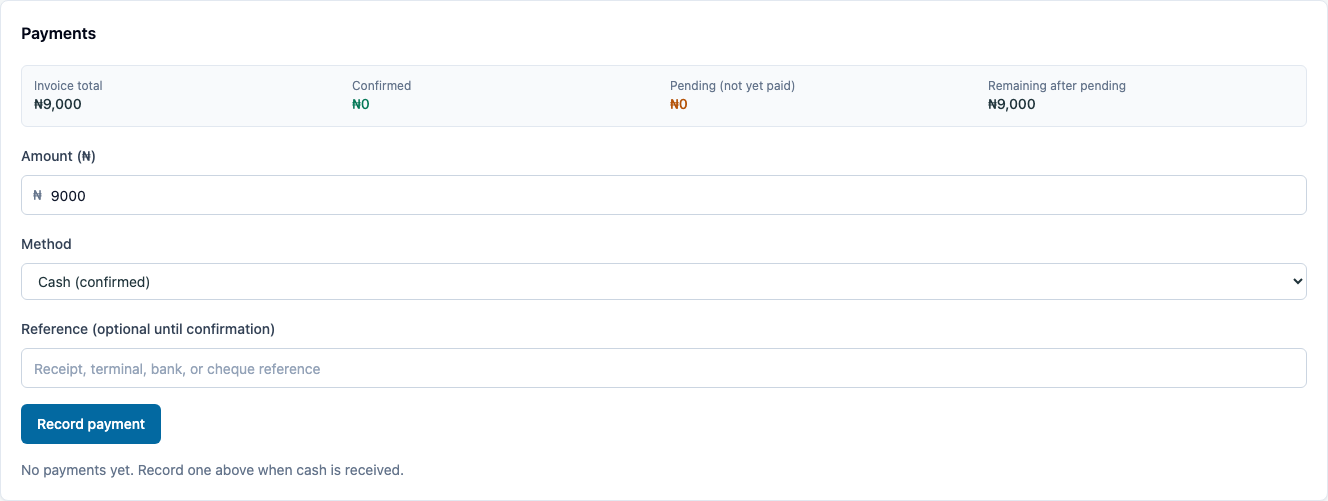
You should see: CASH ₦9,000 · Confirmed, with Remaining at ₦0.
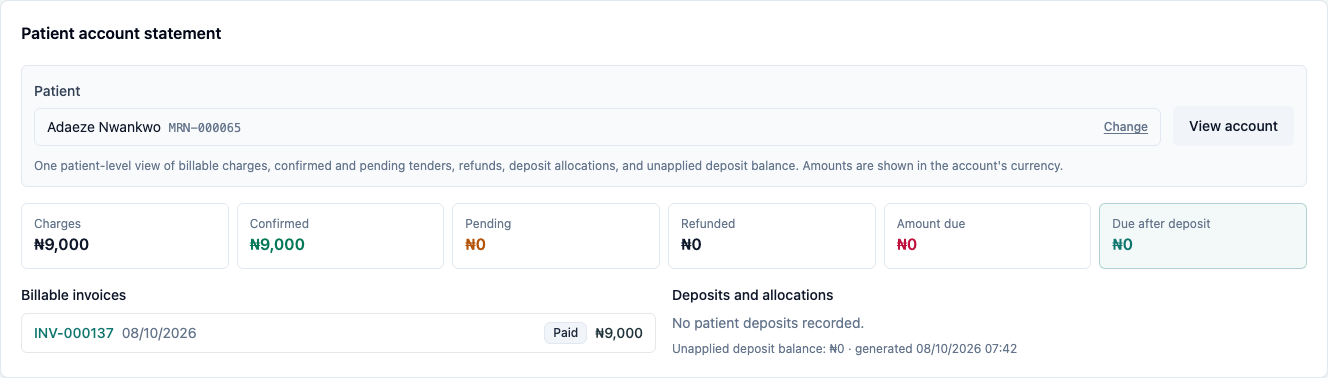
- To see everything this patient owes across visits, find them by name in Patient account statement: billable invoices, tenders, refunds and deposits in one place.
- Open invoice receipt → Print receipt. Paid invoices cannot be edited, and confirmed payments are immutable. A refund is its own recorded transaction.
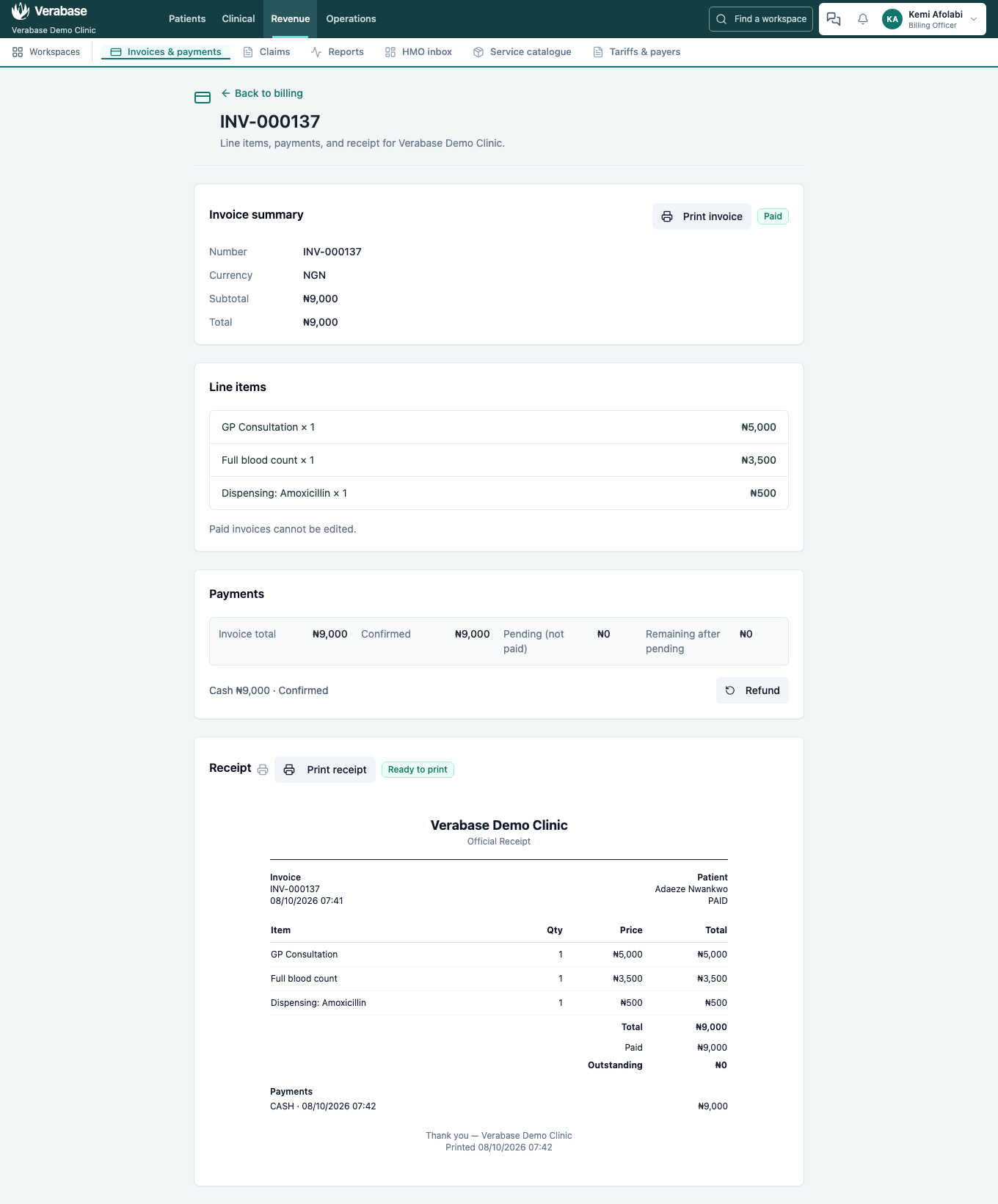
This is the whole point. Nobody retyped Adaeze's name after reception. The bill assembled itself from clinical work that had already happened, and every line traces back to the order that created it.
What Verabase will refuse, and why
| You try | Verabase says | What to do |
|---|---|---|
| Register someone who matches an existing chart on name, date of birth and phone | An existing patient matches these identity details. Use that record instead of creating another one. | Open the matched record. There is no override for a strong match, by design. |
| Register someone who partially matches | A possible existing patient was found. Confirm this is a different person before registering. | Check. If they are genuinely different, confirm and continue. |
| Prescribe a drug that matches a recorded allergy by name or class | …is flagged against this patient's recorded allergies. Give a reason to prescribe it anyway. | Choose another drug, or record a clinical reason. The reason is permanent. |
| Prescribe a drug that is already active for the patient | Duplicate therapy — … is already active. Confirm intentional. | Stop the old order, or confirm it is intended |
| Edit a signed note | Signed notes cannot be edited — add an addendum instead. | Add an addendum or a new version |
| Record a result before the specimen is collected and received | The lab panel only offers the next step | Collect, then receive, then result |
| Capture vitals with NEWS2 inputs missing | Vitals save, but NEWS2 lists what is missing | Complete RR, SpO₂, temp, BP, HR and AVPU for a score |
You're done when…
- [ ] Adaeze has one chart, not two, and her allergy status reads No known drug allergies — recorded.
- [ ] Her visit has vitals with a NEWS2 band and a signed SOAP note.
- [ ] Her full blood count is Verified, with WBC flagged High, and acknowledged by Dr Okafor.
- [ ] Her amoxicillin is Verified and Dispensed.
- [ ] Her invoice reads Paid and you have printed the receipt.
- [ ] You can explain why Chidi Oyelaran could not be given amoxicillin without documenting an override reason.
Practice task
Run steps 1–6 again with a patient of your own invention. As Front Desk, record a Penicillin (HIGH) allergy with Add flag instead of No known allergies. As the doctor, prescribe amoxicillin, first from Orders and then from Prescriptions. Check: both composers stop you, show the class match and ask for a reason, and the override badge appears on the order once you give one.
Known gaps found while verifying this journey
All logged in gaps, with the route and what to change:
Clinicians cannot record allergy statusfixed 2026-09-23.The registration Known allergies box does not set allergy statusfixed 2026-10-01.Take-home prescriptions appeared on the ward drug roundfixed 2026-10-01.The payment box kept the first bill's amount when the cashier picked another billfixed 2026-10-01.Non-critical results never reach the Results inboxfixed 2026-09-23.Demo data leaves Provider orders offfixed 2026-09-24.Invoices without patient names; Patient ID and kobo fieldsfixed 2026-09-24.No override on the quick composerfixed 2026-09-24.Full-name search finds nothingfixed 2026-09-24.
Related journeys
CP-02 Onboard a hospital (before this) · Coming next in the catalogue: FAC-IPD-01 admission → MAR → discharge