Appearance
FAC-IPD-01 · Inpatient stay: admission, drug round, transfer, discharge
Ibrahim Danladi, 65, comes to clinic with pneumonia: fever 39.1 °C and oxygen saturation 91 %. Dr Okafor decides to admit him. The ward finds him a bed. He gets IV ceftriaxone and a STAT dose of paracetamol on the drug round. He worsens and moves to the High Dependency Unit. Later he goes home with instructions and a follow-up. His bed is cleaned and the bill already knows how many nights he stayed.
Do FAC-OPD-01 first. This journey assumes you know the queue, the chart and the Prescriptions tab.
Before you start
- A freshly loaded demo hospital. Accounts as in FAC-OPD-01, plus Housekeeping:
housekeeping@demo-clinic.test/Verabase-2026. - The bedside scanner token:
demo-ward-scanner-token-2026. A Facility Admin attests or rotates it under Devices → Managed devices before the round; nurses only use the current token to start their session.
Who does what
Admission in Verabase is deliberately split, the way Epic splits an admission order from bed placement:
| Decision | Who | Where |
|---|---|---|
| This patient needs a bed | Provider | The note, then Bed board → Placement requests |
| Which bed, and moving the patient into it | Nurse / bed management | Bed board → Placement requests |
| Starting and stopping medicines | Provider | Chart → Prescriptions |
| Checking them | Pharmacist | Medication (MAR) → Current orders |
| Giving them | Nurse | The patient's MAR |
| Transfer and discharge | Nurse | Bed board → bed → Transfer / Manage episode |
| Cleaning the bed | Housekeeping (automatic on discharge) | Inpatient → Housekeeping → Worklist |
Steps
1. Register and check in — as Front Desk
As in FAC-OPD-01 steps 1 and 3: search by surname, register, Check in. This time the front desk doesn't record allergy status; the doctor will.
2. Decide to admit and request a bed — as Provider
- Pick Ibrahim from Clinical → Today's queue. His chart opens with a visit started. The banner says Allergy status not recorded. Ask him, and choose No known allergies in Flags. The banner changes to No known drug allergies — recorded.

- Write and sign a SOAP note whose plan says Admit to Medical Ward A….
- Bed board → Placement requests. Search his surname and pick him. For Source visit, pick today's outpatient visit, so admission closes his place in the queue and keeps one continuous record. Set Preferred ward Medical Ward A, Urgency Urgent and a Reason. Then Request admission bed.
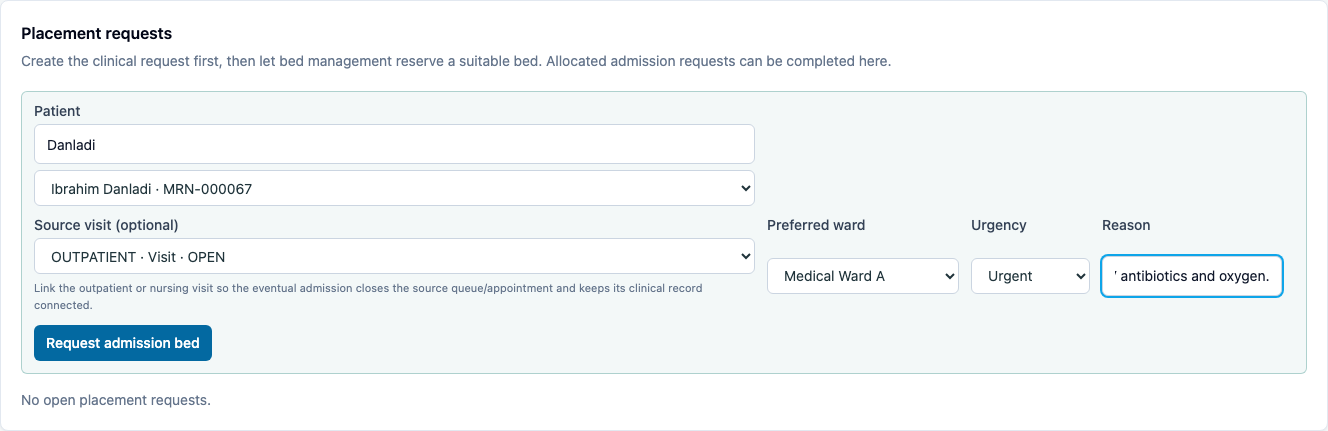
The request shows as REQUESTED. You can't pick the bed: allocation belongs to the ward.
3. Allocate and admit — as Nurse
- Bed board → Placement requests. Dr Okafor's request is waiting, with urgency, ward, reason and source visit linked.
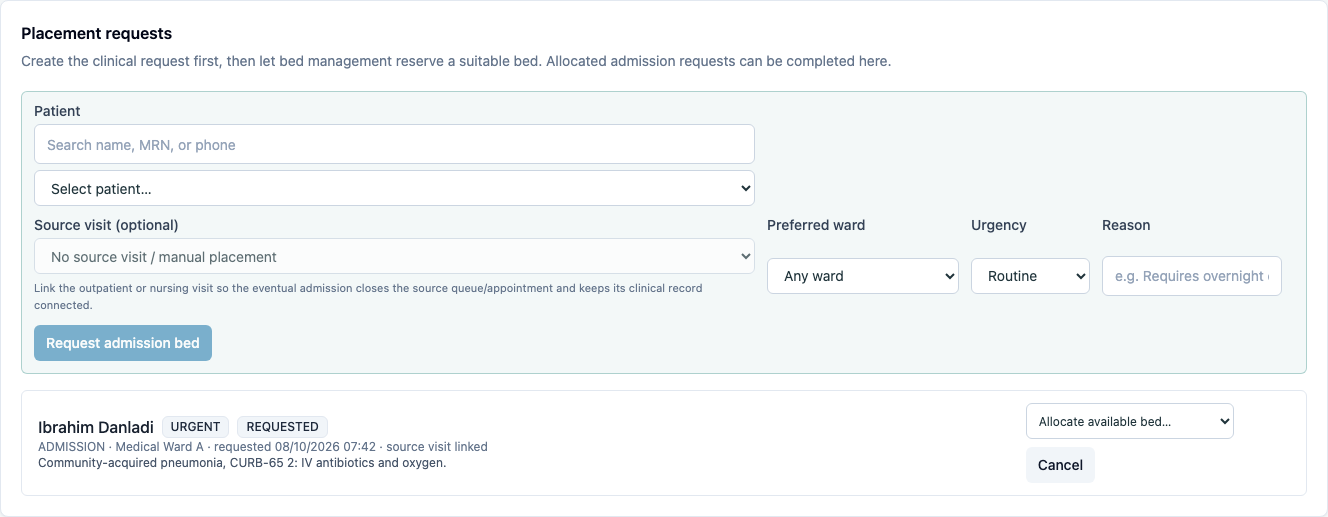
- In Allocate available bed…, choose a free bed in that ward. It becomes ALLOCATED, with the bed reserved.
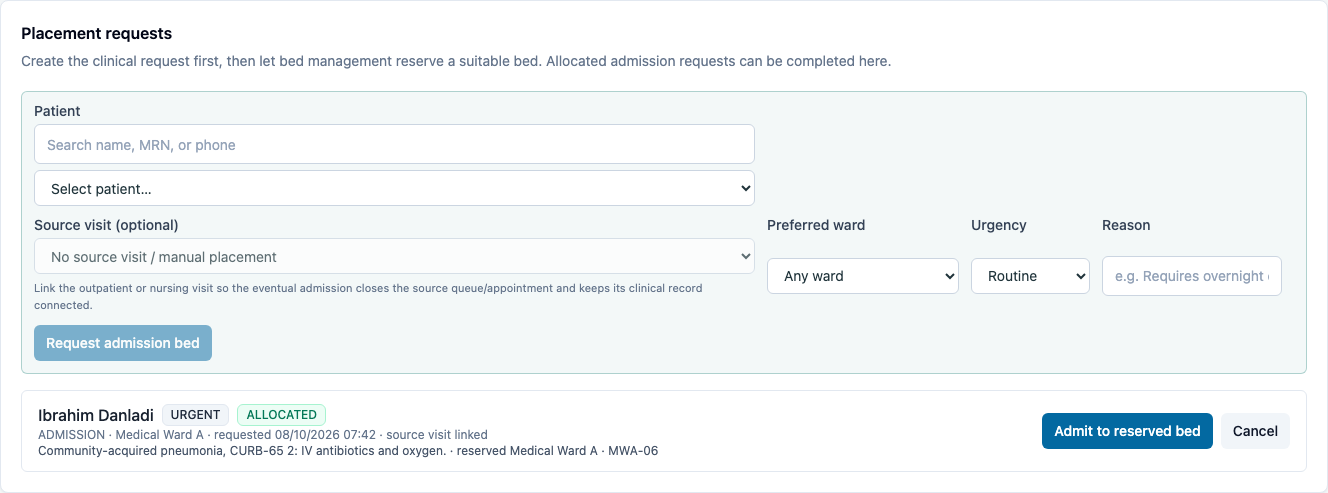
- Admit to reserved bed.
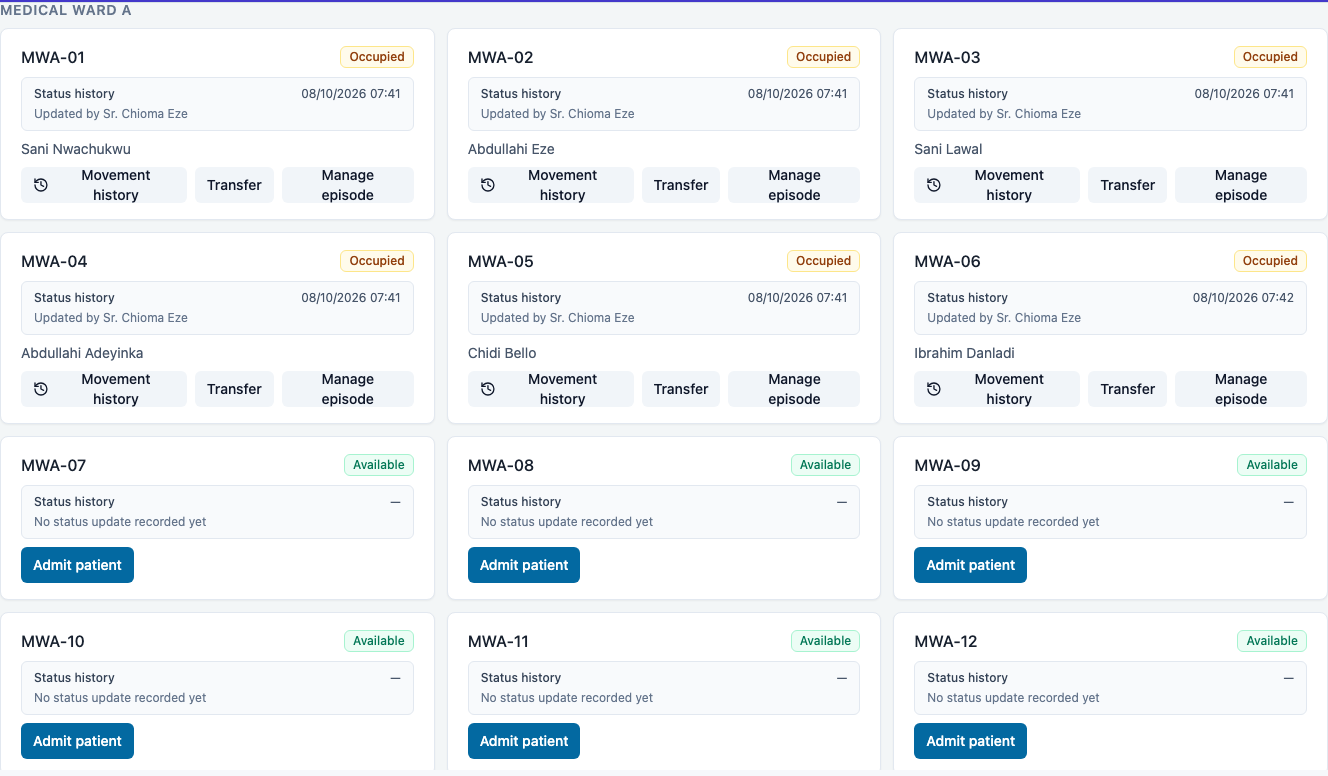
You should see: the bed tile turns Occupied with his name, Updated by Sr. Chioma Eze, and Movement history / Transfer / Manage episode.
4. Prescribe — as Provider
Open his chart from the Ward round worklist (Open chart), then Prescriptions, the full composer. The outpatient source visit stays closed and read-only; the chart confirms the active ward admission, and inpatient orders are saved against that admission:
- Ceftriaxone, 1 g, IV, OD, 5 days, indication Community-acquired pneumonia. Prescribe.
- The order shows a LASA check: cefTRIAXone, a tall-man lettering reminder for look-alike, sound-alike drugs.
- Paracetamol, 1 g, PO, STAT, indication Fever 39.1 °C. Prescribe.
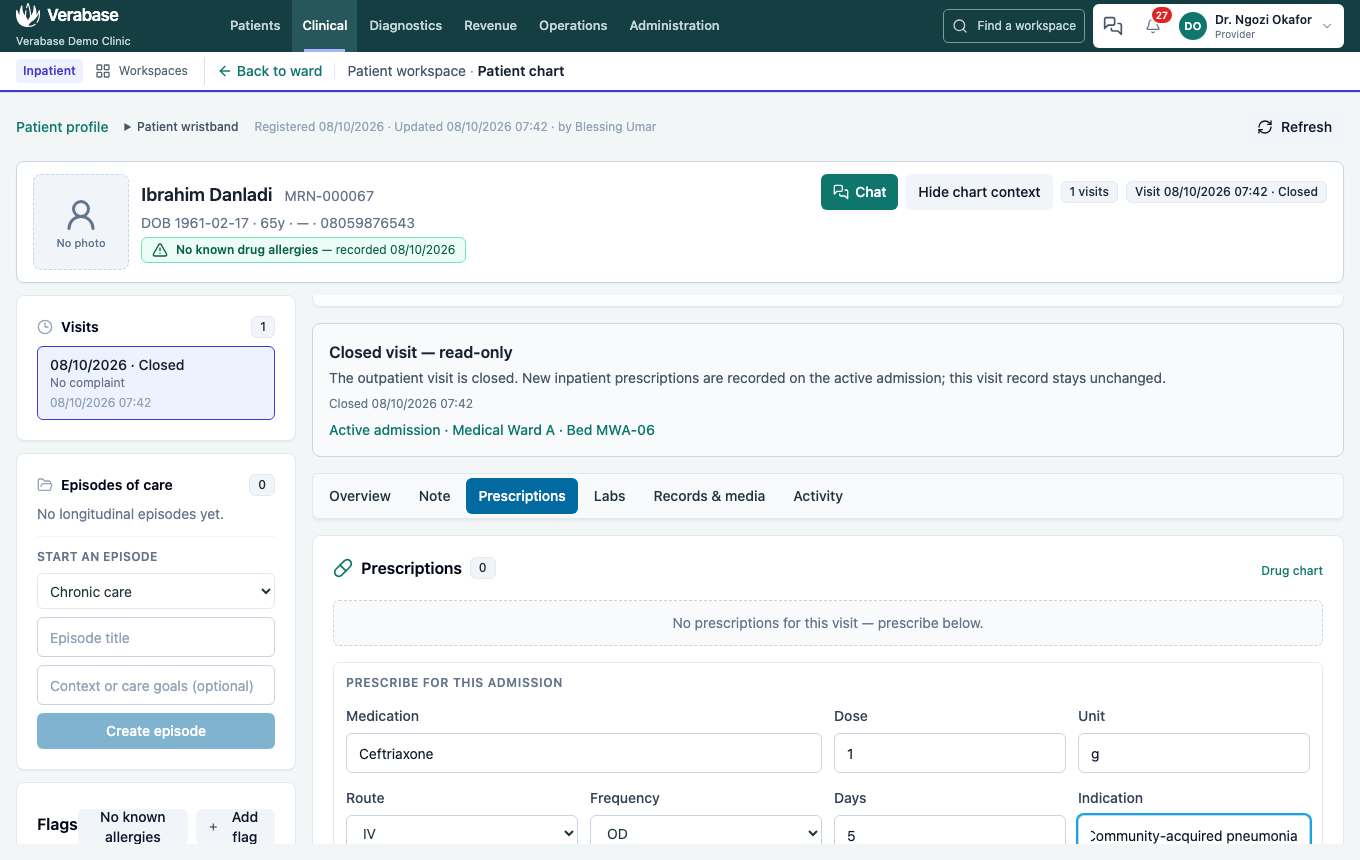

First dose now (on by default) puts a dose on the chart immediately, as well as the regular schedule.
- Labs → a lab test for the admission: Full blood count, indication Pneumonia — baseline before IV antibiotics, Order lab. The panel says Order lab for this admission: the order belongs to the admission, not the closed outpatient visit, and is listed under Lab orders during admission.

After discharge, reopening the original outpatient source visit shows Closed visit — read-only. It retains the admission's prescription history, but the prescription composer is unavailable; choose an open visit to prescribe.
5. Verify — as Pharmacist
Medication (MAR) → Current orders. Both orders read Awaiting pharmacist verification. Choose Verify on each. They then read Verified by Pharm. Segun Adeyemi. See FAC-OPD-01 step 9.
Ward drugs and the pharmacy counter
Inpatient drugs are only sent to the pharmacy as a ward supply request if the Facility Admin has turned on Drug chart (MAR) under Pharmacy → Prescribing integration (FAC-OPD-01 step 0).
6. Give the dose — as Nurse
- Open Medication (MAR). The ward list puts overdue and due doses first, including a first dose whose administration window crosses shift handover. On Ibrahim's Paracetamol row, the first dose is Due and has a Record button. On his Ceftriaxone row, choose Take this patient. It now reads Yours this shift. By design only one nurse holds a patient at a time, so nobody assumes someone else has them.
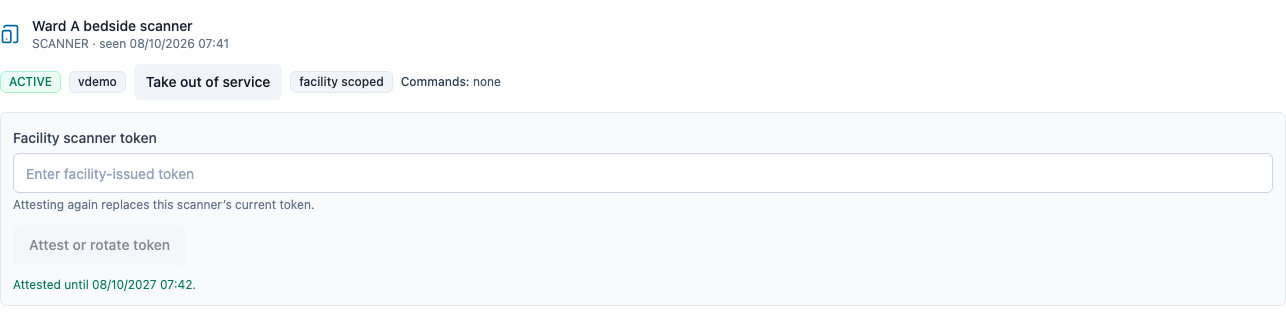
Before the round, a Facility Admin attests the ward scanner under Devices → Managed devices. Attest or rotate token replaces any prior scanner token; the confirmation gives the expiry. The nurse enters the current facility token to start the round session.
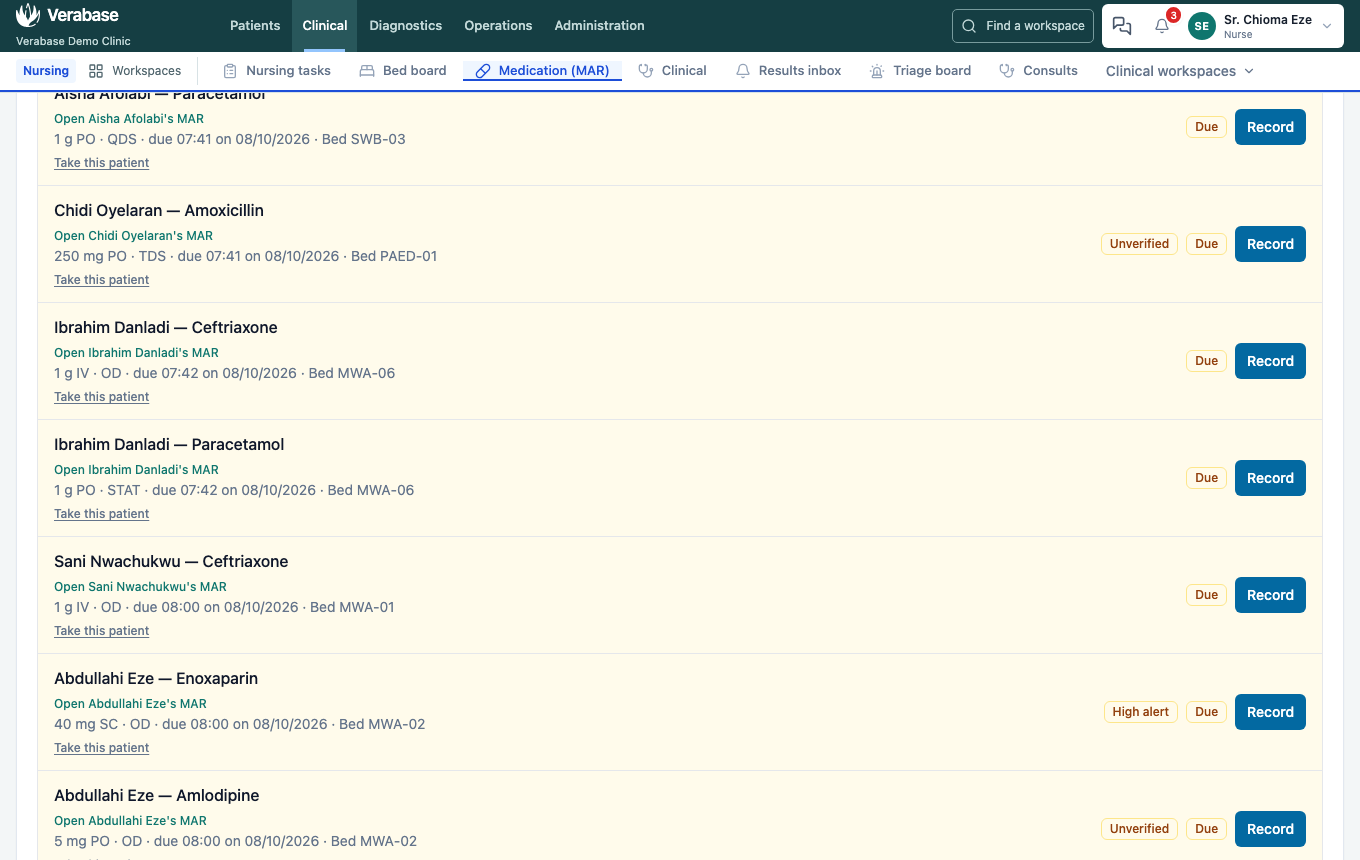
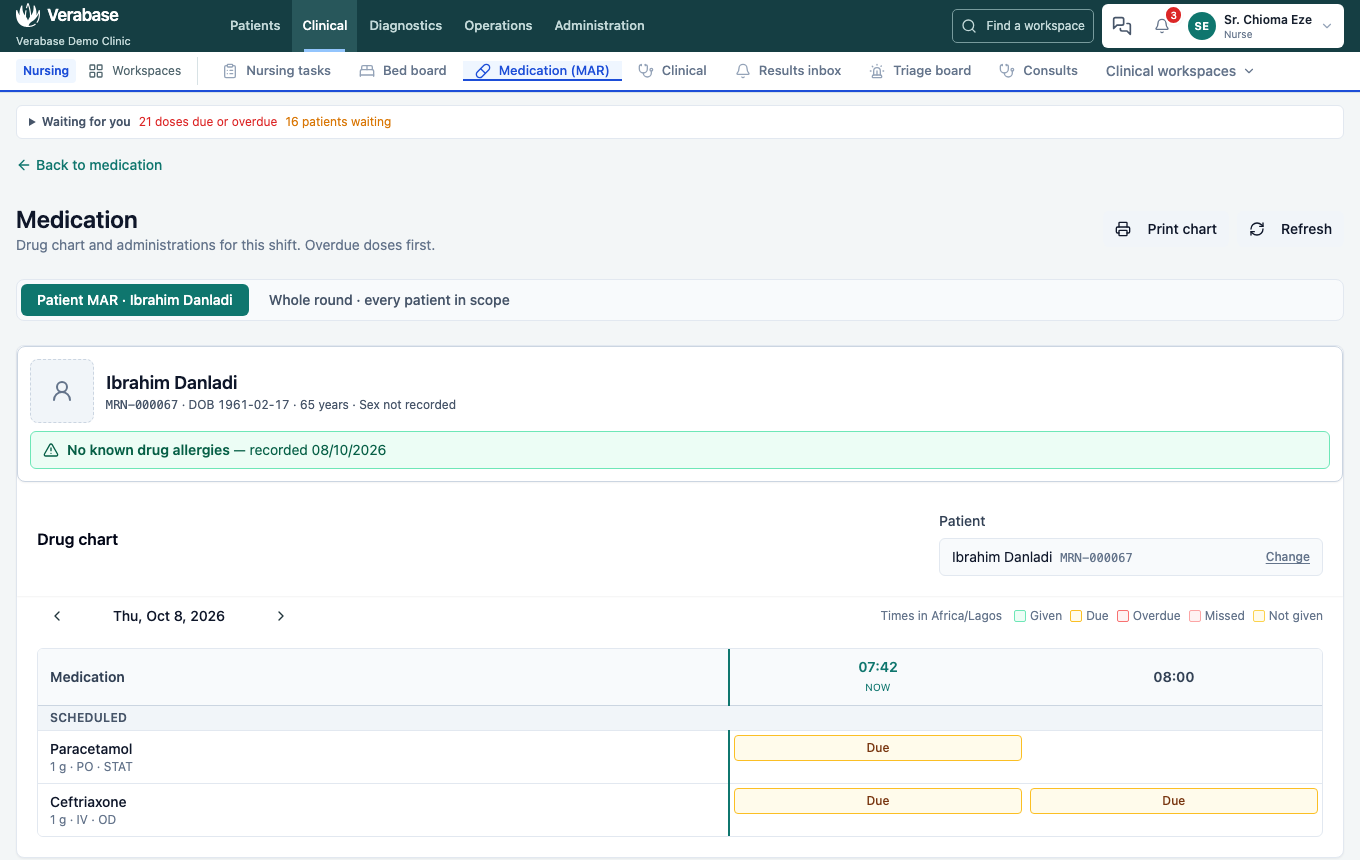
- Choose Open Ibrahim Danladi's MAR. The drug chart grid shows every order against time. Both first doses are Due.
- Choose the Paracetamol … Due cell. The Record administration panel opens:
- Outcome. Given, Withheld, Refused, Not available, Patient absent, Self-administered. All six are clinical facts.
- The five rights. Tick each one separately: patient (against the wristband), drug, dose, route, time.
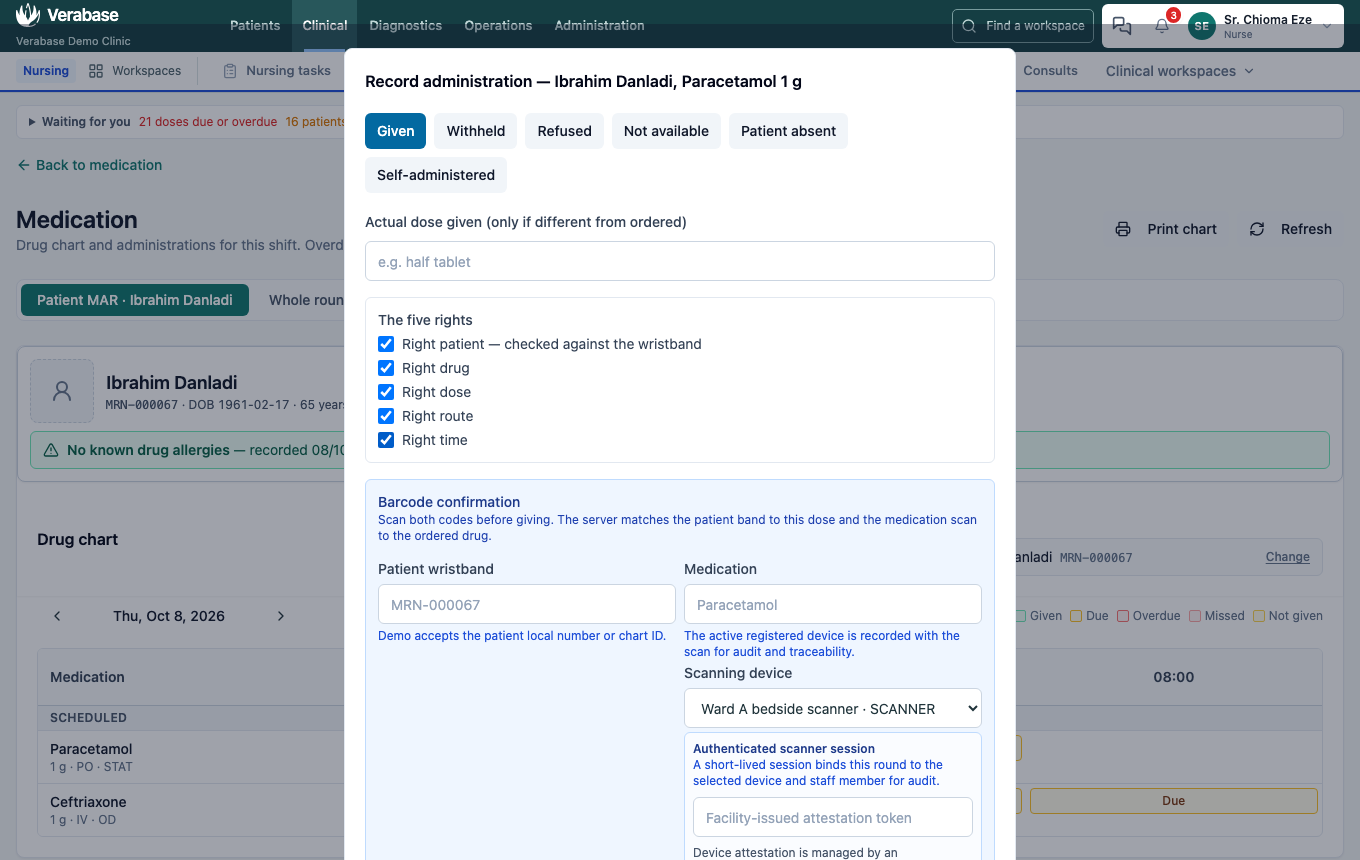
- Barcode confirmation. Pick the Scanning device, enter the current facility token and Start session. The session is short-lived and binds this round to the device and to you. Attestation is managed by a Facility Admin under Devices. Then scan the patient wristband (the demo accepts the MRN) and the medication.
- Until everything is done, Before you can confirm lists exactly what is missing.
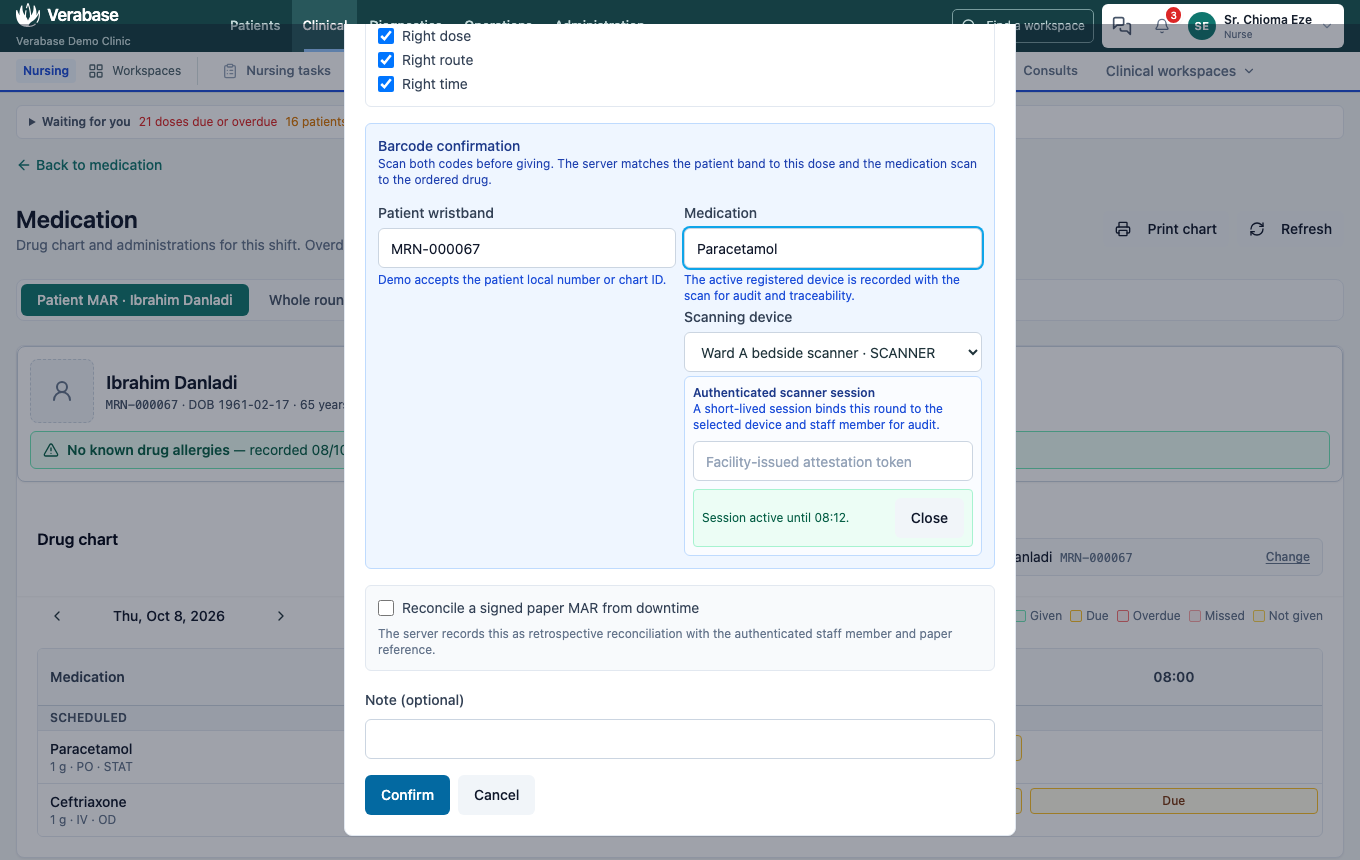
- Confirm.
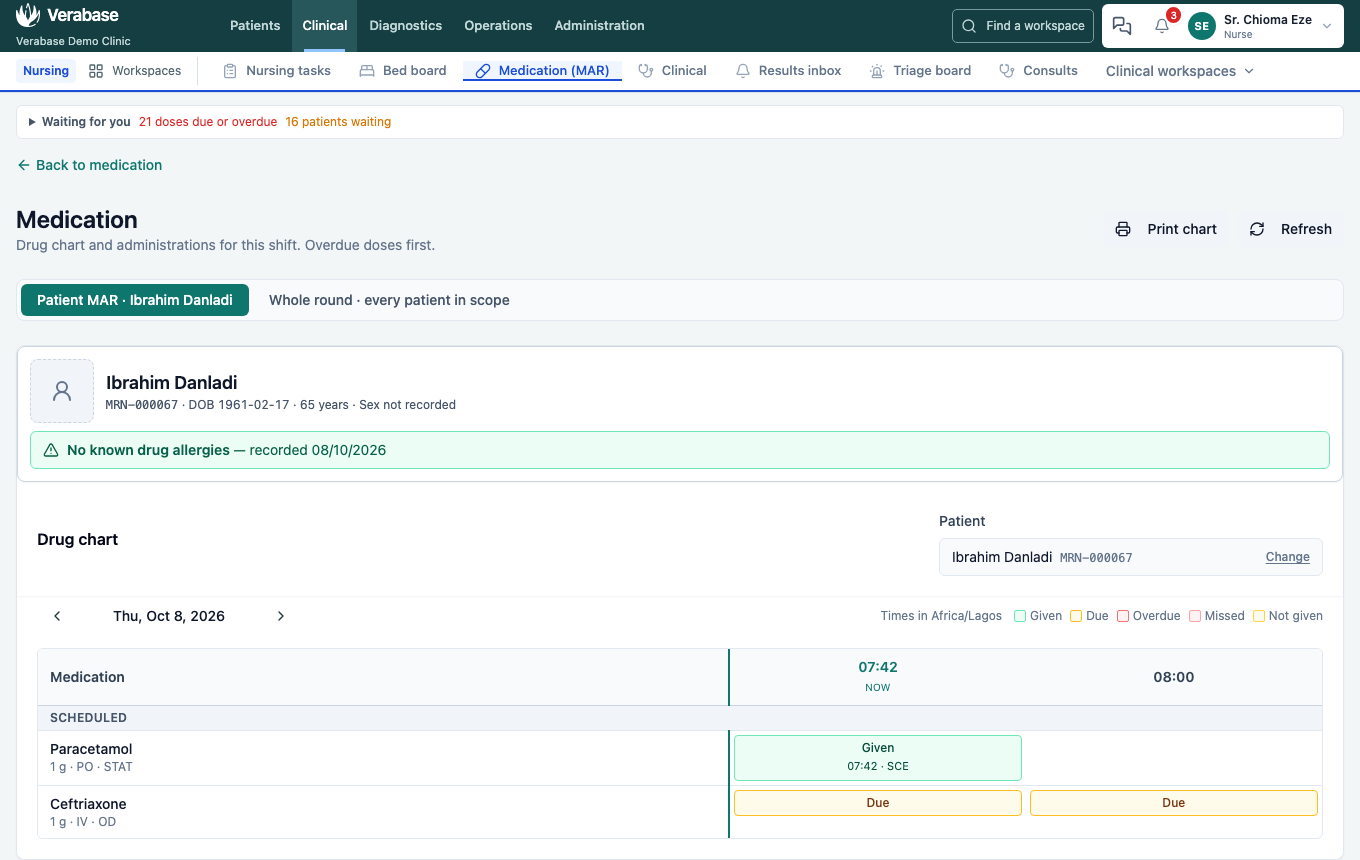
You should see: the cell reads Given HH:MM · SCE, with the time and your initials. The record behind it also holds both scans, the device, the session and each of the five rights.
Facilities without scanners
Admin → Settings → General → Require barcode scanning to give a medication can be turned off. Doses are then recorded with no scan rather than an empty one, so the chart can still tell them apart. (From verabase-client/docs/user-guide/WALKTHROUGHS.md §3.4; not part of this capture.)
7. Transfer to HDU — as Nurse
His oxygen saturation keeps falling. He needs the High Dependency Unit.
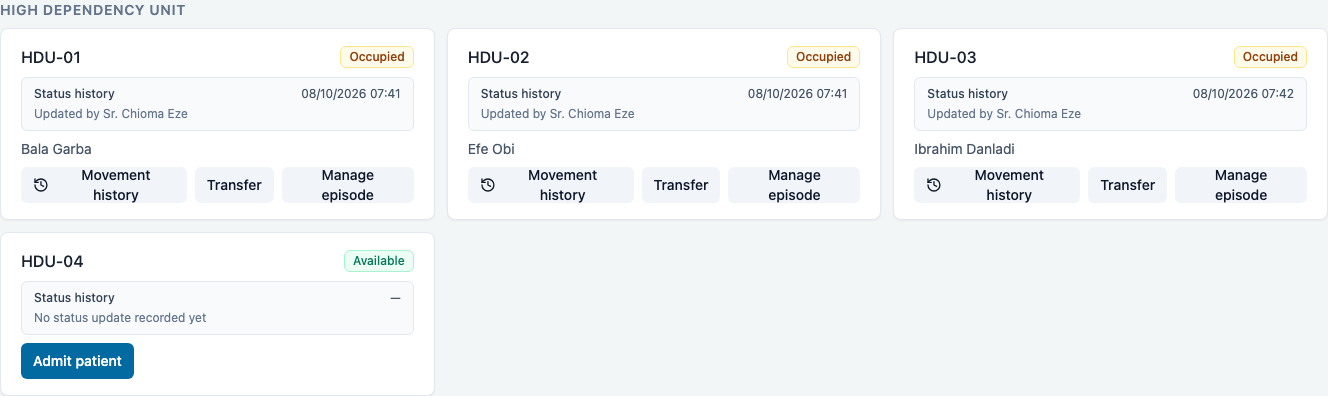
- On his bed tile choose Transfer, pick a free HDU bed and give a reason, then Move patient.
Verabase refuses: "Complete and sign a transfer medication reconciliation before moving a patient with active medication orders." A patient must not arrive in a new unit with nobody having reviewed his medicines.
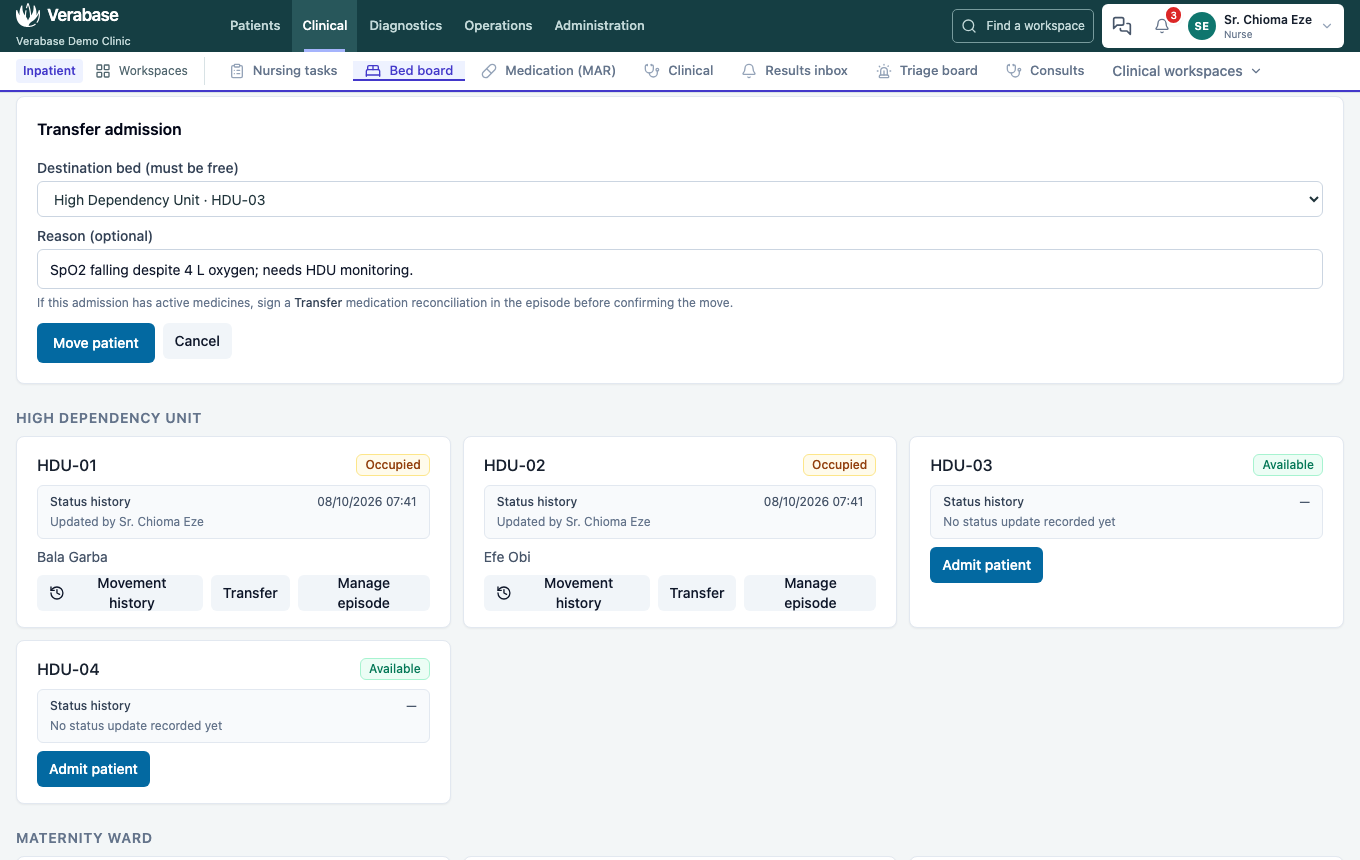
- Cancel, then Manage episode. Under Medication reconciliation ("Snapshot the active orders at admission, transfer, or discharge, then sign the result"), choose Transfer, add a note and choose Sign reconciliation (2 orders).
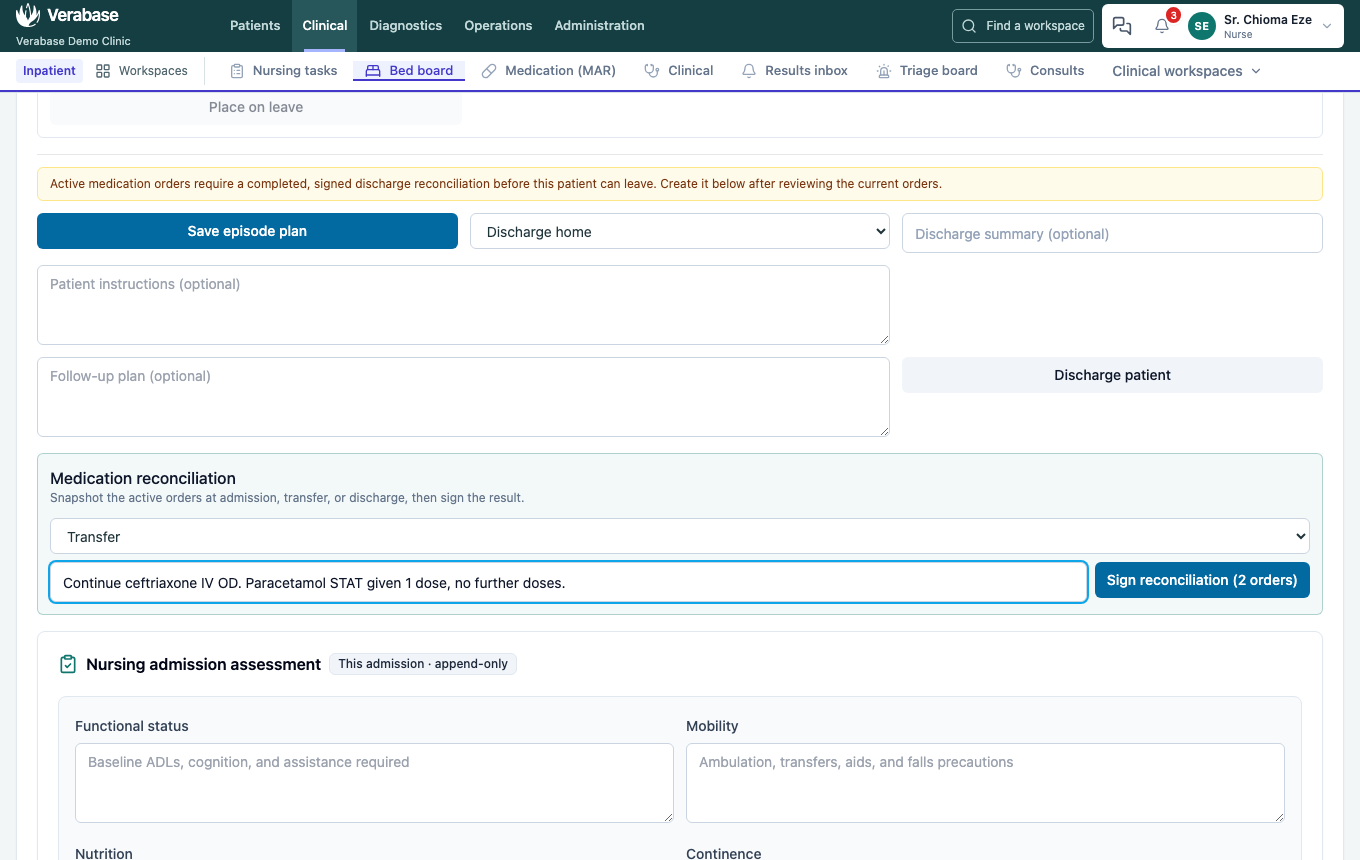
- Transfer → Move patient again. It goes through. It is still one admission, and Movement history keeps the ward-to-ward trail.
8. Discharge — as Nurse
Days later he is afebrile and saturating 96 % on air.
- Manage episode. Discharge readiness lists what is still missing: disposition, instructions, follow-up, signed documentation, discharge medication reconciliation, and patient/carer acknowledgement.
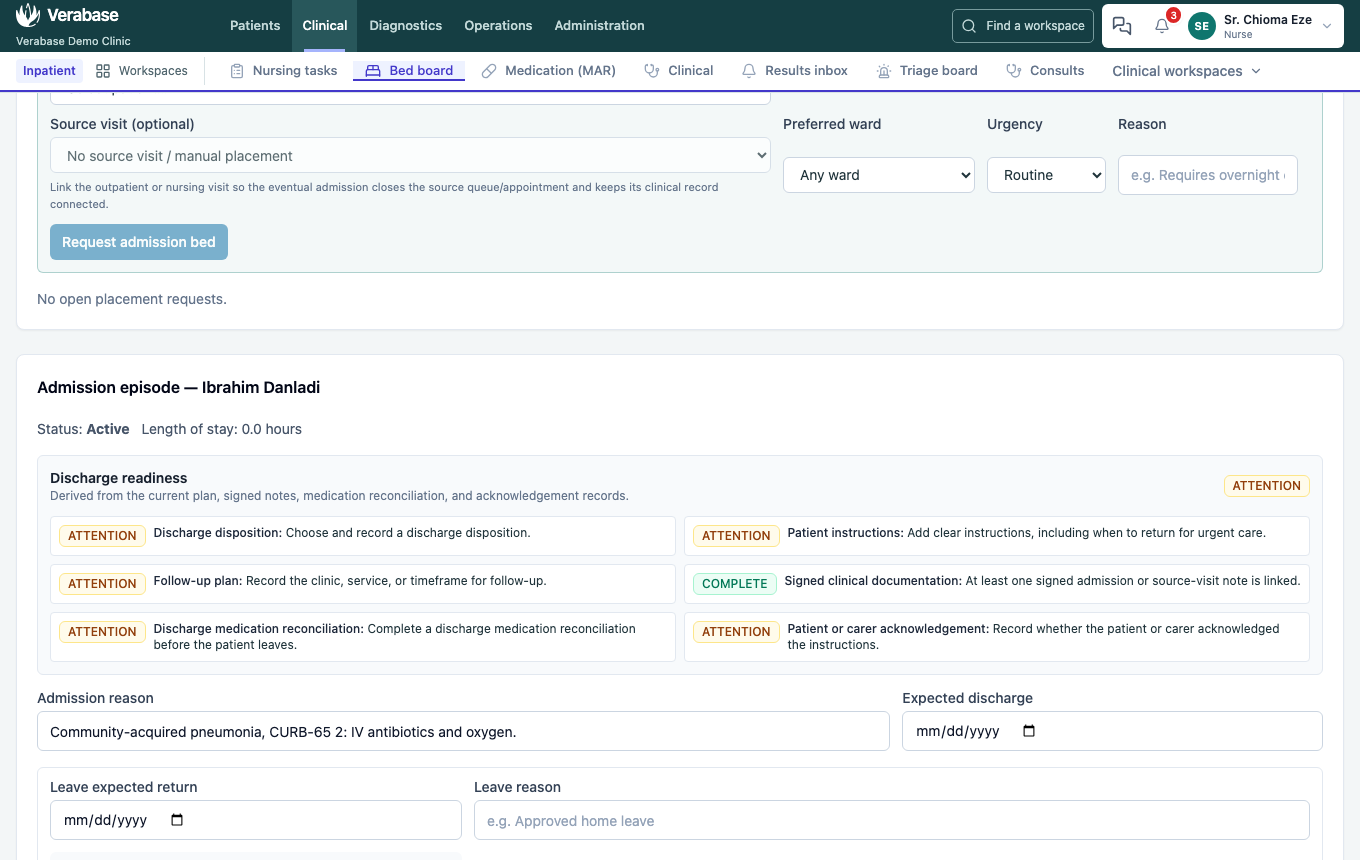
- Medication reconciliation → Discharge. Note the switch to oral antibiotics, then Sign reconciliation. The episode warns that an admission with active medicines needs it before the patient leaves.
- Choose the disposition (Discharge home) and fill in the Discharge summary, Patient instructions (including when to come back urgently) and Follow-up plan. Then Discharge patient.
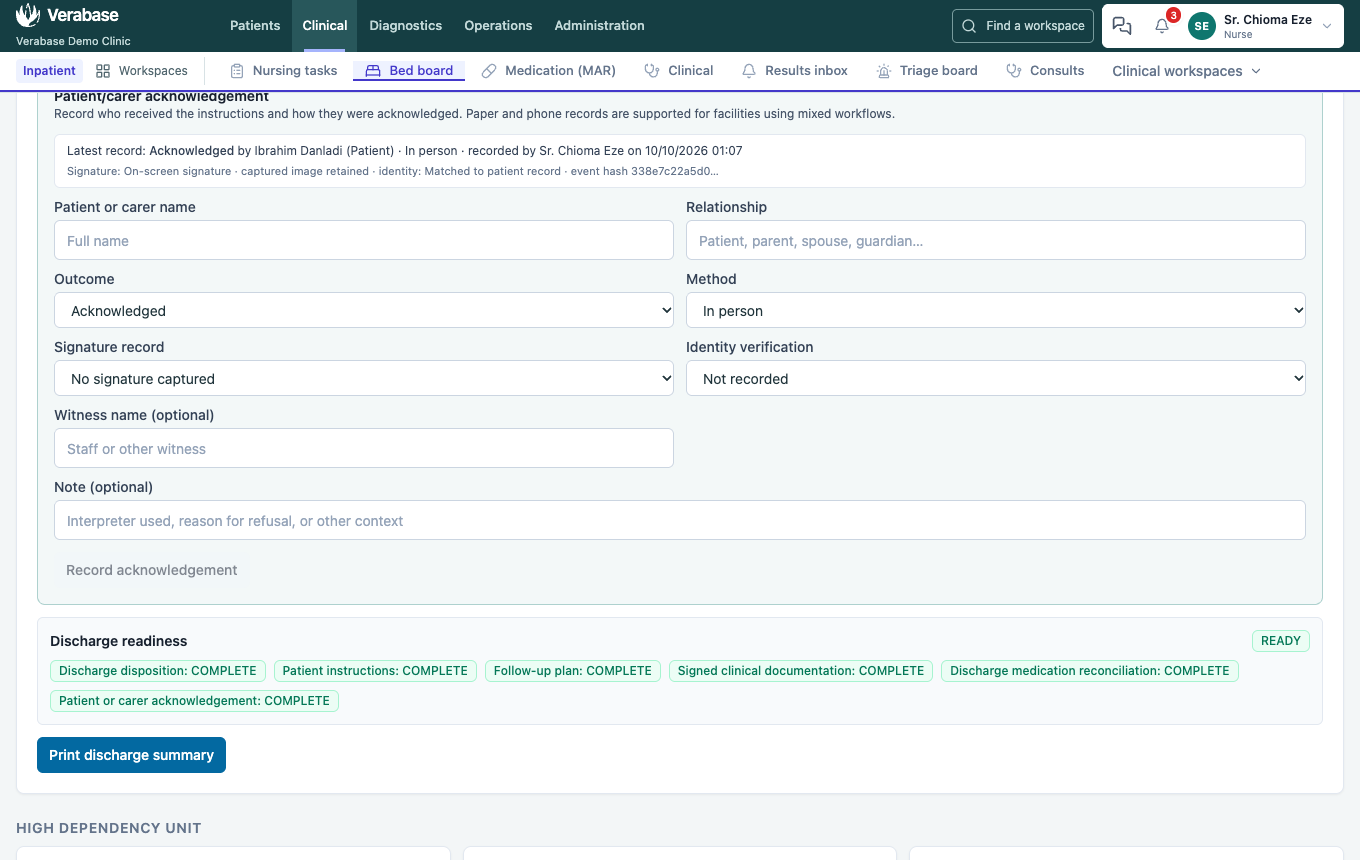
You should see: the Discharge summary: a source-linked packet (notes, medicines, results), admitted and discharged times and place, summary, instructions, follow-up and Transfers: Medical Ward A→High Dependency Unit. Print discharge summary gives the patient a copy.
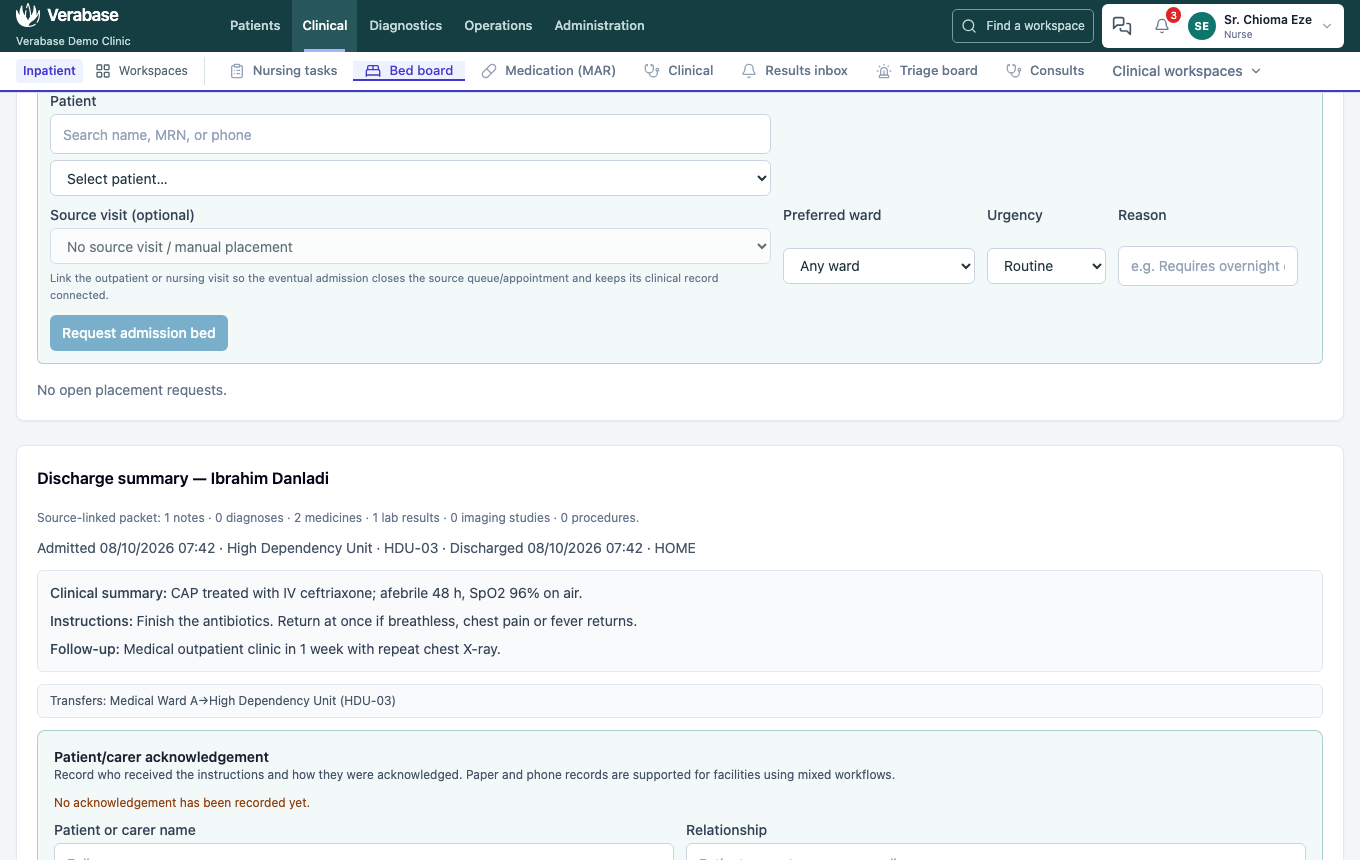
- Patient/carer acknowledgement. Record who received the instructions, their relationship, the outcome (Acknowledged / Refused / Unable), the method, any signature record and how identity was verified. For On-screen signature the patient signs on the pad with a finger, stylus or mouse (the same pad department workflows use); Record acknowledgement stays disabled until there is a drawing. Then Record acknowledgement. The record reads, for example, Signature: On-screen signature · captured image retained · identity: Matched to patient record. Readiness now reads READY, with every item COMPLETE.
9. Turn the bed round — as Housekeeping
Discharge has already done the ward's part. The bed shows Cleaning (Discharge turnaround), and nobody set it by hand.
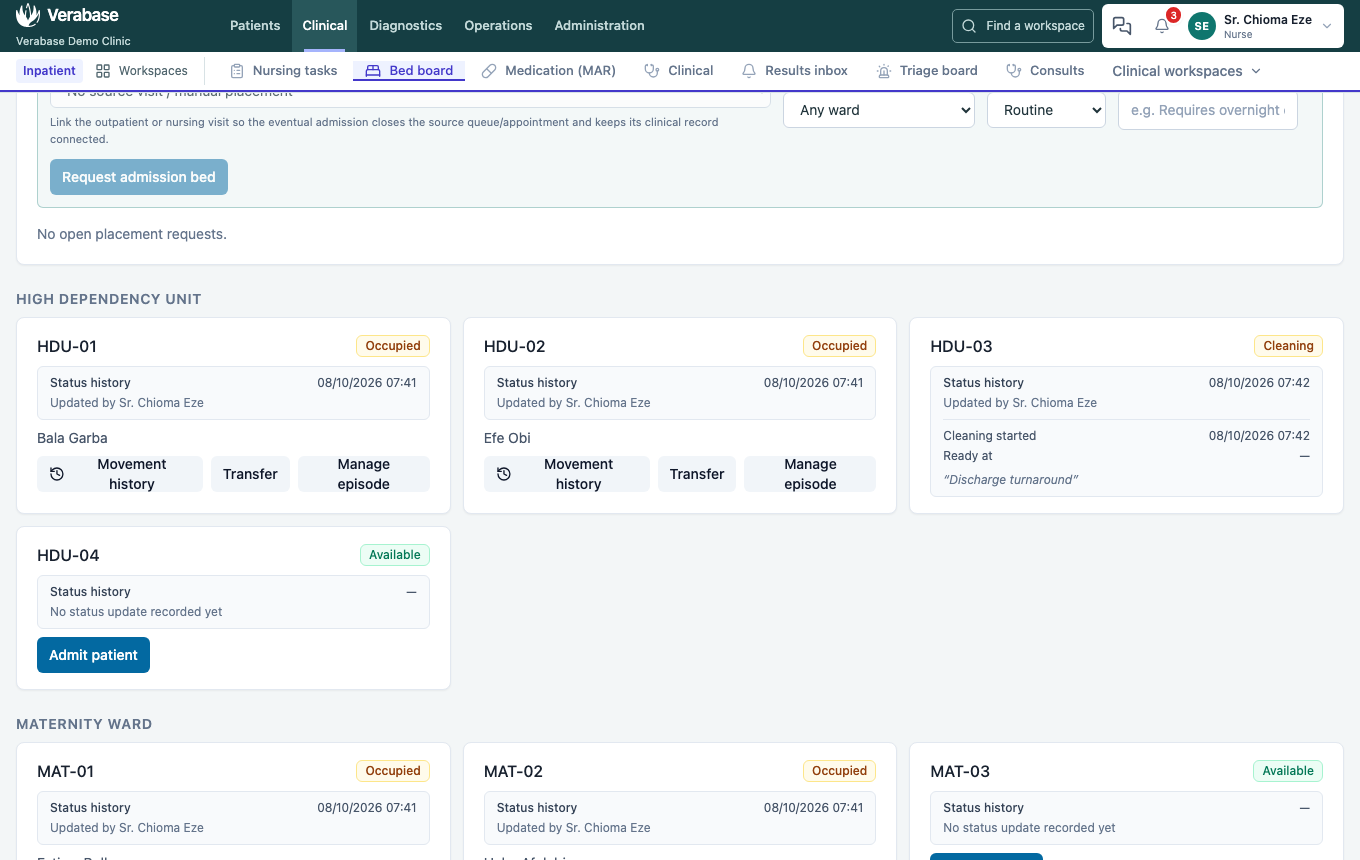
- Inpatient → Housekeeping → Worklist shows the Bed turnaround · routine task for that bed. Sign in as
housekeeping@demo-clinic.test; the account has the Housekeeping role and cannot open Administration.

- Take task, then Start.
- When the clean is done, write a Completion note (Complete stays disabled without one) and choose Complete.
You should see: the bed back to Available, ready for the next admission. Completing the turnaround is what releases the bed.
10. The bill — as Billing Officer
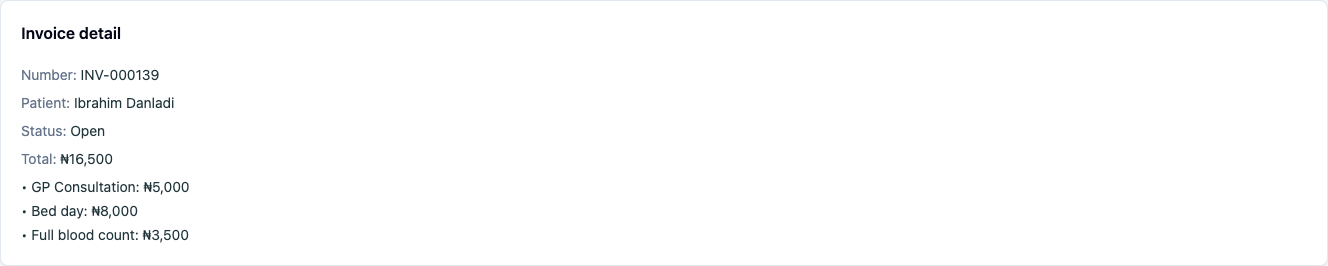
His invoice already carries Bed day ₦8,000 next to the consultation. Admission added it; nobody typed it. Discharge issued the bill (Status: Open): it takes no new lines now, and any charge that arrives later starts a new bill.
Ward drugs on the bill
On the demo data, only Provider orders routes to the pharmacy (step 0 of FAC-OPD-01), so ceftriaxone and paracetamol given on the ward are not on this invoice. Turn on Drug chart (MAR) if the hospital charges for ward medicines through pharmacy.
What Verabase will refuse, and why
| You try | Verabase says | What to do |
|---|---|---|
| Move a patient who has active medicines | Complete and sign a transfer medication reconciliation before moving a patient with active medication orders. | Manage episode → Medication reconciliation → Transfer → Sign |
| Discharge a patient who has active medicines | The episode warns: Active medication orders require a completed, signed discharge reconciliation before this patient can leave. | Sign a Discharge reconciliation first (the walk signs it before discharging) |
| Confirm a dose with something missing | Confirm stays disabled; Before you can confirm lists each missing item | Tick all five rights, start a scanner session, scan band and drug |
| Take a patient another nurse already holds | Refused; one open assignment per patient (by design, per WALKTHROUGHS §3.1; not in this capture) | Take over with a reason, or pick another patient |
| Allocate a bed in the wrong ward | Only free beds in the requested ward are offered | Change the request's ward, or cancel and re-request |
You're done when…
- [ ] Ibrahim was admitted from a request linked to his outpatient visit.
- [ ] His paracetamol dose is Given, with both scans and a scanner session.
- [ ] His transfer to HDU and his discharge each have a signed reconciliation.
- [ ] His discharge summary has instructions, follow-up and a recorded acknowledgement, and readiness reads READY.
- [ ] His bed went to Cleaning on discharge, and completing the housekeeping task made it Available.
- [ ] You found the Bed day line on the bill and can say why the ward drugs aren't on it.
Practice task
Admit a second patient to the Paediatric Ward with a Routine request. Record their first dose as Refused, with a reason. Discharge them against medical advice. Check: the MAR cell shows Refused, the discharge summary shows the AMA disposition, and readiness shows what was left incomplete.
Known gaps found while verifying this journey
Doctors can't raise a bed requestfixed 2026-09-23.Discharge doesn't route the bed through cleaningfixed 2026-09-24.- The ward MAR list shows the next scheduled dose, while the patient's MAR shows a due first dose. Nurses need to open the patient's MAR to see it (gap).
Related journeys
FAC-OPD-01 (before this) · FAC-MAR-01 to 03 (the drug round in depth) · FAC-OPS-03 (housekeeping) in the catalogue