Appearance
CP-07 · Record a hospital's integrations and their keys
The Integrations card on a tenant's page in platform-admin lists the outside services the hospital uses (payments, SMS, WhatsApp, DHIS2, lab analysers, imaging) and holds their keys, encrypted. A key is shown only by its last four characters once it is saved.
SMS and WhatsApp reach the hospital; the rest don't yet
Within five minutes of being turned on, a Twilio connection carries the hospital's SMS and a WhatsApp Business connection its WhatsApp messages. That covers appointment reminders, patient messages and portal sign-in codes, sent from the hospital's own number or sender ID. Turning a connection off sends that channel back through the shared relay. A number typed in local form (0803 123 4567) is sent with the country code of the hospital's facility.
The other providers are recorded here but not yet used by the hospital:
- Lab analysers post straight to the hospital's lab endpoint (FAC-LAB-02).
- The monthly DHIS2 return is generated in Reports (FAC-REP-01) but not sent.
- Payment collection waits until payment webhooks are in scope.
See gaps.
Why this matters
Provider keys move money and send messages to patients in the hospital's name. They belong in one place, encrypted, with a record of who set them, not in an email thread or a spreadsheet. When a provider issues a new key, or a hospital stops using a service, the change should take one step and be audited.
Before you start
- Platform Admin on platform-admin (
admin@verabase.locallocally; see CP-01). - A hospital (see CP-02). The walk uses a new clinic, Ilorin Family Clinic.
- The key from the provider's dashboard, sent to you through the hospital's agreed secure channel.
Steps
1. Add a connection
- On the tenant page, open Integrations → Add connection.
- Choose the Provider. A short note under it says what the provider is for (for example, Paystack: Card, bank transfer and USSD payments in Nigeria.).
- Give the connection a Name the hospital will recognise, for example Card payments.
- Paste the Key if you have it, or leave it empty.
- Choose Add connection.
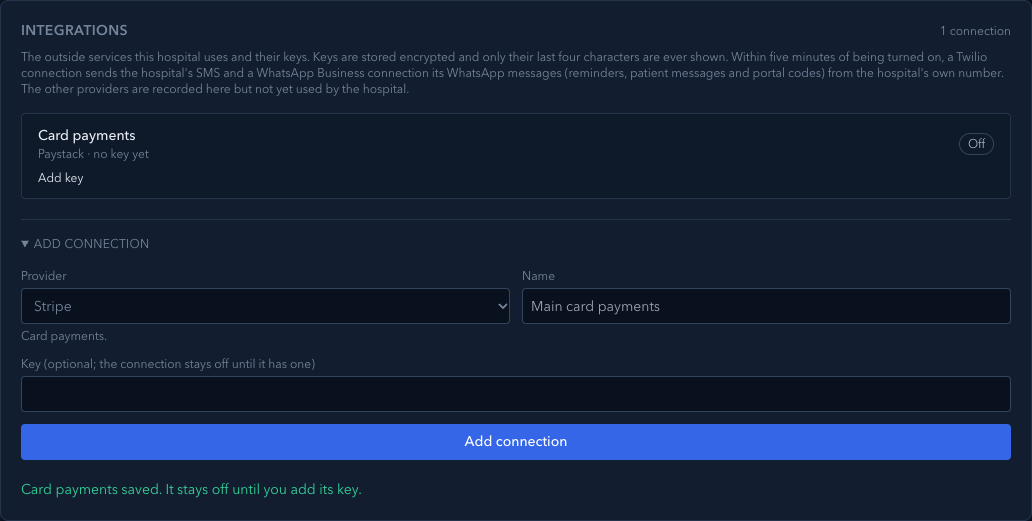
Without a key, the card says Card payments saved. It stays off until you add its key. and the connection reads Paystack · no key yet, Off:
With a key, it says … saved and turned on.
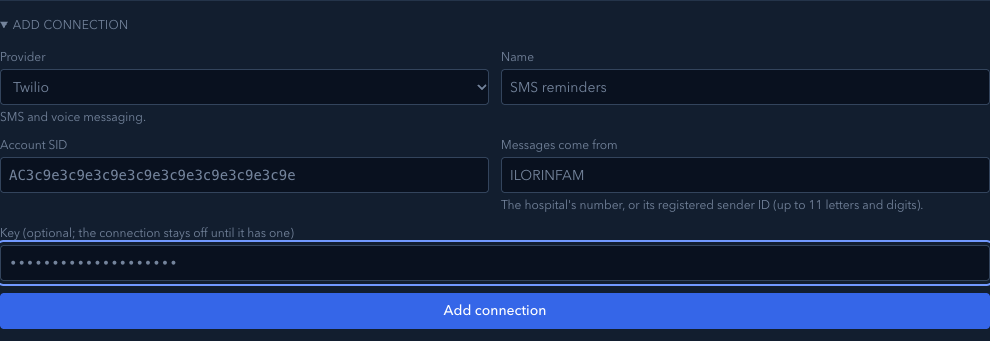
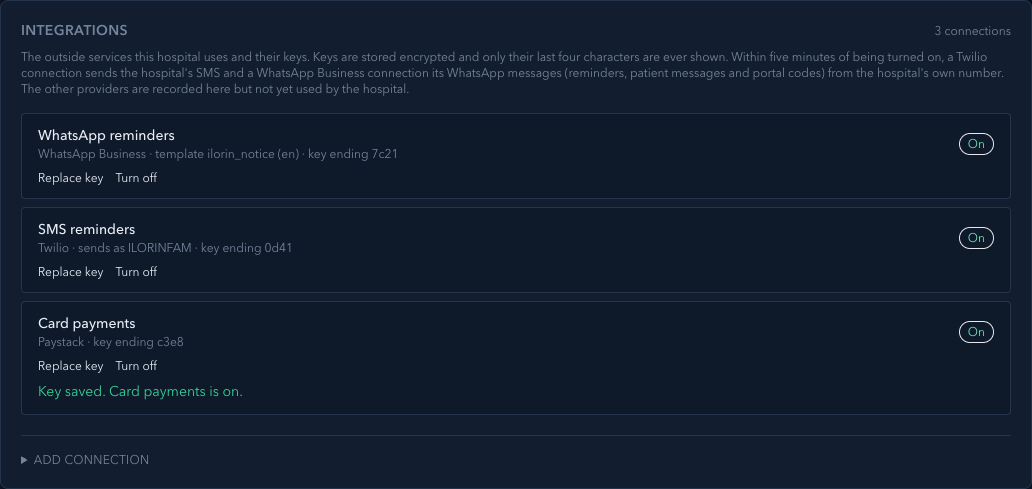
The hospital's SMS account (Twilio) also needs the Account SID (it starts AC) and who Messages come from: the hospital's number (+2348012345678) or its registered sender ID (up to 11 letters and digits, such as ILORINFAM). The row then reads Twilio · sends as ILORINFAM · key ending 0d41.
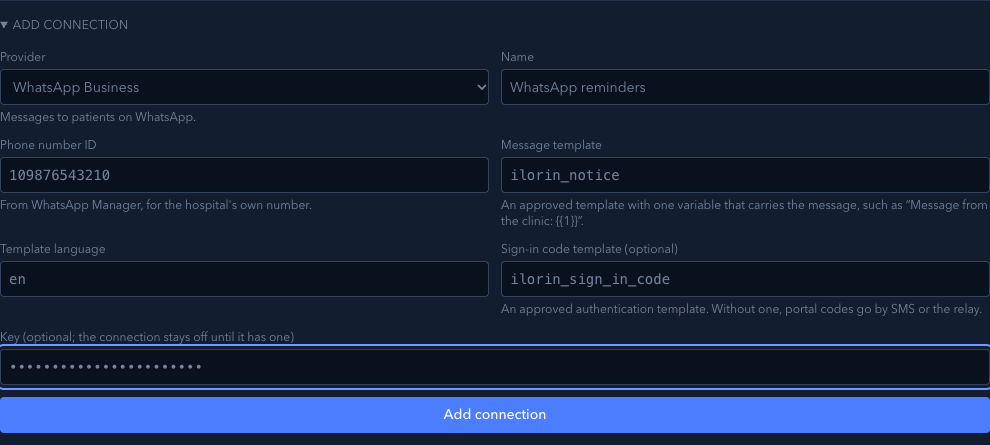
The hospital's WhatsApp Business number needs four settings from WhatsApp Manager, and its access token as the key:
- the Phone number ID of the hospital's own number;
- the Message template: the name of an approved template with one variable that carries the message, such as Message from Ilorin Family Clinic: 1;
- the Template language (en, or en_GB);
- an optional Sign-in code template: an approved authentication template. Without it, portal sign-in codes go by SMS or the relay.
WhatsApp only lets a business start a conversation with an approved template. Get the templates approved in WhatsApp Manager before adding the connection.
2. Add the key later
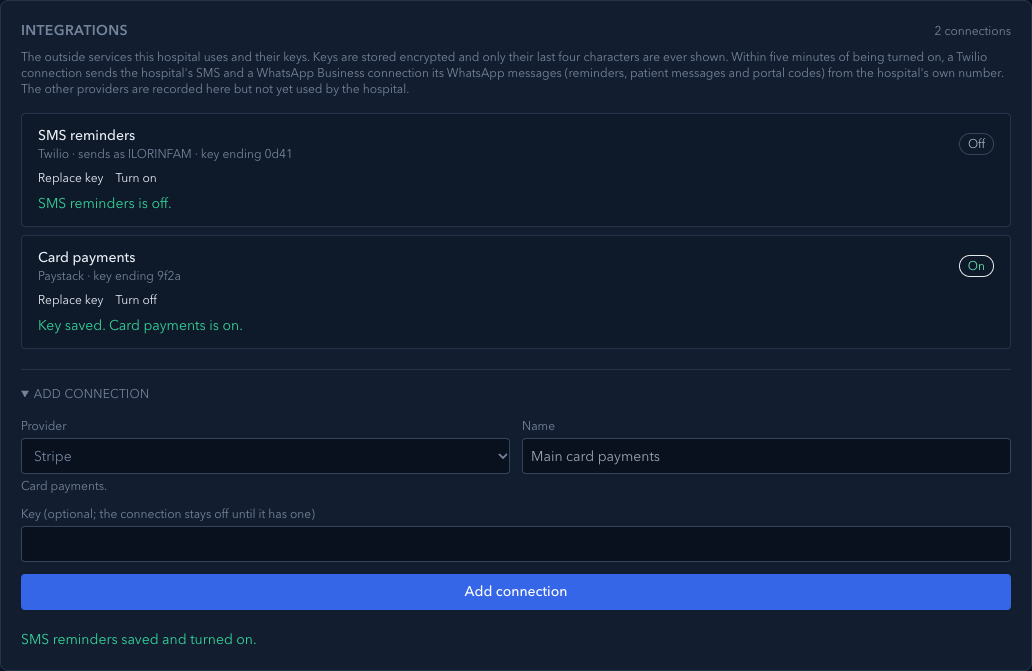
On the connection, choose Add key, paste it and choose Save key. The card says Key saved. Card payments is on., and the connection shows key ending 9f2a and On. The key itself never appears on the page again.
3. Turn a connection off or on
Choose Turn off when the hospital stops using a service or a key may have leaked. The key is kept, so Turn on brings it back. Turning the SMS account off sends the hospital's SMS back through the shared relay within five minutes:
4. Replace a key
When the provider issues a new key, choose Replace key, paste the new one under New key and choose Save key. The connection shows the new key's last four characters. Each key change and on/off is recorded in the audit trail (CP-05).
5. Failed jobs
If a job sent through a connection fails, it appears under Failed jobs with the connection's name and the reason (for example, it has no key). Fix the cause, then choose Send again.
What Verabase will refuse and why
| You try to… | Verabase says | Why |
|---|---|---|
| Use a name the hospital already has | This hospital already has a connection called Card payments. Use a different name. | Each connection needs a name people can tell apart |
| Save a key shorter than four characters | That key is too short. Paste the whole key from the provider. Nothing is saved | A cut-off paste would fail later, quietly |
| Add a Twilio connection without a valid Account SID or sender | Enter the Twilio Account SID: AC followed by 32 letters or digits. / Enter who messages come from… | The hospital's server could not send with it |
| Add WhatsApp without a valid number ID, template name or language | Enter the name of the approved message template, in lowercase letters, digits and underscores. (and similar) | WhatsApp would refuse every message |
| Turn on a connection with no key (through the API) | Add the key for … before turning it on. The page doesn't offer Turn on until there is a key | An "on" connection without a key can't work |
You're done when…
- [ ] Each service the hospital uses has a connection with a name it recognises.
- [ ] Every connection that should work is On, with the right key ending.
- [ ] Old or unused connections are Off.
Practice task
On a local practice tenant, add a Twilio connection named SMS reminders without a key, then add a key ending 0d41. Check: the connection read Off and no key yet first, then On and key ending 0d41, and the full key appears nowhere on the page.
Not walked
- Failed jobs and Send again. Jobs are created by the platform API, not from this page, and the local walk ran without the platform worker, so no job ran or failed.
- The hospital's side in a browser. The walk checks the runtime record a hospital server receives. It carries the SMS account while Twilio is on and drops it when Twilio is off, and it carries the WhatsApp number with its templates. Sending through them is covered by the hospital server's tests (
hospital-messaging.test.ts), against stand-ins for Twilio and WhatsApp. A hospital server running from the local control plane has no first admin (that needs real provisioning). So no staff member sent a message in this walk, and nothing went to real Twilio or WhatsApp.
Related journeys
CP-02 Onboard a hospital · CP-05 Investigate an audit event · FAC-LAB-02 Analyser results