Appearance
FAC-BILL-02 · The cashier's shift: split payment, a pending transfer, close and reconcile
A cashier shift is the drawer a cashier is responsible for, from the opening float to the count at the end. Every cash and POS payment they take goes into it, and every cash refund they give comes out of it. At close, Verabase compares the cash the cashier counts with what the drawer should hold, and records the difference (the variance) against their name.
Why this matters
A drawer that's ₦500 short at the end of the day is a question someone has to answer. If the system only records the count, nobody can tell whether the money is missing or the count is wrong. Verabase keeps both figures side by side.
A bank transfer the patient says they sent is not money until it's in the account. Counting it as paid before it's confirmed is how bills get marked settled when they aren't.
Before you start
- Cashier:
cashier@demo-clinic.test/Verabase-2026(Kemi Afolabi, Billing Officer). - The demo opens a shift for the cashier with a ₦20,000 float. Use any unpaid self-pay bill of ₦25,000 or more; the captured walk took Zara Okonkwo's ₦32,000 antenatal bill.
Steps
1. Take the bill in two tenders
Revenue → Invoices & payments. The Cashier shift card shows the open shift: Open · collected ₦… · opening float ₦20,000.
Choose the invoice from Invoices. In Payments, take it in two parts:
- Enter everything except ₦20,500 (₦11,500 on a ₦32,000 bill), method Cash (confirmed), and choose Record payment. Cash is confirmed at once.
- Enter ₦20,500, method Bank transfer (pending), and choose Record payment.
The bill is now fully tendered, but it isn't paid yet: ₦20,500 is only promised.
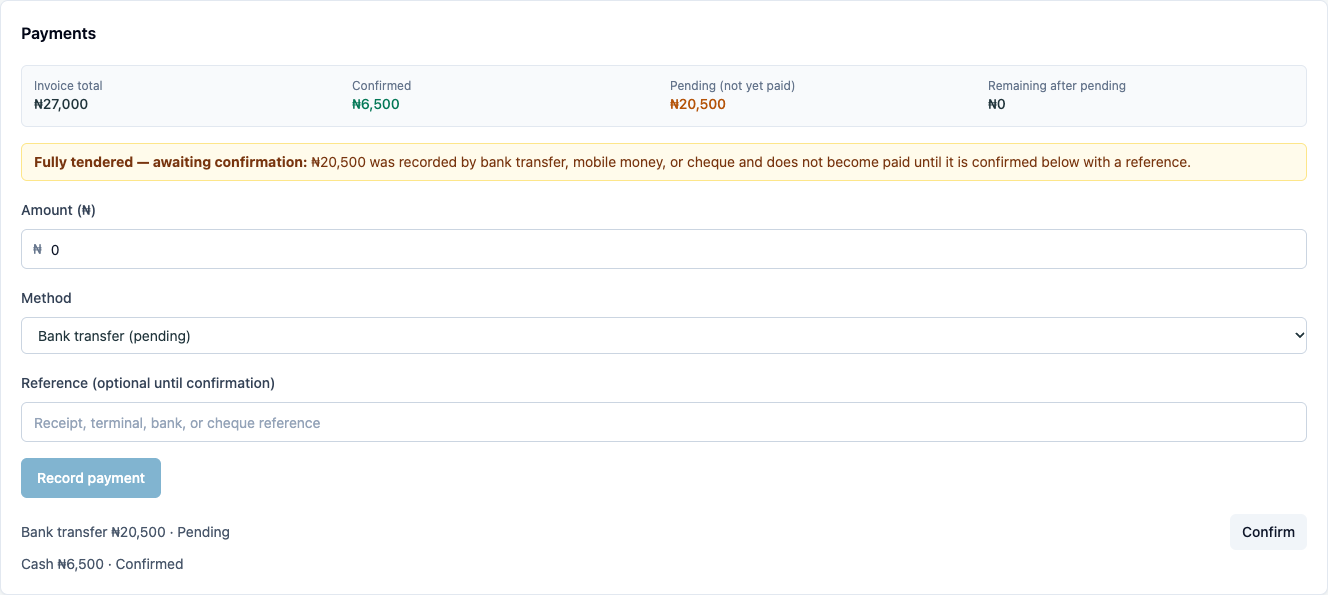
2. Confirm the transfer against the bank reference
When the money shows in the bank account, choose Confirm on the pending transfer. Enter the Confirmation reference from the bank statement. Confirm payment stays disabled until you do.
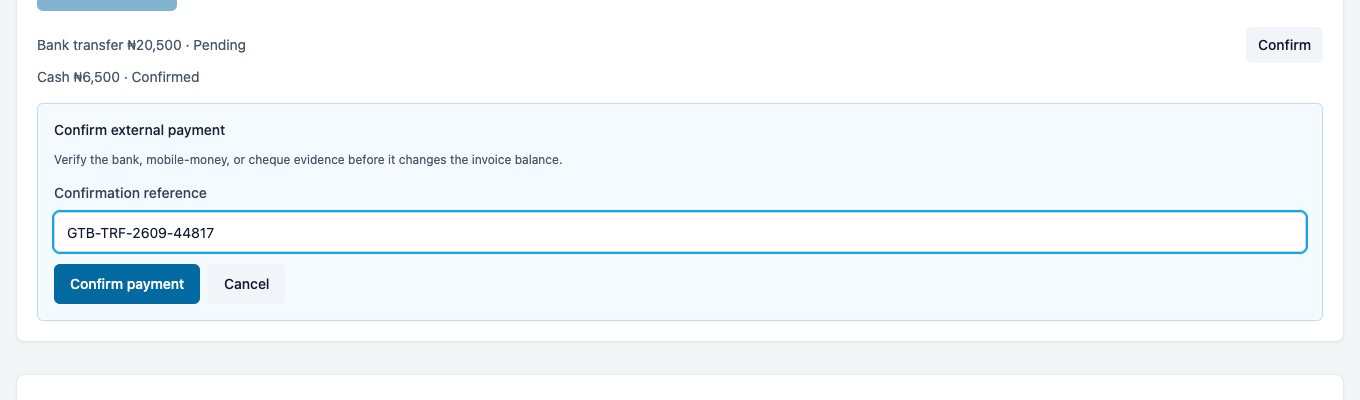
The transfer is now Confirmed and the invoice is Paid.
3. Count the drawer and close the shift
At the end of the shift, count the cash in the drawer. The shift card shows what was collected and the opening float, so you know what to expect. Enter the count in Declared cash (₦). Close shift stays disabled until you enter a count: an empty count is not the same as ₦0.

Choose Close shift. The closed shift appears under Closed shifts with who closed it, when, what the drawer should have held (expected: float plus cash taken, minus cash refunded), what was counted (declared), and the result: Balanced, Short ₦… or Over ₦….

Here the drawer should have held ₦78,500 and ₦78,000 was counted: Short ₦500. The variance is on the record against the cashier who closed the shift, for the supervisor to follow up.
4. Open the next shift
Enter the Opening float (₦) for the next shift and choose Open shift. The card shows Open · collected ₦0 · opening float ₦20,000, and the closed shift stays listed below.
What Verabase will refuse and why
| You try to… | Verabase says | Why |
|---|---|---|
| Confirm a transfer without a reference | Confirm payment stays disabled | The reference is how anyone finds the money in the bank |
| Close a shift without counting | Close shift stays disabled | A blank count would record the whole drawer as missing |
You're done when…
- [ ] Every transfer and mobile-money payment is confirmed with its reference, or still visibly pending.
- [ ] The shift is closed with a counted amount, and any variance is explained to the supervisor.
- [ ] The next shift is open with its float before the next patient pays.
Practice task
Take a bill in cash plus a pending transfer, confirm the transfer with a reference, then close the shift declaring ₦1,000 less than expected. Check: the trainer sees the invoice Paid, and the closed shift Short ₦1,000 under your name.
Related journeys
FAC-OPD-01 Outpatient visit, front door to paid · FAC-BILL-03 Claims · FAC-BILL-04 Adjustments and refunds