Appearance
FAC-BG-02 · Reviewing emergency (break-the-glass) access
Every break-the-glass access is reviewed after the event. The reviewer checks that the emergency was real and the access proportionate, and records the decision. Unjustified access is a privacy breach to follow up under the hospital's policy.
Why this matters
Break-the-glass works because people know it is checked. Reviewing every use, promptly, is what keeps it for emergencies.
Before you start
- Facility Admin:
admin@demo-clinic.test/DemoAdmin-2026. - Someone has broken the glass (FAC-BG-01).
Steps
1. What is waiting for review
Administration → Audit → Emergency access review lists each pending access: the patient, who requested it, their reason, when the access expires, and when the chart was actually opened (first and last).
Check the reason against what happened: ask the ward, look at the patient's record of the event. Write a review note saying what you checked; Approve and Reject stay disabled until you do.

2. Decide, and find it in the audit trail
Choose Approve if the access was justified, Reject if it wasn't. The access leaves the list. The audit trail below records the request (BREAK_GLASS_REQUESTED), each use (BREAK_GLASS_USED), anything recorded under it (BREAK_GLASS_POST, BREAK_GLASS_PATCH, …) and your decision (BREAK_GLASS_REVIEWED).
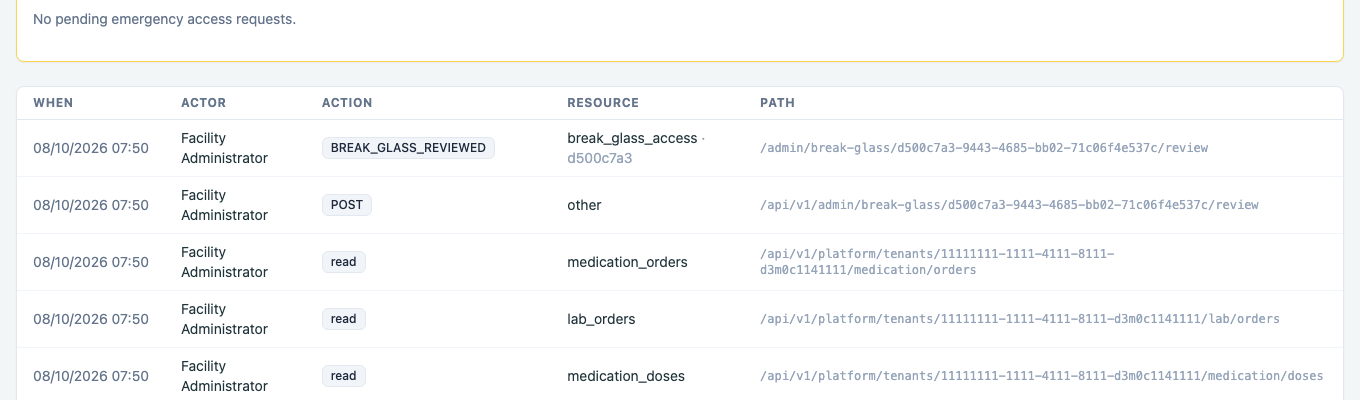
A rejected access is a privacy concern to raise with the staff member and record under the hospital's policy.
You're done when…
- [ ] No emergency access waits more than a working day for review.
- [ ] Every rejected access is followed up.
Practice task
Review the access from FAC-BG-01's practice task, with a note saying what you checked. Check: the trainer sees your decision as BREAK_GLASS_REVIEWED in the audit trail.