Appearance
FAC-INV-01 · Stock: low stock, reordering, goods received, and a recall
Inventory is the stock the pharmacy and stores hold. Every supply at the counter reduces it (FAC-RX-02). When an item runs low, a reorder policy suggests how much to order from which supplier. The suggestion becomes a purchase order, and the goods are received against it with their lot and expiry. That lets Verabase issue the earliest-expiring stock first (FEFO) and quarantine a whole lot when a supplier recalls it.
Why this matters
Running out of salbutamol on a Saturday night is a patient safety problem, not a paperwork one. Stock received without a lot and expiry can't be recalled or issued in expiry order, and expired drugs end up on the shelf.
Before you start
- Pharmacist:
pharmacist@demo-clinic.test/Verabase-2026. - The demo has three items at or below reorder level: IV cannulae, malaria RDT kits and salbutamol nebules.
Steps
1. See what's low
Operations → Inventory. The top line says how many items are at or below their reorder level. In Stock on hand, choose Low stock:
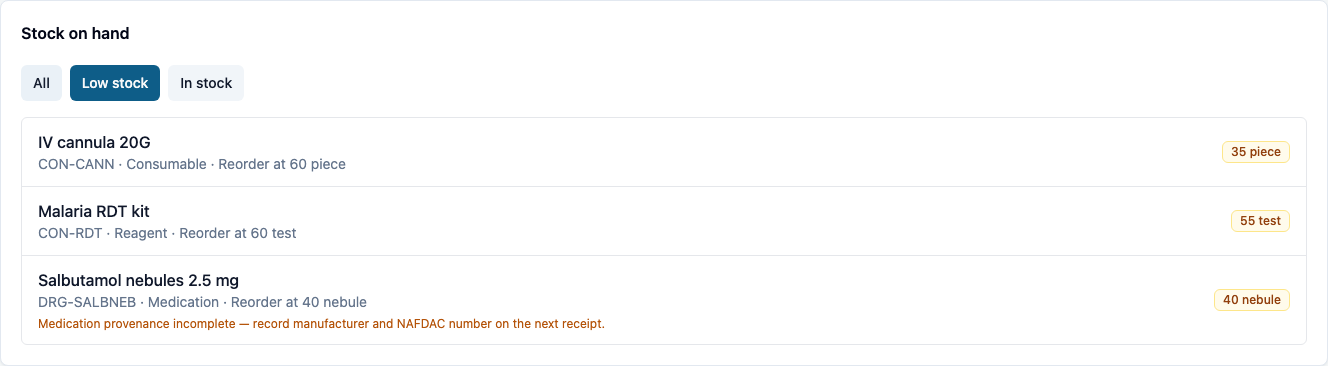
Medicines missing a manufacturer or NAFDAC registration number are flagged, so it can be recorded on the next receipt. Consumables like gloves aren't asked.
2. A supplier and a reorder policy
Several cards on this page act on an item. Each one has its own Item picker, so you can always see which item you're working on.
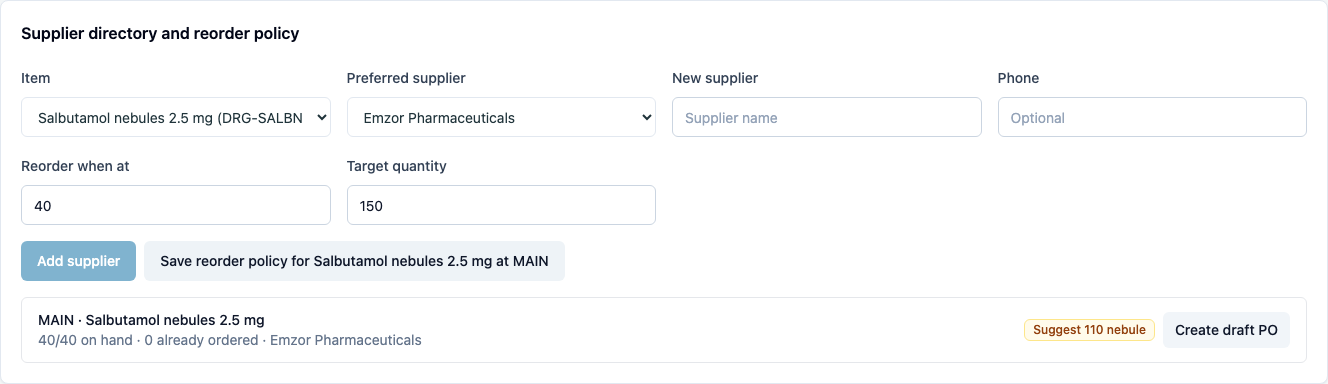
In Supplier directory and reorder policy:
- Add the New supplier (name and phone) and choose Add supplier.
- Choose the Item and the Preferred supplier, set Reorder when at (the reorder level) and Target quantity (what to bring stock up to), then Save reorder policy.
Verabase compares on-hand stock and what's already ordered with the policy, and suggests the quantity:
3. From suggestion to goods received
- Create draft PO turns the suggestion into a purchase order in Procurement and goods received, marked Draft.
- Place order once it has been sent to the supplier. It becomes Ordered.
- When the delivery arrives, choose Receive goods…. The quantity defaults to what's outstanding. Enter the Lot number and Expiry date from the packs, then choose Record goods received. A partial delivery leaves the rest outstanding.
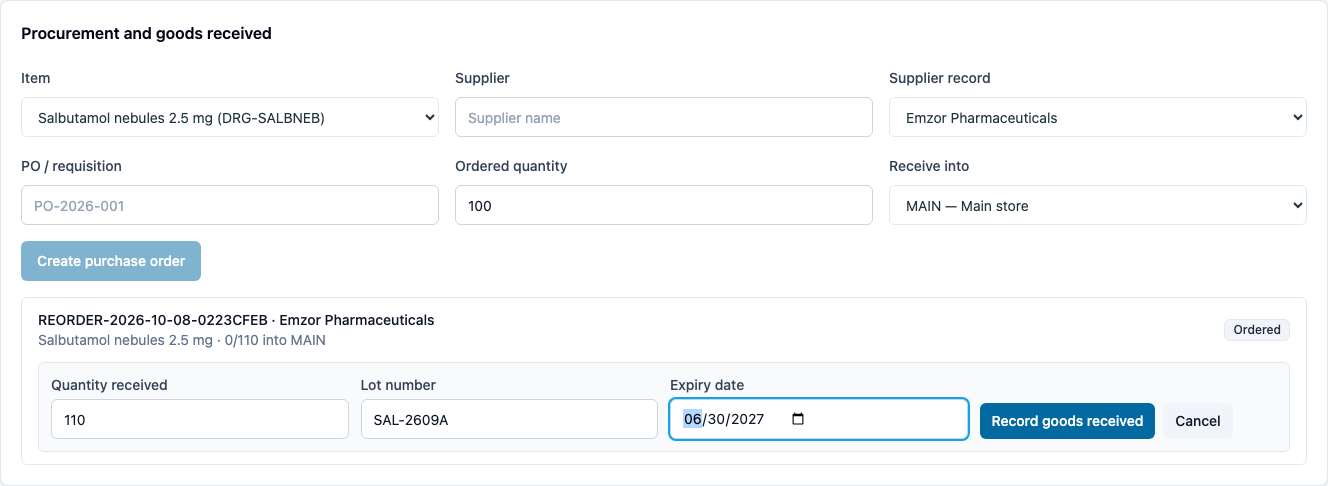
Receiving more than was ordered is refused: Only 110 units remain on this order.
Stock on hand rises, and the item drops off the low-stock list. For stock that arrives without a purchase order, use Receive stock, which also takes the manufacturer and NAFDAC number.
4. Lots, earliest expiry first
Lots and expiration (FEFO) lists the chosen item's lots and their expiry dates. Supplies are taken from the earliest-expiring lot first, and expired lots are never used.

5. A recall
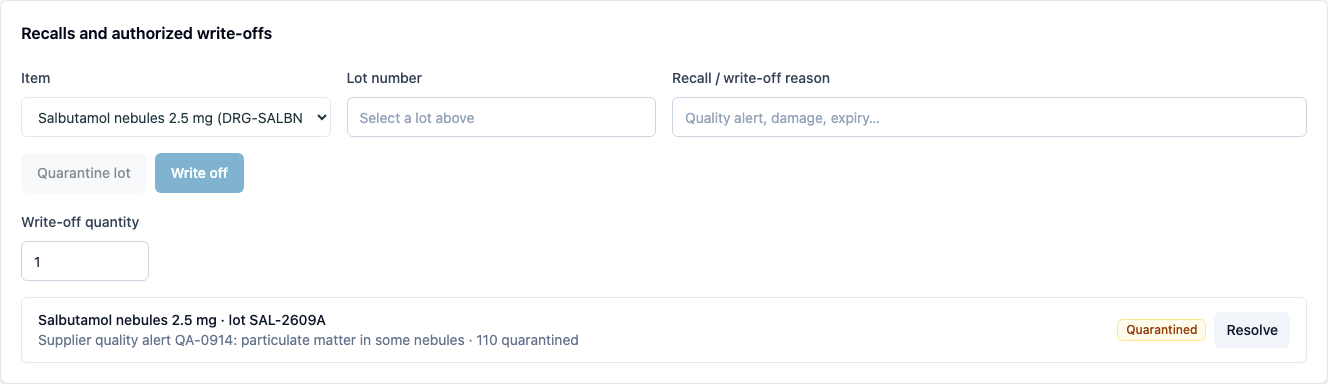
When a supplier recalls a lot, go to Recalls and authorized write-offs. Choose the Item, enter the Lot number and the reason, then choose Quarantine lot. The whole lot comes out of usable stock at once, and the recall is listed as Quarantined until it's resolved. Write off removes a quantity for good, for example damaged or expired stock, with its reason.
What Verabase will refuse and why
| You try to… | Verabase says | Why |
|---|---|---|
| Receive more than was ordered | Only 110 units remain on this order. | The purchase order is the contract |
| Supply a drug from quarantined stock | All available … is under an active recall. | A recalled lot must not reach a patient |
| Supply more than the non-expired lots hold | Only N non-expired … available. | Expired stock isn't stock |
Not covered here
Physical stock take (count a location, review the variance, approve) and Multi-store transfers (main store to pharmacy or a ward) work the same way, with the item and locations chosen on the card. They'll get their own journey.
You're done when…
- [ ] Every low item has a reorder policy with a preferred supplier.
- [ ] Deliveries are received against their purchase order, with lot and expiry.
- [ ] You know where to quarantine a recalled lot.
Practice task
Set a reorder policy for a low item, create the draft order from the suggestion, place it, and receive it with a lot and expiry. Then quarantine that lot. Check: the trainer sees the item leave the low-stock list, the lot with its expiry, and the recall.
Related journeys
FAC-RX-02 Rejection and counter supply · FAC-MAR-02 The controlled-drug register