Appearance
FAC-RAD-01 · Imaging: request, perform, report, and a critical finding
The doctor requests the study from the patient's chart. It appears straight away on the radiology worklist, where the radiographer schedules it, performs it and writes the report. A report marked critical goes to the top of the ordering doctor's results inbox. It stays there until the doctor acknowledges it and writes down what was done, and radiology sees that acknowledgement on the same record.
Why this matters
An abnormal image nobody reads is worse than no image. The two dangers are a report that sits unread and a critical finding the ordering doctor never hears about. Verabase routes every report to the doctor who asked for it, and a critical finding can't be acknowledged without a note saying what was done.
Before you start
- Doctor:
dr.okafor@demo-clinic.test. Radiographer:radiographer@demo-clinic.test(bothVerabase-2026). - The patient is checked in and in today's queue (FAC-OPD-02 step 6).
- The Radiology module is on for the hospital.
Steps
1. Request the study — as Doctor
Open the patient from Today's queue. Choose Orders, then Imaging:
- Study (e.g. Chest radiograph), Modality (X-ray), Body site, Laterality and Priority (Routine, Urgent or STAT).
- Clinical indication: why the study is needed. This is what the reporter reads first.
- Preparation (e.g. Fast 6 hours), and Contrast required with the patient's contrast consent, when they apply.
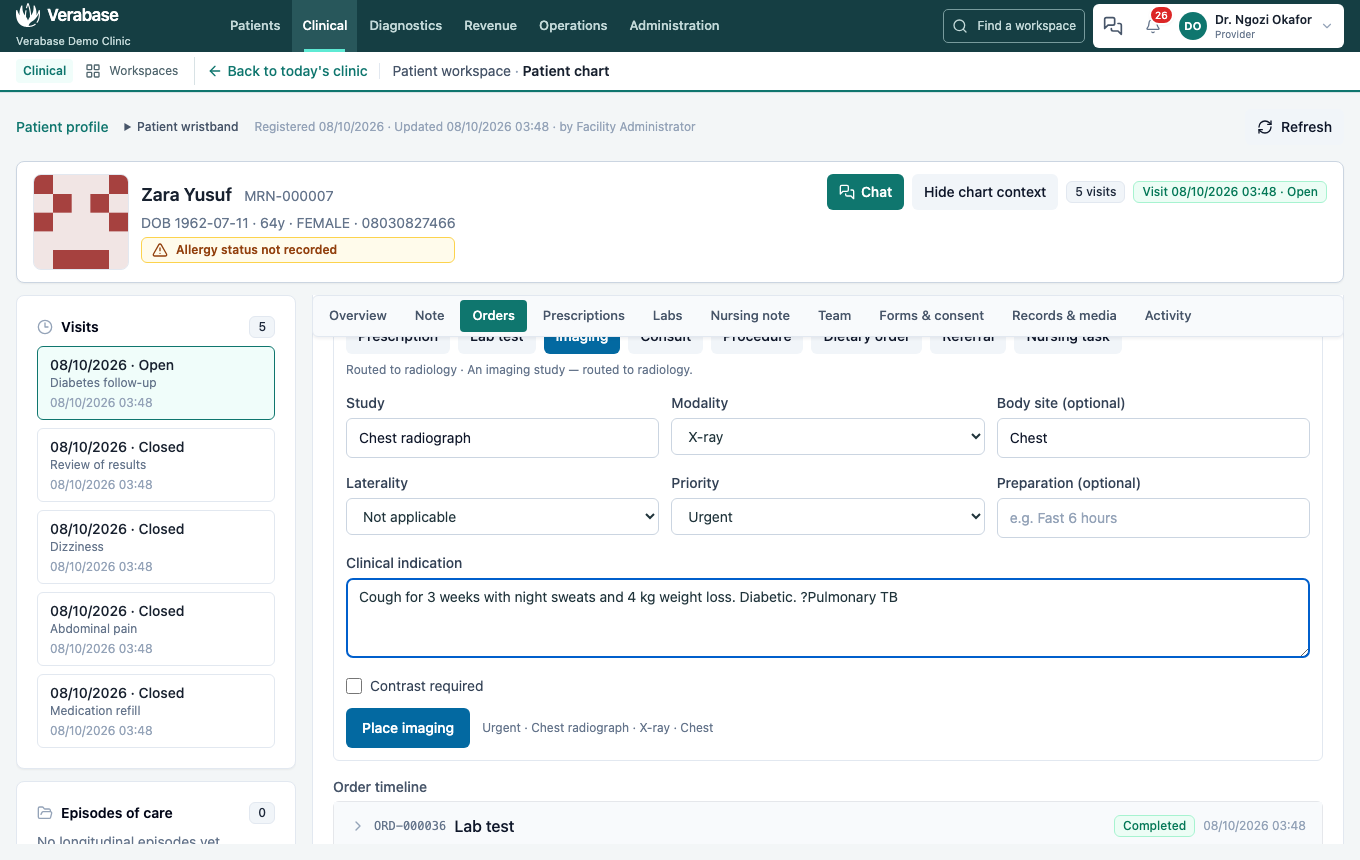
Choose Place imaging. The request appears in the chart's order timeline and in its Imaging orders panel, and on the radiology worklist as Ordered.
2. The worklist — as Radiographer
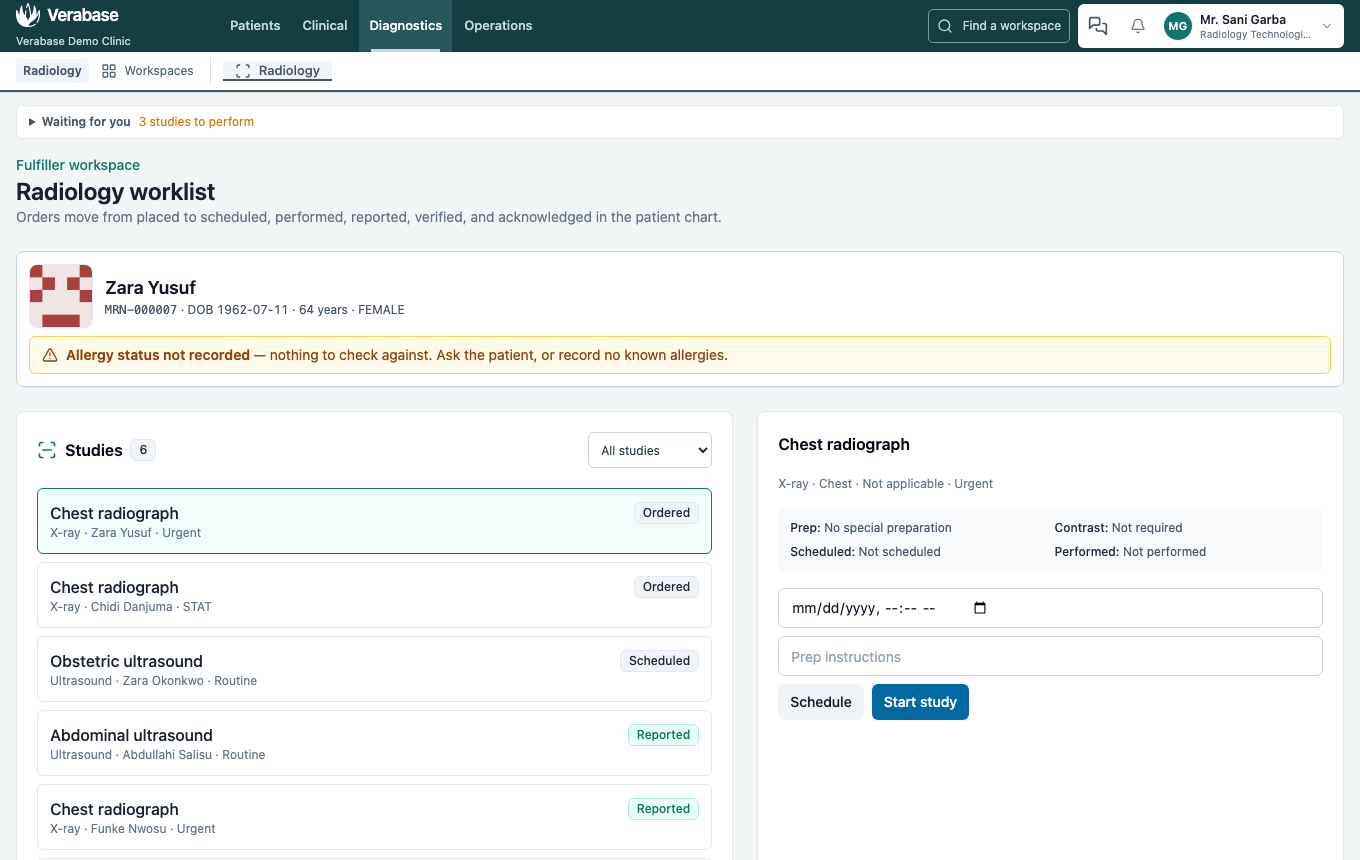
Diagnostics → Radiology. Studies lists every request with its status: Ordered, Scheduled, In progress, Awaiting report or Reported. The filter narrows the list to one status. Choose a study to see its details, and the patient's identity banner with photo and allergy status.
3. Schedule and perform
- Schedule: leave Scheduled time empty for "now", or book a slot, and add any Preparation instructions the patient must follow.
- Start study when the patient is in the room.
- Record Views taken, Technique, and any Repeat views with the reason, then Save performance record. The study shows who performed it and when.
4. Report
The report template follows the study. A chest X-ray gets Technique, Heart and mediastinum, Lungs and pleura, and Bones and soft tissues, then free-text Findings and Impression.
Tick Critical finding — notify the ordering clinician when the result needs action today. Here the impression is suspected active TB.
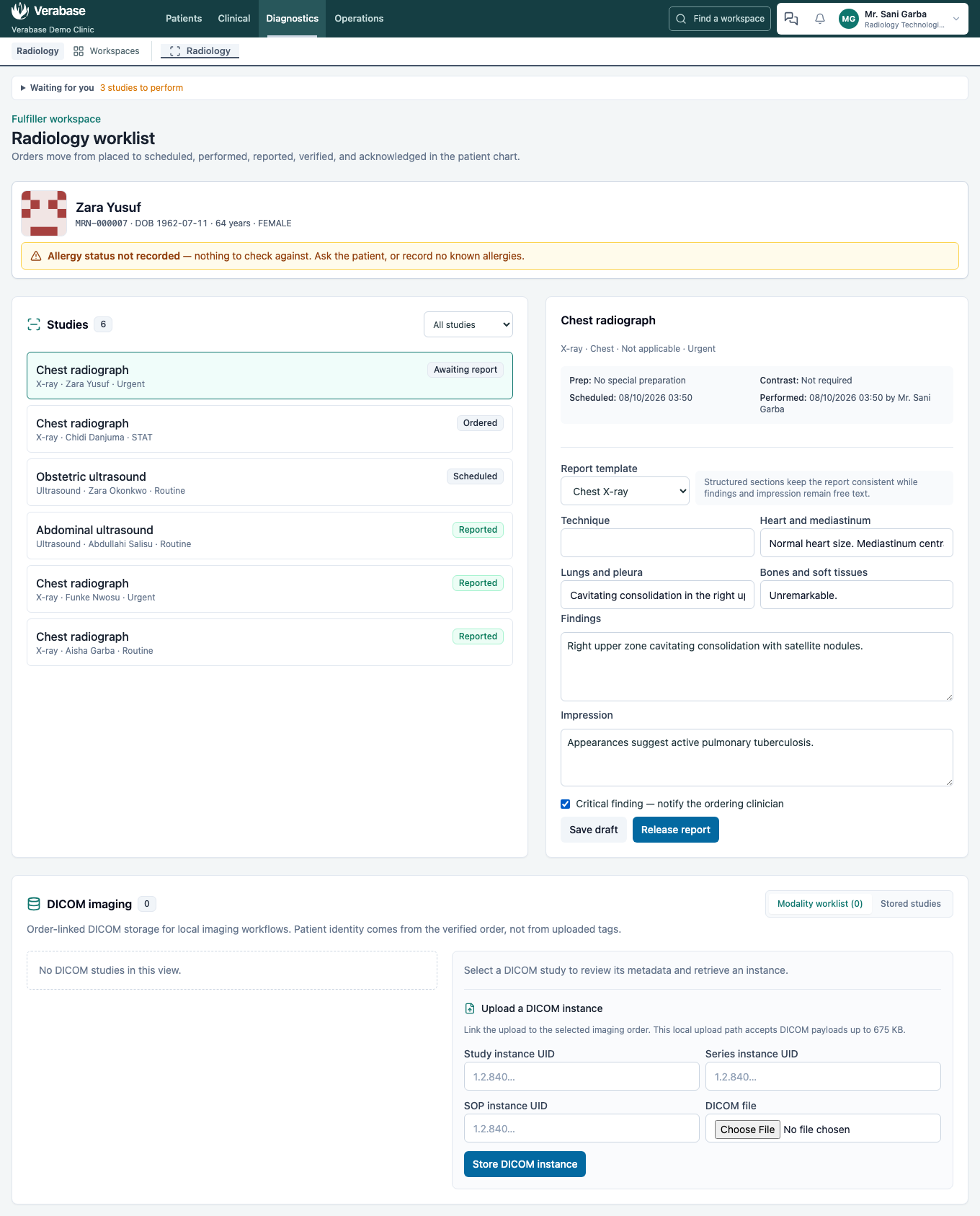
Save draft keeps the report without releasing it. Release report sends it to the ordering doctor at once, marked Awaiting verification.
5. Verify
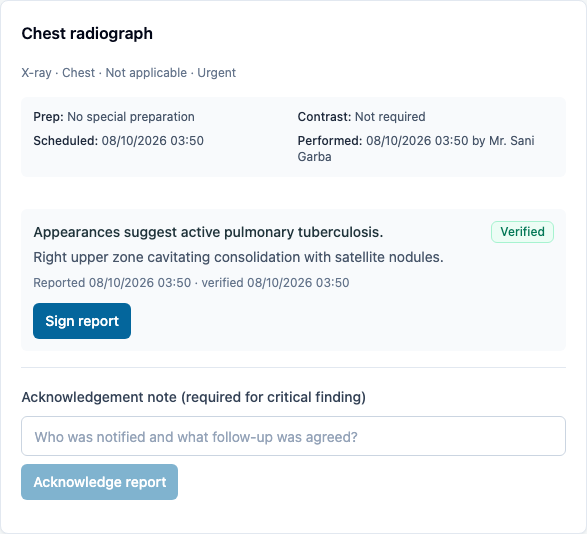
A second reader (or the same one, where the hospital allows) chooses Verify report. Where the hospital's radiologist signs reports, Sign report follows; that step wasn't walked here.
6. The doctor acknowledges — as Doctor
Clinical → Results inbox. The critical finding sits at the top of Results to review, in red, marked Critical finding. A Critical result notification is also in the doctor's work queue and bell. Acknowledge stays disabled until you write what was done:

Once acknowledged, the item leaves the inbox. On the radiology worklist, the report now reads Reported … · verified … · acknowledged. Radiology can see the loop is closed without phoning the ward.
What Verabase will refuse and why
| You try to… | Verabase says | Why |
|---|---|---|
| Acknowledge a critical finding with no note | Acknowledge stays disabled; the field is marked required for critical finding | "Seen" isn't enough for a result that needs action; the note records what was done |
| Release a report with no findings or impression | Release report stays disabled | An empty report looks like a normal one |
Not covered here
DICOM imaging stores and retrieves images against the order; how the hospital connects its modalities is set up with Verabase support. Sign report is covered when the radiologist role is set up.
You're done when…
- [ ] The request shows on the chart and on the worklist the moment it's placed.
- [ ] The study was performed and reported, with a critical finding flagged.
- [ ] The doctor acknowledged it with a note, and the report shows acknowledged.
Practice task
As the doctor, request an urgent chest X-ray for a checked-in patient with a three-week cough. As the radiographer, perform it and report a critical finding. As the doctor again, acknowledge it with what you did. Check: the trainer sees the finding at the top of your inbox before you acknowledge it, and acknowledged on the radiology report afterwards.
Related journeys
FAC-OPD-01 Outpatient visit (lab results follow the same inbox) · FAC-OPD-02 Appointments and check-in