Appearance
FAC-RX-02 · The pharmacist rejects an order, and the prescriber fixes it
Verification is where the pharmacist catches what the prescriber missed: a wrong dose, a duplicate, an interaction. A rejection has to reach the prescriber with a reason they can act on, and a rejected drug must not be handed out anyway. Here the pharmacist rejects an adult dose written for an 8-year-old, the doctor re-prescribes, and the corrected drug is supplied at the counter.
Why this matters
A rejection that only sits on a list nobody watches leaves the patient without treatment. One that doesn't stop the counter lets the wrong drug go out. Verabase does three things at once: it holds the order, takes it out of the dispense queue, and notifies the prescriber with the reason.
Before you start
- Pharmacist:
pharmacist@demo-clinic.test. Doctor:dr.okafor@demo-clinic.test. BothVerabase-2026. - Prescriptions reach the pharmacy on their own once Provider orders is on (IMP-08).
- Interaction and dose-ceiling rules are proven separately in IMP-05.
Steps
1. Reject, with the reason — as Pharmacist
Medication (MAR) → Current orders lists each order with Awaiting pharmacist verification or Verified by …. On the order, choose Reject… and write what's wrong and what to do instead. Reject order stays disabled until you do. The decision is final; a fix means a new order.
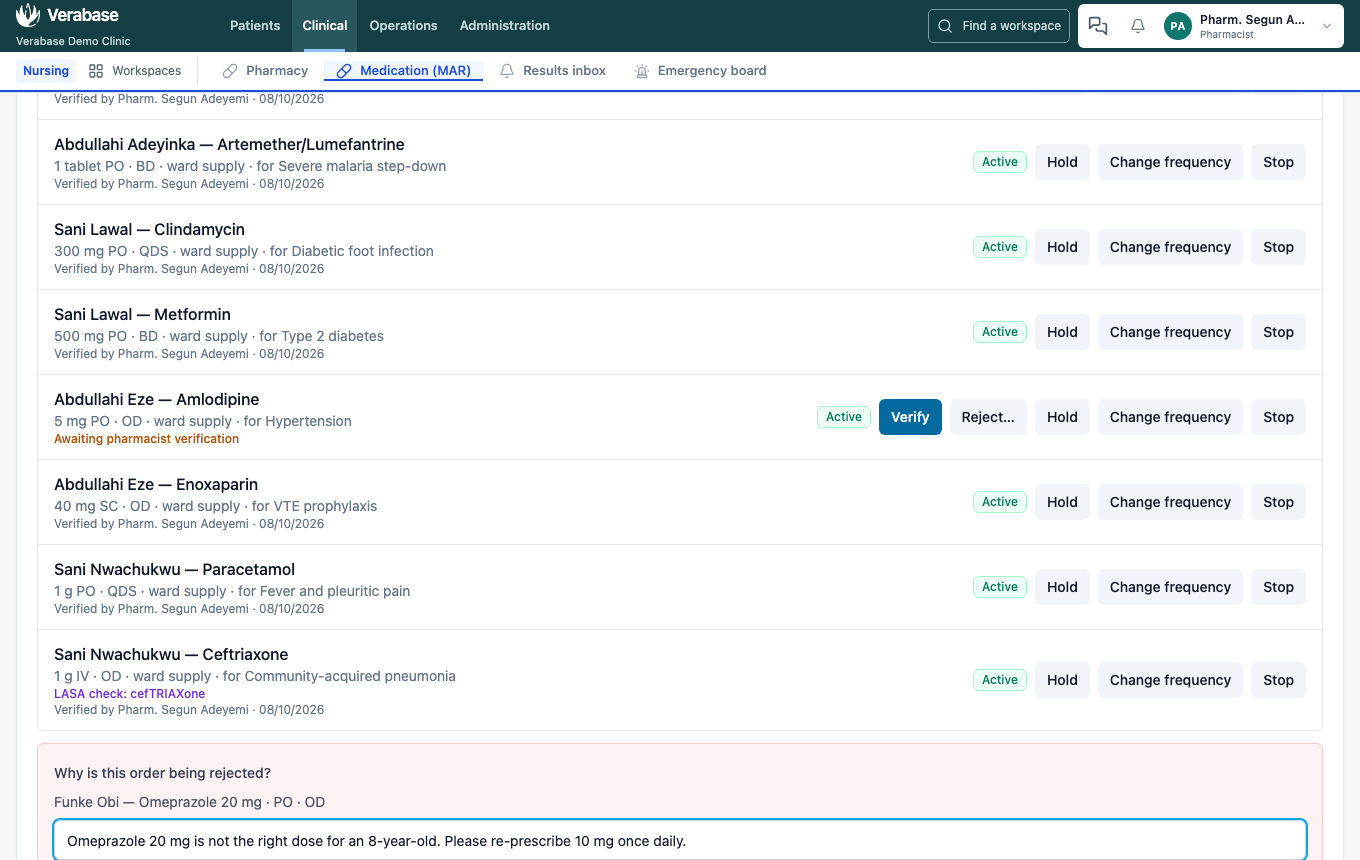
The order is now Held, with your reason on it. Its doses won't appear as givable on the ward round.

It also leaves the Pharmacy dispense queue, so nobody hands it out.
2. The prescriber sees why — as Doctor
The rejection arrives in Results inbox → Work queue (and the bell) with the pharmacist's words:

It opens the patient's chart. Under Prescriptions, the order is marked Rejected by pharmacist, with the reason, and says it won't be given or dispensed:

Prescribe again with the correction (here, Omeprazole 10 mg once daily). The new order goes back for verification.
3. Verify and supply — as Pharmacist
Verify the new order. It appears in the Pharmacy dispense queue with the patient, prescriber and wait. Check the Quantity to supply and choose Supply quantity. The message says what happened to stock:
- Amoxicillin supplied to Aisha Garba; stock reduced. The drug is in the stock list, and the dispense is on its movements (Inventory → Recent movements, Dispensed to patient).
- Omeprazole supplied to Funke Obi. It isn't in the stock list, so stock wasn't reduced. The drug has no stock item. Add it under Inventory (FAC-INV-01) if you want it tracked.
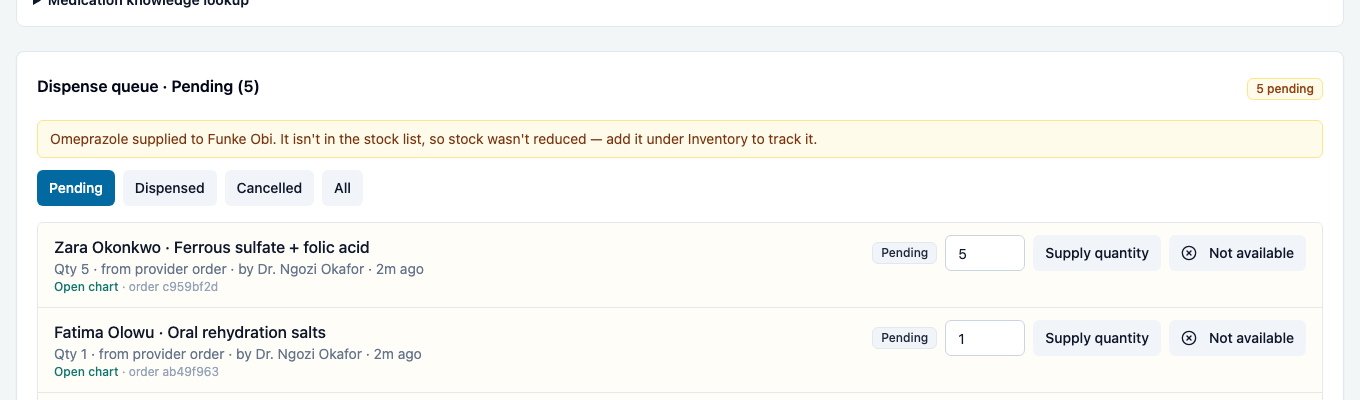

If you can't supply it, choose Not available and say why. The prescriber sees Not available on the chart.
What Verabase will refuse and why
| You try to… | Verabase says | Why |
|---|---|---|
| Reject without a reason | Reject order stays disabled | The prescriber needs to know what to fix |
| Give a dose of a rejected order | The order is held; no dose can be given | Rejected means not given |
| Supply more than is in stock | Only N … of … on hand. | You can't hand out what isn't on the shelf |
You're done when…
- [ ] The rejected order is held, off the dispense queue, and its reason is on the prescriber's chart.
- [ ] The corrected order is verified and supplied.
- [ ] You know whether each supply moved stock.
Practice task
Reject an order with a specific reason. As the doctor, find it from the notification and prescribe again. As the pharmacist, verify it and supply it. Check: the trainer sees the reason on the doctor's chart, and the supply message about stock.
Related journeys
IMP-05 Medication safety rules · FAC-MAR-02 Pharmacist verification: Warn or Block · FAC-INV-01 Stock