Appearance
FAC-SPEC-01 · Specialty observations for nursing review
Verified in Chromium as Provider and Nurse on freshly seeded synthetic data, with the browser set to a timezone outside Lagos. All four chart types passed; the four screenshots were opened and inspected.
Before you begin
Practice on fresh synthetic demo data. The capture uses Dr. Tunde Balogun (Provider) and Sr. Chioma Eze (Nurse), on Aisha Garba's outpatient chart. Values in the screenshots are synthetic training text, not clinical guidance.
Steps
Provider: record each chart type
- Open the patient's chart and choose Nursing note. Find Specialty observation charts.
- Choose a Chart type. The form shows only that type's fields:
- Mental health: mood / mental state, self-harm / suicide risk, plan / safety actions.
- Dental: oral hygiene, findings, plan.
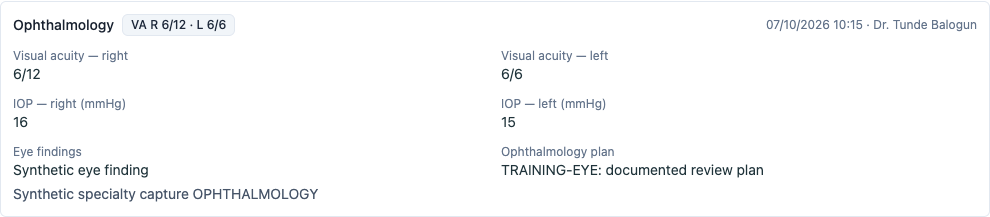
- Ophthalmology: visual acuity (right, left), eye pressure (right, left), findings, plan.
- Physiotherapy: mobility aid, functional status, interventions / exercises, goals / next session.
- Enter Observed at: when you made the observation, on the facility's clock. It is saved as that time whatever timezone your computer is set to.
- Add any Additional clinical context and choose Record observation.
You should see: a row for the observation with every field you entered, the observed time and your name. The form clears, so the next chart type starts empty.



Nurse: review
Sign in as the nurse, open the same chart and choose Nursing note. Each observation shows the same fields, the provider's name and the observed time.
You're done when…
- Each chart type's row shows every field that was entered, including its plan.
- The observed time is the one entered, on the facility's clock.
- The nurse sees the same rows the provider recorded.
Practice task
On a fresh seed, record a physiotherapy observation for a patient of your choice with an observed time 30 minutes ago, then switch the chart type to dental before saving a second one. Check: the dental row shows none of the physiotherapy values, and both rows show the times you entered.