Appearance
FAC-OPD-03 · Receive a referred patient with a scanned letter
When a patient arrives with a paper referral, Front Desk finds or creates the right chart, scans the letter into Records & media, and checks the patient in. The provider opens the same letter from the chart before starting the consultation.
Why this matters
A referral letter carries the reason another clinician sent the patient and the history that should shape today's care. Filing it on the patient's chart means the provider can see it without carrying paper from reception or relying on a separate inbox.
Before you start
- Front Desk:
frontdesk@demo-clinic.test/Verabase-2026. - Provider:
dr.okafor@demo-clinic.test/Verabase-2026. - A paper referral letter and the patient's correct name and date of birth.
Steps
1. Search and register the referred patient — as Front Desk
Choose Front desk and search the patient's name before registering. If no matching chart exists, enter the patient's name, date of birth and phone. Ask and record allergy status, capture consent, then register the patient.
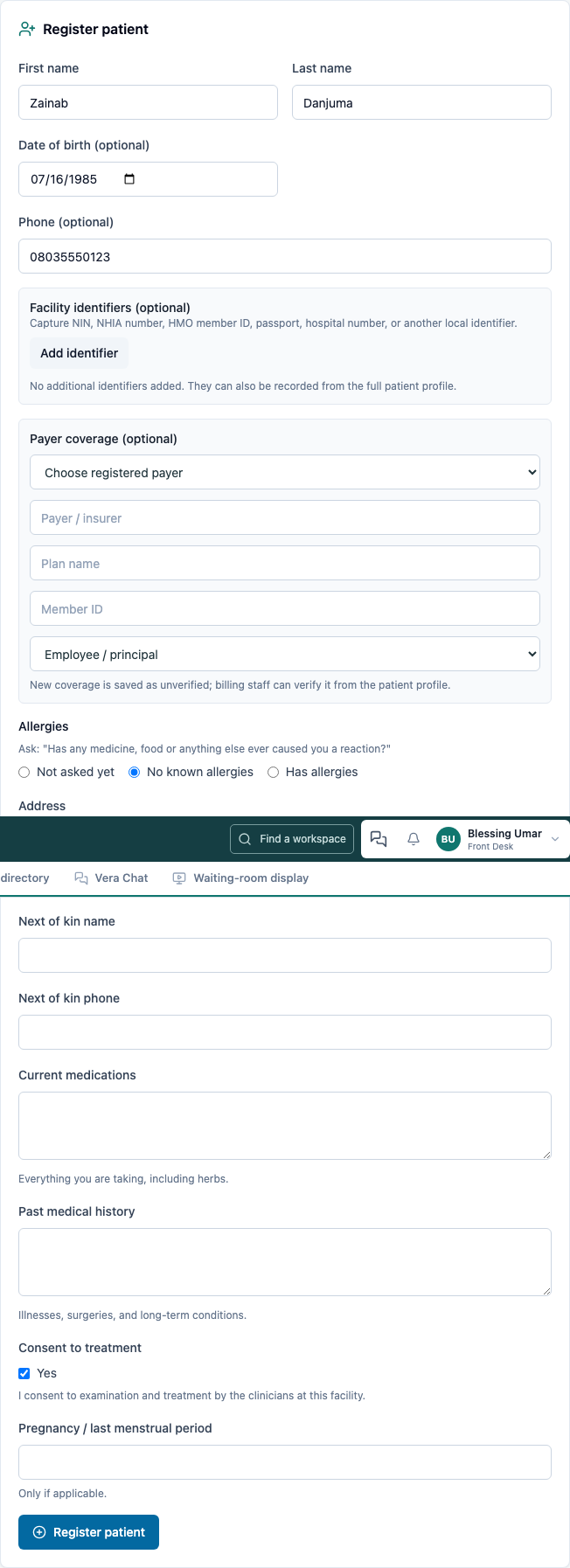
Open the patient's full profile. Check that the name and date of birth match the letter before attaching anything.
2. Scan the letter into the chart
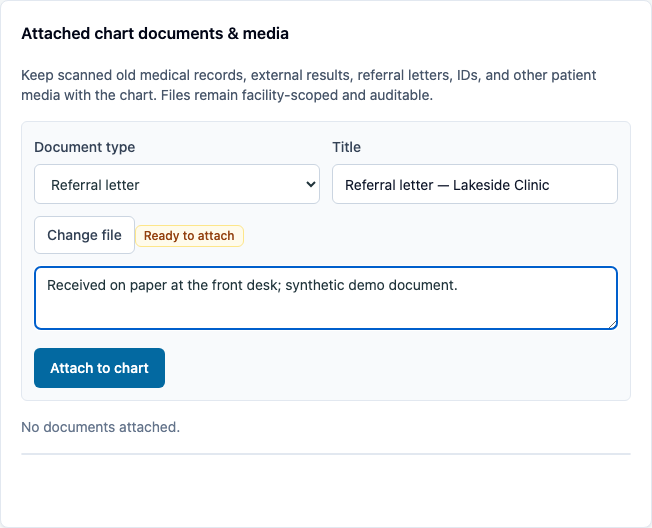
In Attached chart documents & media:
- Choose Referral letter as the document type and give it a useful title that names the sending clinic.
- Choose the scanned PDF or image. Add a note that identifies the paper source or context.
- Choose Attach to chart.
The row shows the title, document type, file details, time and staff member who added it. Open the file if you need to verify that the scan is readable and belongs to this patient.

3. Check in the arrival — still Front Desk
Return to Front desk, find the patient and choose Check in. The patient enters the same waiting queue used for ordinary outpatient visits.
4. Open the letter before the consultation — as Provider
From Clinical → Today's queue, open the patient. Choose Records & media and find the referral letter. Confirm the staff attribution and open the file to review the referring clinician's reason and supporting history.

Continue with the ordinary consultation in FAC-OPD-01. The letter stays with the chart when the visit moves through nursing, consultation, orders and billing.
What the attachment does
The scan is a patient-chart document. It does not create an internal referral order, an appointment, or a structured lab result. The clinician still reviews the document and records any resulting clinical decision in the visit. If another organization needs to submit a document securely, use Outside records and referrals instead.
You're done when…
- [ ] The referred patient has one chart with the correct identifying details.
- [ ] The chart contains a readable referral letter with the source in its title or notes.
- [ ] The chart names the staff member who added the scan.
- [ ] The patient appears in the waiting queue and the provider can open the letter from the chart.
Practice task
Register a synthetic referral arrival, attach a scanned letter from another clinic, and check the patient in. Ask the provider to open the document from the chart. Check: one patient record exists, the referral is labelled, the attachment shows its uploader, and the patient is still visible in the outpatient queue.
Related journeys
FAC-OPD-01 Outpatient visit · FAC-OPD-02 Appointments · FAC-REC-01 Outside records