Appearance
FAC-INV-02 · Count pharmacy stock and move it between stores
The Pharmacist records the shelf count and submits any difference for review. A Facility Admin approves the count, which reconciles the stock ledger. The Pharmacist then requests and receives a transfer into the pharmacy store.
Why this matters
The stock total needs to match the physical supply people can dispense. A reviewed count corrects a discrepancy, and location transfers show where stock is available for the pharmacy team.
Before you start
- Pharmacist:
pharmacist@demo-clinic.test/Verabase-2026. - Facility Admin:
admin@demo-clinic.test/DemoAdmin-2026. - The demo has Metformin 500 mg tablet in the MAIN store. MAIN and PHARMACY are configured stock locations.
Steps
1. Count the main store — as Pharmacist
Open Operations → Inventory. In Physical stock take, choose MAIN, enter a reference, and choose Open count session. Select the item, enter the physical quantity, choose Add counted SKU, then Submit for approval.
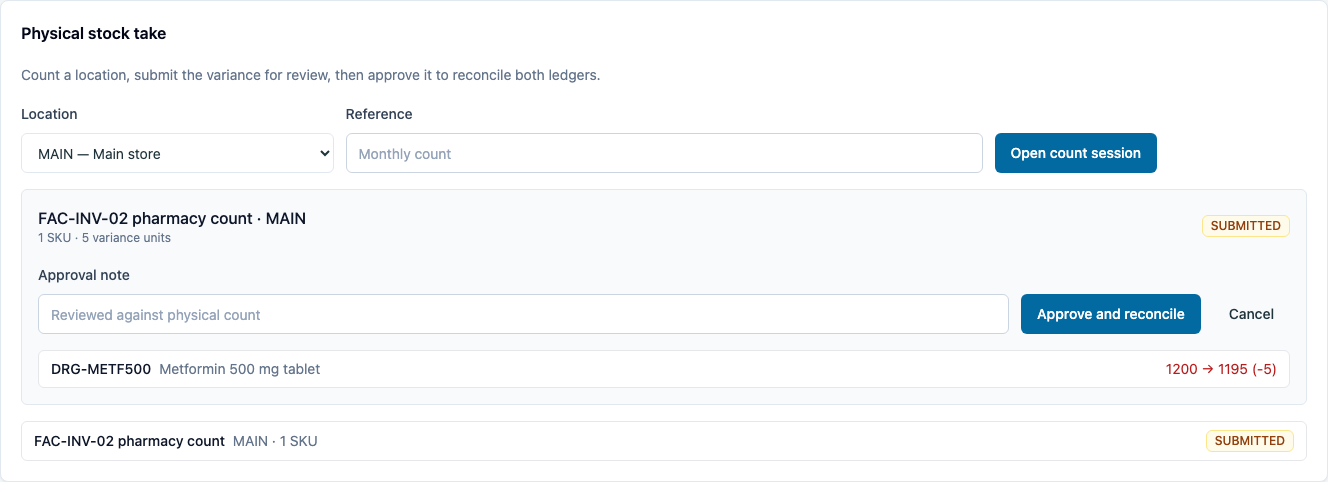
The count shows the expected quantity, the count, and the variance. Its status becomes SUBMITTED; on-hand stock has not changed yet.
2. Review and reconcile — as Facility Admin
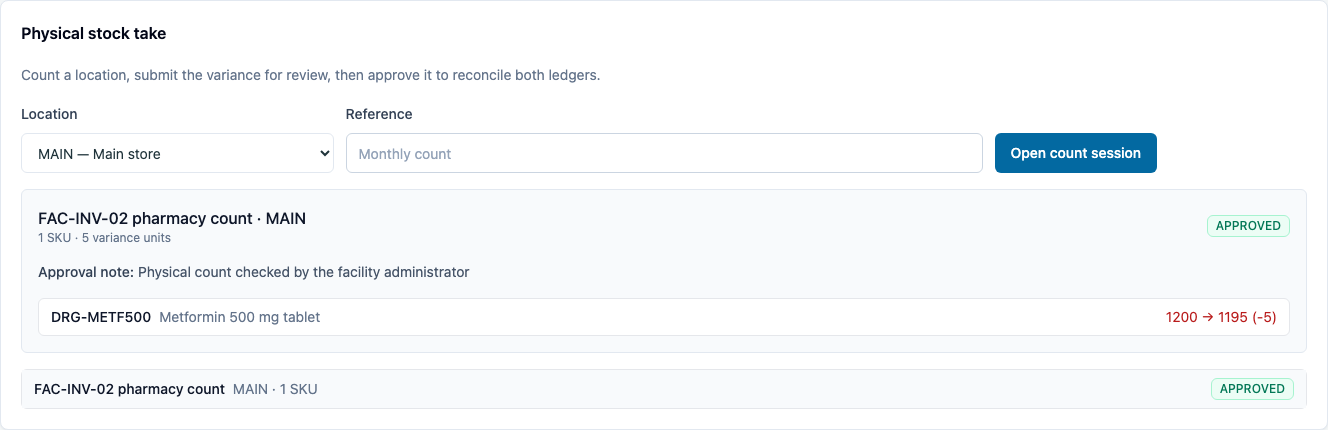
Open the submitted count in Physical stock take. Compare the expected quantity with the count, add an approval note, and choose Approve and reconcile.
You should see: the count marked APPROVED and the Stock on hand quantity matching the approved physical count.
3. Replenish the pharmacy store — as Pharmacist
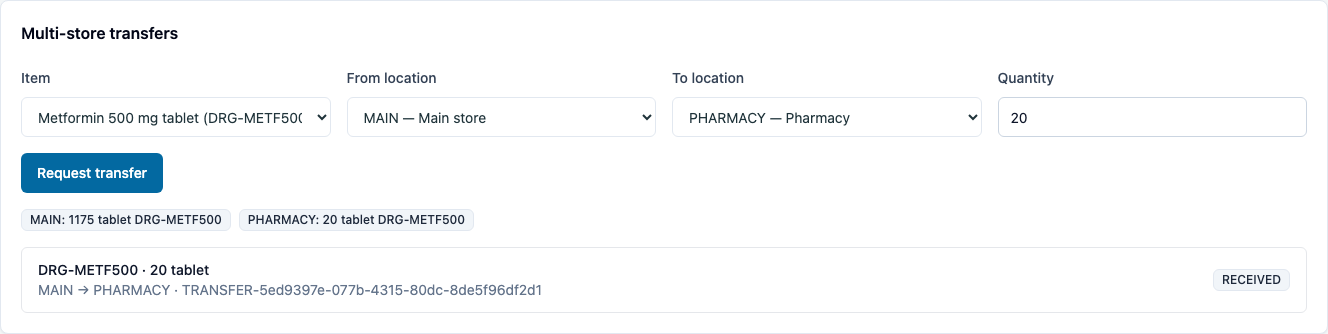
In Multi-store transfers, choose the item, set From location to MAIN and To location to PHARMACY, then enter a quantity and choose Request transfer. Approve the request and choose Receive when the stock arrives at the pharmacy.
You should see: the transfer marked RECEIVED, with the source and destination balances updated.
What Verabase will refuse, and why
| You try to… | Verabase says | Why |
|---|---|---|
| Submit a count without a counted SKU | Add at least one counted SKU before submitting. | An empty count cannot reconcile stock. |
| Add the same SKU to a count twice | This SKU is already counted in the stock take. | Each SKU appears once in the count session. |
You're done when…
- [ ] A physical count is submitted and approved with a review note.
- [ ] Stock on hand reflects the approved quantity.
- [ ] The transfer is received and both store balances show the moved quantity.
Practice task
Count a different item in the main store, submit a variance, and have a Facility Admin approve it. Then transfer part of its remaining stock to the pharmacy. Check: the approved count and transfer have their own audit events, and both store balances match the transfer.
Related journeys
FAC-INV-01 Reorder and receive stock · FAC-RX-02 Counter supply
Verification · 2 October 2026
The fresh-seed Chromium capture passed the full count, approval and transfer journey, and all three screenshots were inspected. A manual Firefox pass also completed the count as Pharmacist and approval as Facility Admin; the approved variance and note were visible with no clipping at Firefox's existing 80% zoom. Playwright's Firefox binary could not launch in this environment, so the Firefox check was a manual UI walk rather than an automated capture. The Firefox-only walkthrough did not run the transfer step; the full transfer was verified in Chromium.