Appearance
FAC-GOV-02 · Retention schedules and legal holds
A Facility Admin records the facility's approved retention schedule, places a hold on a patient chart, and documents the review process. A hold blocks matching disposal reviews. Approving a review records a decision only; it does not delete data.
Before you begin
Use the retention period and legal or policy basis approved for your facility and record class. The sample policy values in this walkthrough are synthetic demonstration data, not legal advice or a statement of Nigerian retention requirements.
Steps
Save the retention schedule
- Open Administration → Retention & legal holds.
- Under Save retention policy, choose the record class, enter the facility-approved period in days, and record its approved legal or policy basis.
- Select Save policy and confirm the saved period and basis appear in the policy list.
Preserve the chart
- Under Place a legal hold, choose the record class and find the patient by name using the patient search.
- Enter the case reference and a concise reason, then select Place hold.
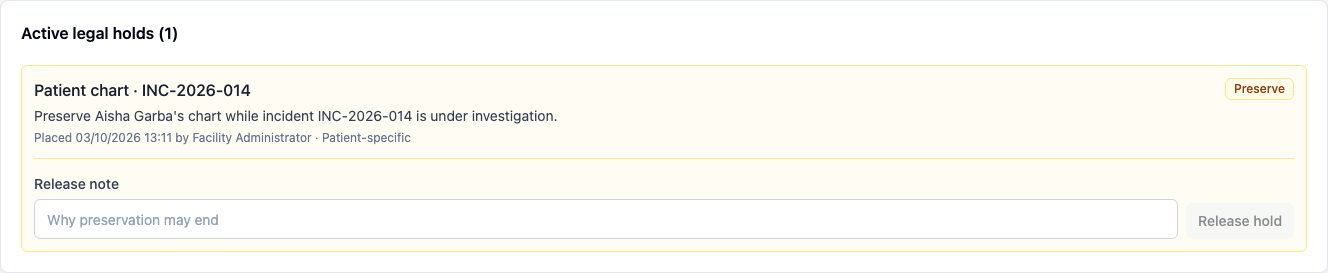
- Confirm the active hold identifies the case and patient-specific scope. The record is marked Preserve.
- Request a disposal review for the same patient and record class. The app refuses the request while the matching hold is active.
- When the preservation duty has ended and release is authorized, enter a documented release note and select Release hold.
Record the human review
- Retry the disposal review with a rationale that points to the approved schedule and the evidence to check.
- Review the candidate and record the decision note before selecting Approve, Reject or Void.
- Confirm the decision and note remain visible in the queue. Approval only records the human review; it does not delete the record or perform disposal.

You're done when
- The saved policy shows the approved period and basis.
- A matching active hold refuses a disposal review request.
- The hold is released with a documented note when its preservation duty ends.
- The disposal review displays its human decision and note.
Practice task
On synthetic training data, place a hold for a second patient and demonstrate the blocked matching disposal request. Record why the hold was created, then release it only when the training scenario says the preservation duty has ended. Explain to a colleague what approving a review records and why it does not delete data.
Evidence
The Chromium capture uses a fresh synthetic guide seed as Facility Admin. It saves a chart policy, places and releases a patient-specific hold, verifies the active hold blocks a disposal request, then records an approved human review. The capture does not delete a record or establish that disposal is legally permitted.