Appearance
FAC-GOV-01 · Audit log for compliance: one staff member, one morning
Patient chart reads and changes are recorded with the staff member and time. A Facility Admin can filter the audit log to review a specific staff member's activity and export the matching evidence.
Why this matters
The audit log helps the hospital answer who accessed a record and when. The review stays focused on the requested person, resource and time window, and the export preserves the same filters.
Before you start
- Nurse:
nurse.eze@demo-clinic.test/Verabase-2026. - Facility Admin:
admin@demo-clinic.test/DemoAdmin-2026. - A freshly seeded demo facility.
Steps
1. Open a patient chart as the staff member
As the Nurse, open Patients, search for Aisha Garba, and open her chart. The chart read is recorded under your name.
2. Filter the audit log
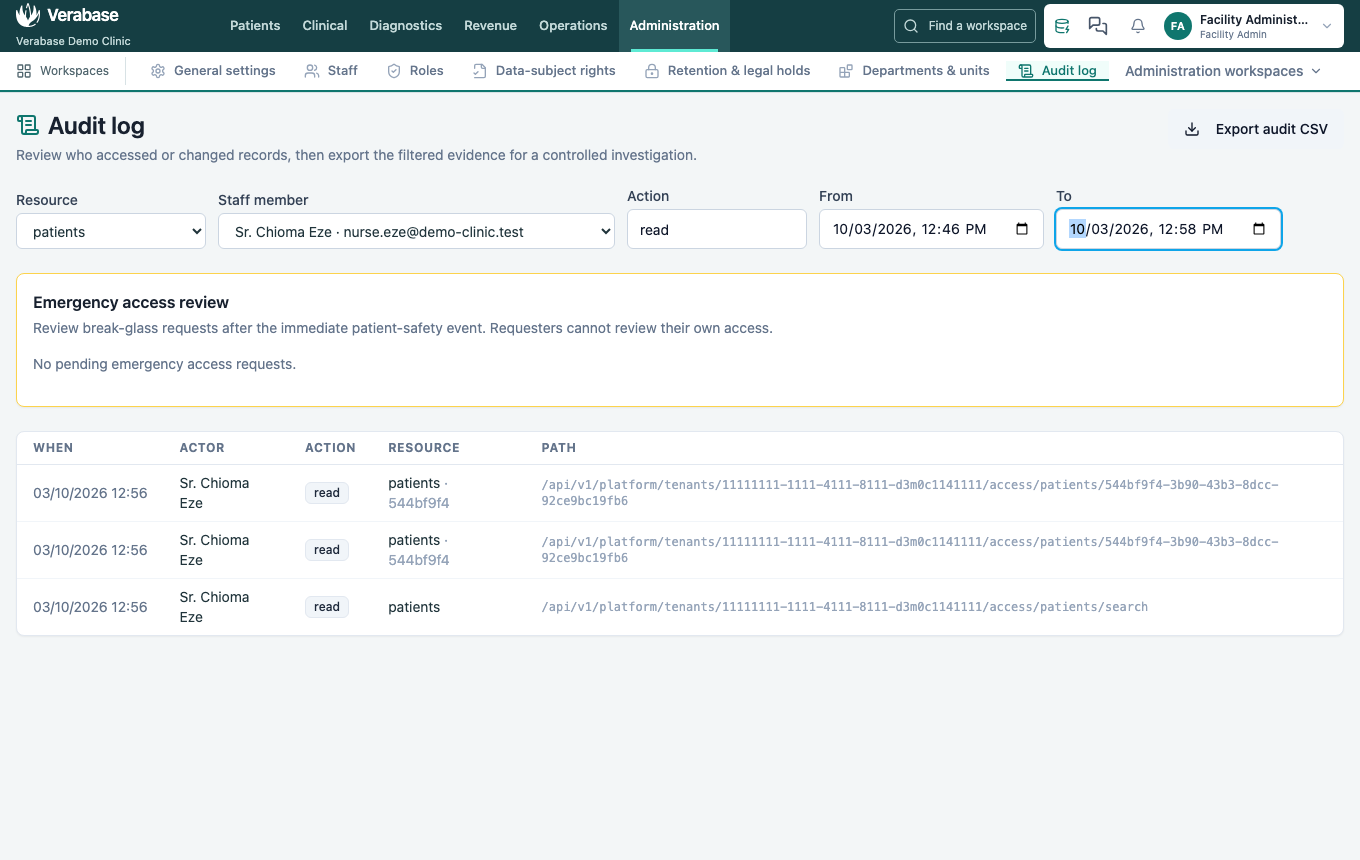
Sign in as the Facility Admin and open Administration → Audit log. Set Resource to patients, Action to read, choose the Nurse under Staff member, and set From and To to the morning you are reviewing.
The matching row shows when the chart was opened, the staff member, the resource and the request path.
3. Export the filtered evidence
Choose Export audit CSV. The downloaded verabase-audit.csv contains the same staff, resource, action and time filters as the table.
You're done when…
- [ ] The audit table shows the chart read under the staff member who opened the chart.
- [ ] The table is filtered to one staff member, the patient resource and the review window.
- [ ] The CSV contains the same matching event.
Practice task
As a clinician, open a different seeded patient's chart, then find that read in the audit log as Facility Admin. Check: the actor, time and patient resource match, and the filtered CSV includes the event.
Related journeys
FAC-BG-02: review emergency access · Facility Admin role handbook